Networking
Basic Networking
What is a Network?
Definition: According to Merriam Webster, a Network is usually an informally interconnected group or association of different entities (e.g., a person, computers, radio stations).
Computer Network: A system of peripherals or computers interconnected with each other.
- Has a standard communication channel established between them.
- Used to exchange different types of information and data.
- Example: Dominos has a network of 1232 branches across India.
Importance of Computer Networks
- connects all different network-enabled devices.
- Enables data and information sharing between devices.
- Considered a core part of technical interviews and daily life.
Network Classifications
Network types are classified based on the area of distribution.
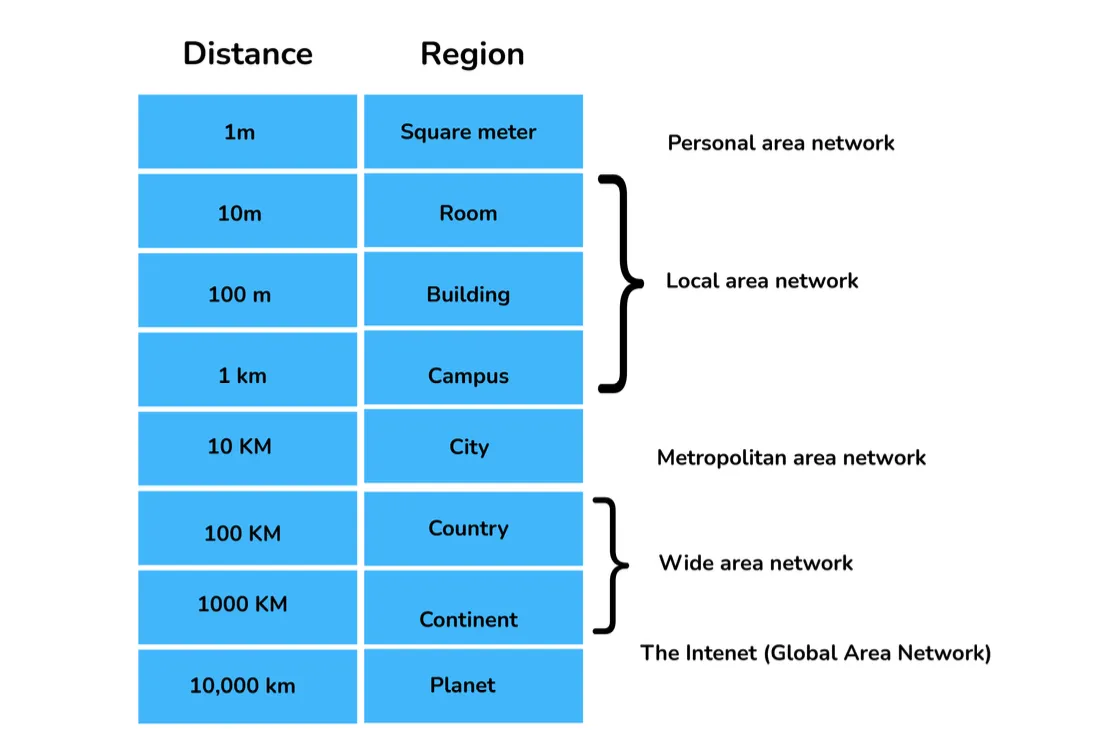
Distance and Region Breakdown
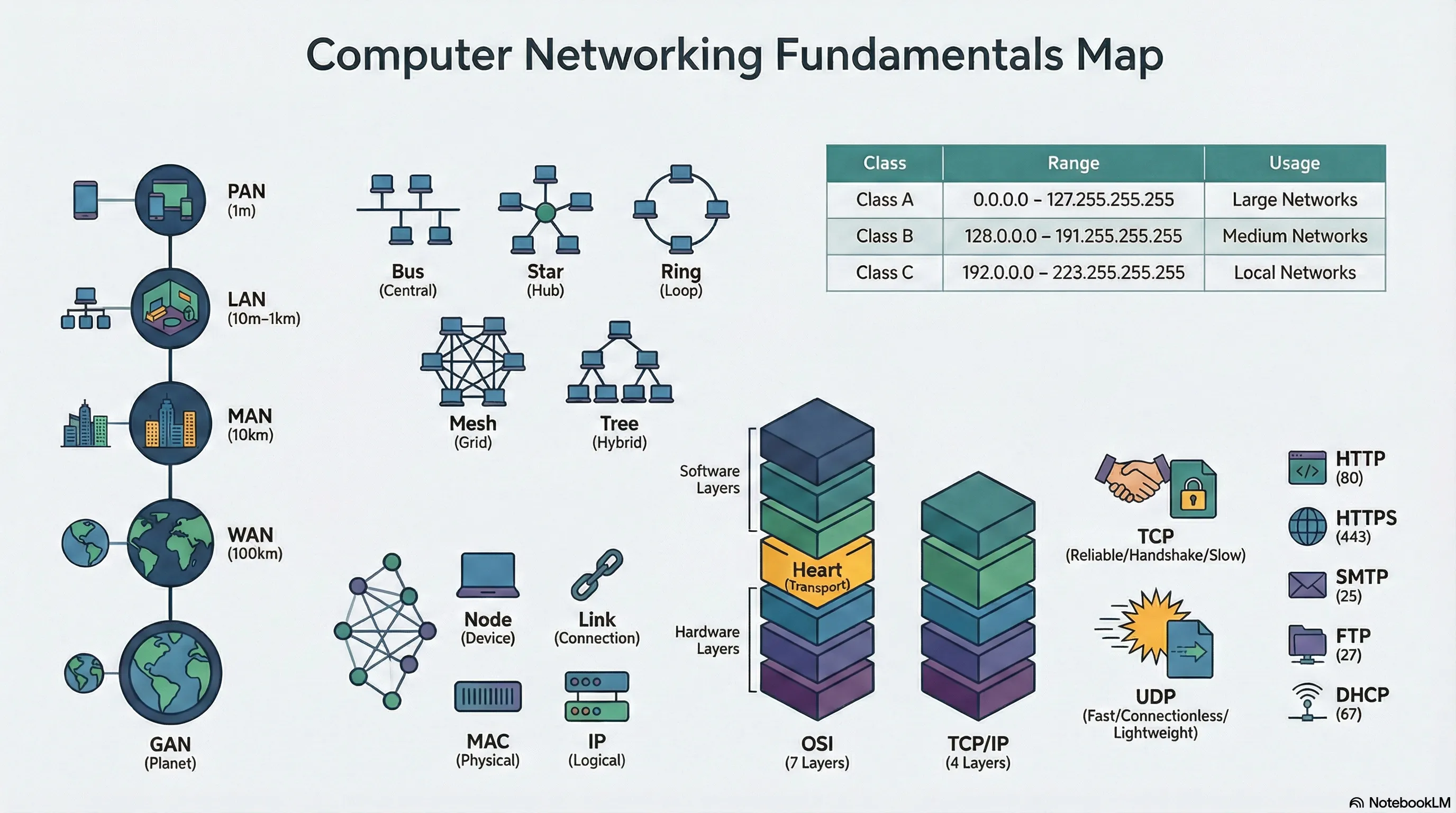
- 1m (Square meter): Personal Area Network
- 10m (Room) - 1km (Campus): Local Area Network
- 10km (City): Metropolitan Area Network
- 100km (Country) - 1000km (Continent): Wide Area Network
- 10,000km (Planet): The Internet (Global Area Network)
flowchart LR
    A["1m<br/>PAN"] --> B["10m-1km<br/>LAN"]
    B --> C["10km<br/>MAN"]
    C --> D["100-1000km<br/>WAN"]
    D --> E["10000km<br/>GAN"]
    style A fill:#1a7fab,color:#fff
    style B fill:#2a94c5,color:#fff
    style C fill:#3da8d5,color:#fff
    style D fill:#4eb6e0,color:#fff
    style E fill:#5bc4e6,color:#fff
Types of Networks
- PAN (Personal Area Network)
- Lets devices connect and communicate over the range of a person.
- Example: Connecting Bluetooth devices.
- LAN (Local Area Network)
- A privately owned network operating within and nearby a single building (home, office, factory).
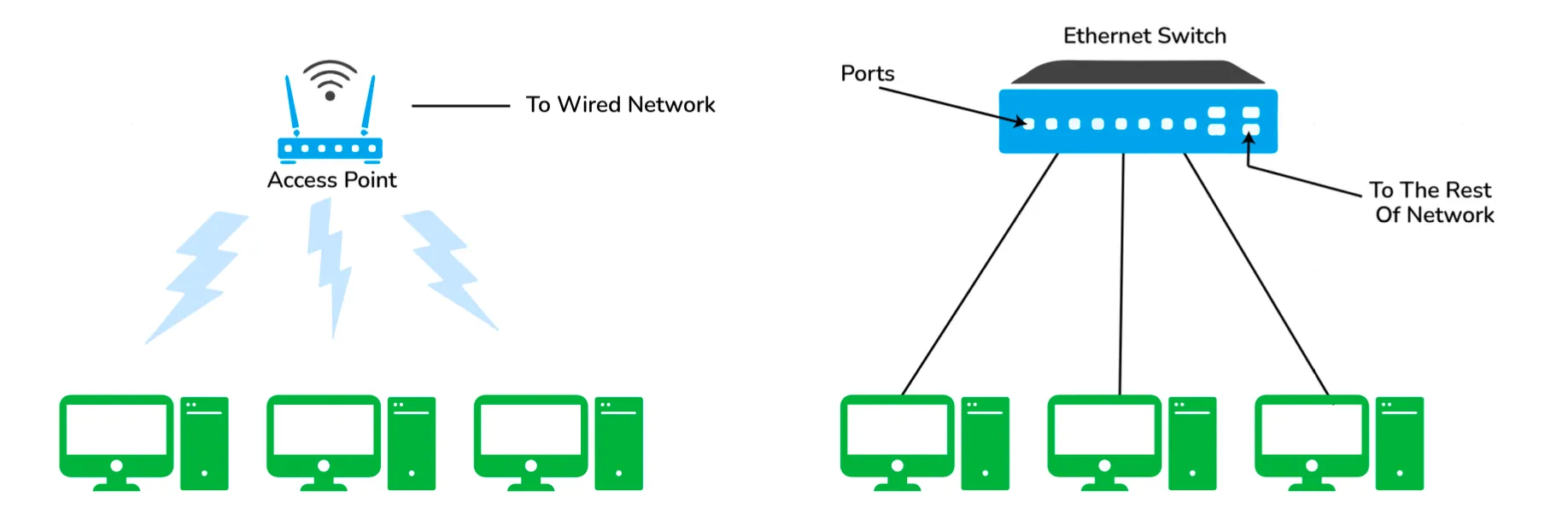
- Widely used to connect computers/laptops and consumer electronics.
- Enables sharing of resources (printers, fax machines) and information exchange.
- Enterprise Networks: LANs used by companies or organizations.
- Types:
- Wireless LAN: No wires involved; achieved using Wi-Fi. Popular where installing wire is difficult.
- Wired LAN: Achieved using LAN cable.
- MAN (Metropolitan Area Network)
- Connects and covers the whole city.
- Example: TV Cable connection over the city.
- WAN (Wide Area Network)
- Spans a large geographical area, often a country or continent.
- Example: The Internet is the largest WAN.
- GAN (Global Area Network)
- Also known as the Internet.
- Connects the globe using satellites.
- Called the Network of WANs.
VPN (Virtual Private Network)
Definition
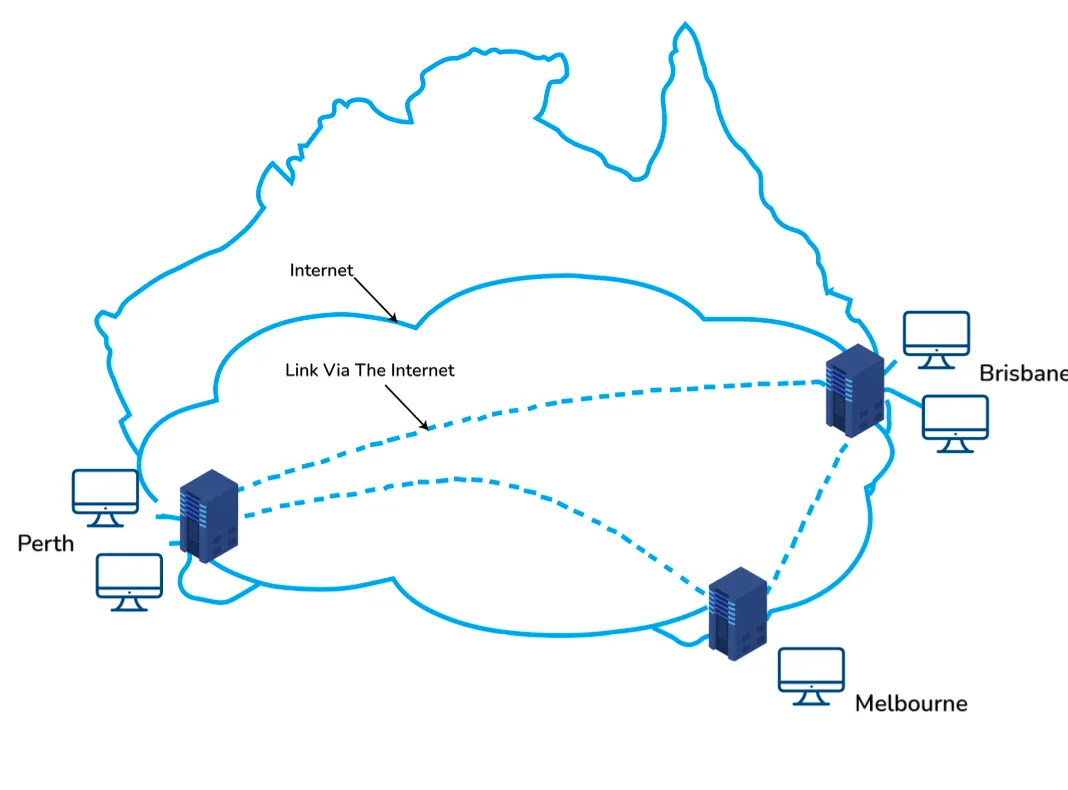
A VPN is a private WAN built on the internet.
- Allows creation of a secured tunnel (protected network) between different networks using the internet (public network).
- Enables clients to connect to an organization’s network remotely.
Advantages
- Connects offices in different geographical locations remotely.
- Cheaper compared to WAN connections.
- Used for secure transactions and confidential data transfer between multiple offices.
- Keeps organization information secured against threats or intrusions via virtualization.
- Encrypts internet traffic and disguises online identity.
Types of VPN
- Access VPN
- Provides connectivity to remote mobile users and telecommuters.
- Alternative to dial-up or ISDN connections.
- Low-cost solution with a wide range of connectivity.
- Site-to-Site VPN (Router-to-Router)
- Connects the network of one office to another in different locations.
- Common in large companies with multiple branches.
- Sub-categories:
- Intranet VPN: Connects remote offices using shared infrastructure (internet connectivity and servers) with the same accessibility policies as a private WAN.
- Extranet VPN: Uses shared infrastructure over an intranet to connect suppliers, customers, partners, and other entities using dedicated connections.
flowchart TD
    VPN["Virtual Private Network<br/>VPN"]
    VPN --> ACCESS["Access VPN<br/>Remote Users"]
    VPN --> SITE["Site-to-Site VPN<br/>Office to Office"]
    SITE --> INTRANET["Intranet VPN<br/>Internal Offices"]
    SITE --> EXTRANET["Extranet VPN<br/>Partners & Suppliers"]
    style VPN fill:#b8860b,color:#fff
    style ACCESS fill:#daa520,color:#fff
    style SITE fill:#daa520,color:#fff
    style INTRANET fill:#ffa500,color:#000
    style EXTRANET fill:#ffa500,color:#000
Network Fundamentals
Nodes and Links
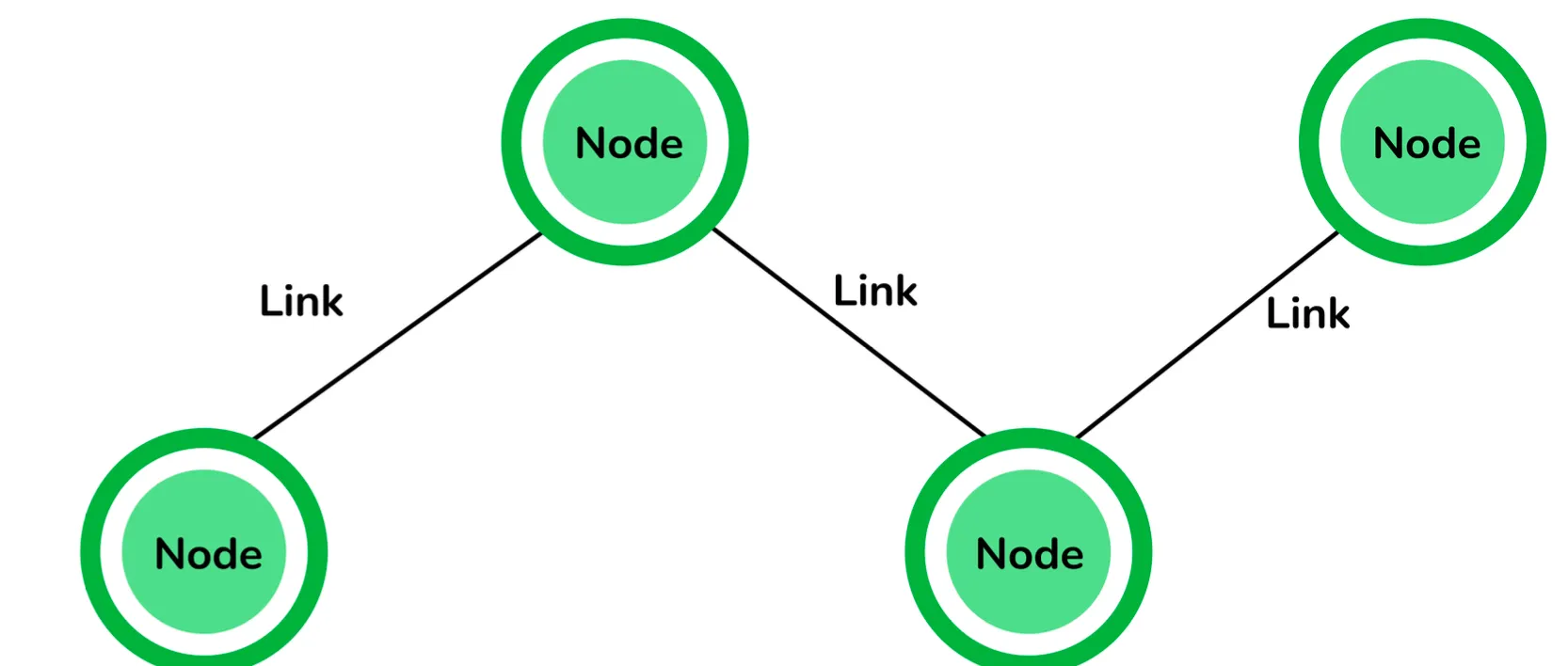
- Node: Any communicating device in a network.
- Point of intersection in a network.
- Can send/receive data.
- Examples: Computers, laptops, printers, servers, modems.
- Link: The connectivity (edge) between two nodes in the network.
- Includes the type of connectivity (wired/wireless).
- Includes protocols used for communication.
Network Topology
Definition: The physical layout of the network connecting different nodes using links. It depicts connectivity between computers, devices, and cables.
Types of Topologies
- Bus Topology
- All nodes connected using a central link known as the bus.
- Pros: Useful for a smaller number of devices.
- Cons: If the main cable gets damaged, the whole network is damaged.
- Star Topology
- All nodes connected to one single central node.
- Pros: More robust; easy to troubleshoot. Mainly used in home/office networks.
- Cons: If the central node fails, the complete network is damaged.
- Ring Topology
- Each node connected to exactly two nodes, forming a ring structure.
- Cons: Rare usage; expensive; hard to install and manage. If one node is damaged, the whole network is damaged.
- Mesh Topology
- Each node connected to one or many nodes.
- Pros: Robust (failure in one link only disconnects that node).
- Cons: Rare usage; installation and management are difficult.
- Tree Topology
- Combination of star and bus topology (Extended Bus Topology).
- All smaller star networks are connected to a single bus.
- Cons: If the main bus fails, the whole network is damaged.
- Hybrid Topology
- Combination of different topologies to form a new one.
- Pros: Ignores drawbacks of specific topologies and picks strengths from others.
IP Addressing
IPv4 Address
- Definition: A 32-bit dynamic address of a node in the network.
- Structure: 4 octets of 8-bits each (values up to 255).
IPv4 Classes
Classes are based on the first octet and the number of hosts supported.
| Class | IPv4 Start Address | IPv4 End Address | Usage |
|---|---|---|---|
| A | 0.0.0.0 | 127.255.255.255 | Large Network |
| B | 128.0.0.0 | 191.255.255.255 | Medium Size Network |
| C | 192.0.0.0 | 223.255.255.255 | Local Area Network |
| D | 224.0.0.0 | 239.255.255.255 | Reserved for Multicasting |
| E | 240.0.0.0 | 255.255.255.254 | Study and R&D |
Private and Special IP Addresses
Private Address: Specific IPs reserved for private use only. Non-routable on the Internet.
| Class | Private IPv4 Start Address | Private IPv4 End Address |
|---|---|---|
| A | 10.0.0.0 | 10.255.255.255 |
| B | 172.16.0.0 | 172.31.255.255 |
| C | 192.168.0.0 | 192.168.255.255 |
Special Address: Range 127.0.0.1 to 127.255.255.255.
- Known as loopback addresses.
- Used for network testing.
Subnet
- Definition: A network inside a network achieved by subnetting.
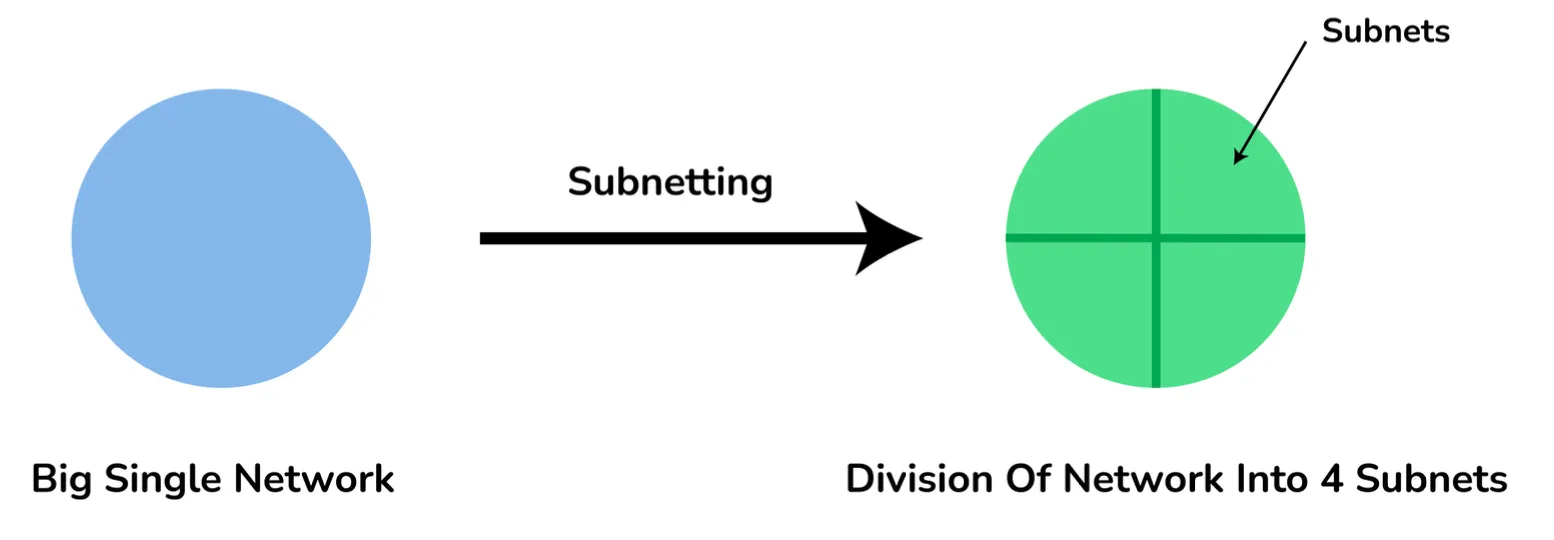
- Purpose:
- Divides a network into subnets.
- Higher routing efficiency.
- Enhances network security.
- Reduces time to extract host address from routing table.
Reference Models
OSI Reference Model
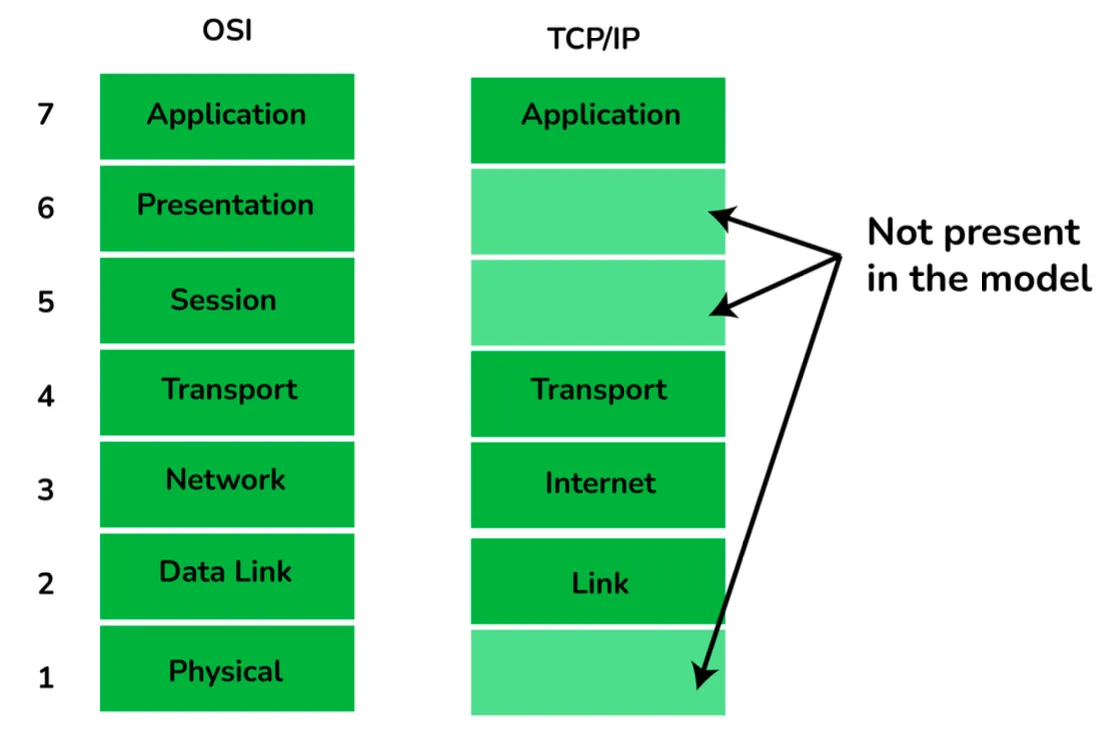
Open System Interconnections (OSI) is a network architecture model based on ISO standards.
- Deals with connecting systems open for communication.
- Has seven layers.
Principles
- Create a new layer if a different abstraction is needed.
- Each layer has a well-defined function.
- Functions chosen based on internationally standardized protocols.
The 7 Layers
- Physical (Hardware Layer)
- Unit: Bit.
- Description: Transmits raw bits over communication channel. Selects transmission mode (Simplex, Half Duplex, Full Duplex).
- Data Link (Hardware Layer)
- Network (Hardware Layer)
- Transport (Heart of OSI)
- Session (Software Layer)
- Presentation (Software Layer)
- Application (Software Layer).
flowchart TB
    L7["7. Application<br/>HTTP, SMTP, DNS, FTP"]
    L6["6. Presentation<br/>Encryption, Compression"]
    L5["5. Session<br/>Connections"]
    L4["4. Transport<br/>TCP, UDP"]
    L3["3. Network<br/>IP, Routers"]
    L2["2. Data Link<br/>Frames, MAC"]
    L1["1. Physical<br/>Bits, Cables"]
    L7 --> L6 --> L5 --> L4 --> L3 --> L2 --> L1
    style L7 fill:#ba68c8,color:#fff
    style L6 fill:#ba68c8,color:#fff
    style L5 fill:#ba68c8,color:#fff
    style L4 fill:#9c27b0,color:#fff
    style L3 fill:#7b1fa2,color:#fff
    style L2 fill:#6a4c93,color:#fff
    style L1 fill:#5d4e78,color:#fff
TCP/IP Reference Model
Compressed version of the OSI model with 4 layers.
- Developed by US DoD in the 1960s.
- Named after TCP (Transmission Control Protocol) and IP (Internet Protocol).
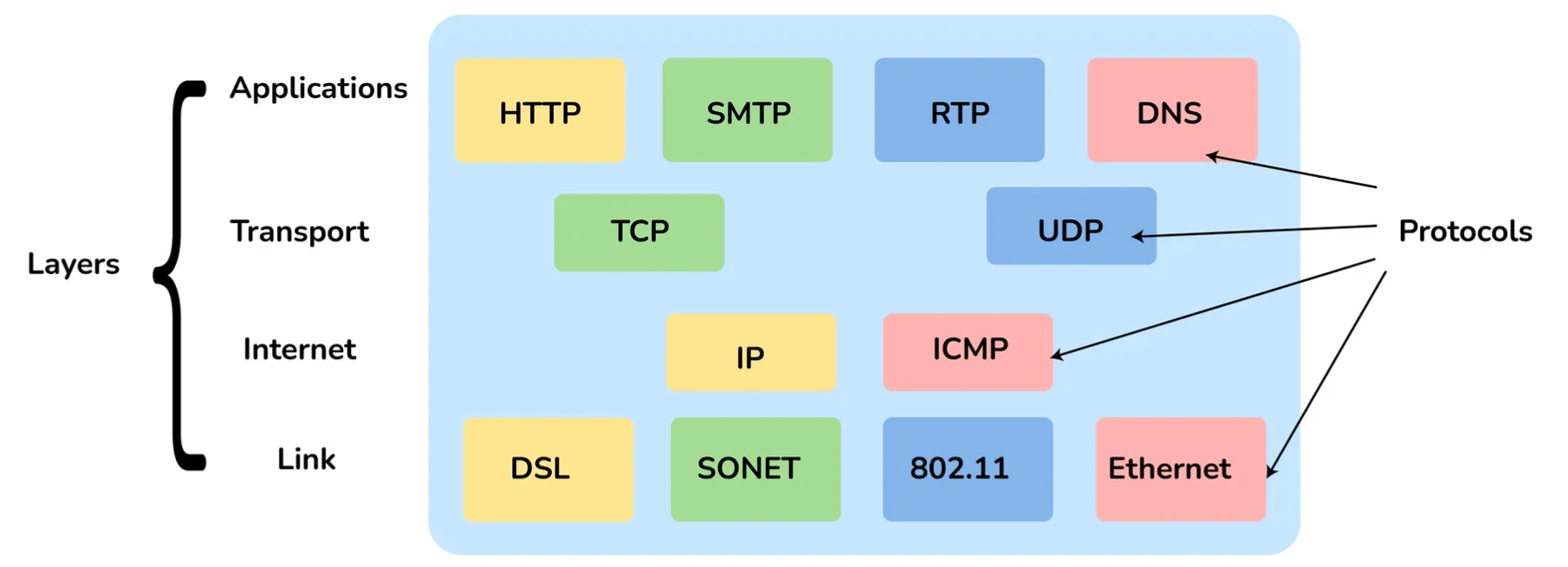
The 4 Layers
- Link Layer: Decides which links (serial lines, Ethernet) to use to meet connectionless internet layer needs.
- Internet Layer: Most important layer holding architecture together. Delivers IP packets to destinations.
- Transport Layer: Enables peer entities to carry on a conversation (similar to OSI Transport).
- Application Layer: Contains all higher-level protocols.
flowchart TB
    L4["4. Application<br/>HTTP, SMTP, DNS, FTP"]
    L3["3. Transport<br/>TCP, UDP"]
    L2["2. Internet<br/>IP, ICMP, ARP"]
    L1["1. Link<br/>Ethernet, Wi-Fi"]
    L4 --> L3 --> L2 --> L1
    style L4 fill:#ba68c8,color:#fff
    style L3 fill:#9c27b0,color:#fff
    style L2 fill:#7b1fa2,color:#fff
    style L1 fill:#6a4c93,color:#fff
OSI vs TCP/IP Comparison
| OSI Reference Model | TCP/IP Reference Model |
|---|---|
| 7 layered architecture | 4 layered architecture |
| Fixed boundaries and functionality for each layer | Flexible architecture with no strict boundaries |
| Low Reliability | High Reliability |
| Vertical Layer Approach | Horizontal Layer Approach |
Note: The Presentation and Session layers from OSI are not present in the TCP/IP model.
Protocols
HTTP and HTTPS
- HTTP (HyperText Transfer Protocol)
- Defines rules for transmitting info on the WWW.
- Helps communication between web browsers and servers.
- Stateless protocol (each command is independent).
- Application layer protocol built on TCP.
- Default Port: 80.
- HTTPS (HyperText Transfer Protocol Secure)
- Advanced, secured version of HTTP.
- Uses SSL/TLS protocol on top of HTTP.
- Encrypts communication and identifies network servers securely.
- Default Port: 443.
SMTP (Simple Mail Transfer Protocol)
- Sets rules for communication between servers to transmit emails.
- Supports End-to-End and Store-and-Forward methods.
- Always-listening mode.
- Default Port: 25.
DNS (Domain Name System)
- Decentralized, hierarchical naming system (Devices/Services directory of the Internet).
- Translates domain names (e.g.,
codingismeditation.github.io) to IPs (e.g.,172.217.166.36). - Default Port: 53.
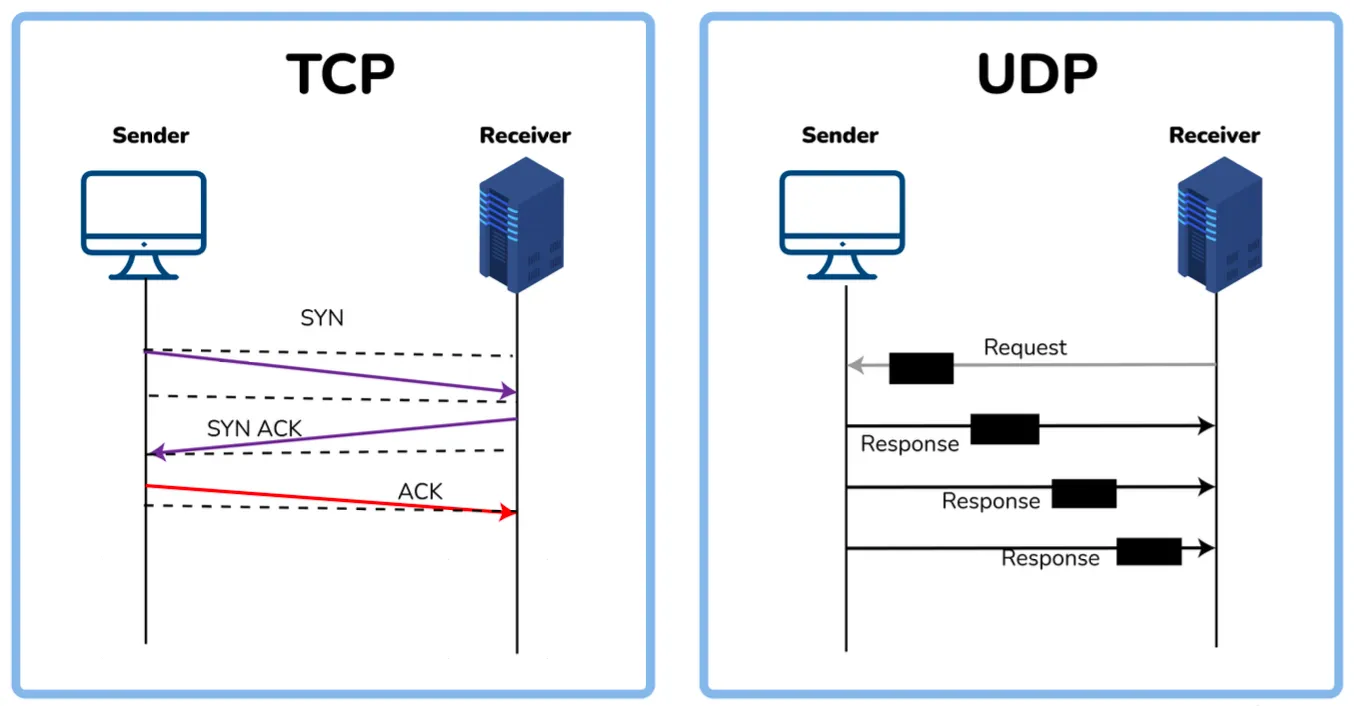
TCP (Transmission Control Protocol)
- Set of rules for connecting to the Internet and transmitting data.
- Creates a virtual network when multiple computers connect.
- Uses three-way handshake model.
- Reliable connection.
sequenceDiagram
    participant Client
    participant Server
    Client->>Server: SYN
    Server->>Client: SYN-ACK
    Client->>Server: ACK
    Note over Client,Server: Connection Established
UDP (User Datagram Protocol)
- Based on Datagrams.
- Used for multicasting and broadcasting.
- Simple transmission without hand-shaking.
- Less reliable than TCP.
TCP vs UDP
| TCP / TCP/IP | UDP |
|---|---|
| Connection-Oriented Protocol | Connectionless Protocol |
| More Reliable | Less Reliable |
| Slower Transmission | Faster Transmission |
| Packet order preserved/rearranged | Packet order not fixed; independent packets |
| Uses three-way handshake | No handshake |
| Heavy-weight packets | Light-weight packets |
| Error checking mechanism | No error checking mechanism |
| Protocols: HTTP, FTP, Telnet, SMTP, HTTPS | Protocols: DNS, RIP, SNMP, RTP, BOOTP, TFTP, NIP |
ICMP (Internet Control Message Protocol)
- Network layer protocol for error handling.
- Used by network devices (routers) to diagnose issues.
- Reports errors and tests if data reaches destination.
- Default Port: 7.
DHCP (Dynamic Host Configuration Protocol)
- Application layer protocol to auto-configure devices on IP networks.
- Auto-assigns IPs, subnet masks, and DNS settings.
- Enables use of TCP/UDP-based protocols.
- Default Port: 67.
ARP (Address Resolution Protocol)
- Network-level protocol.
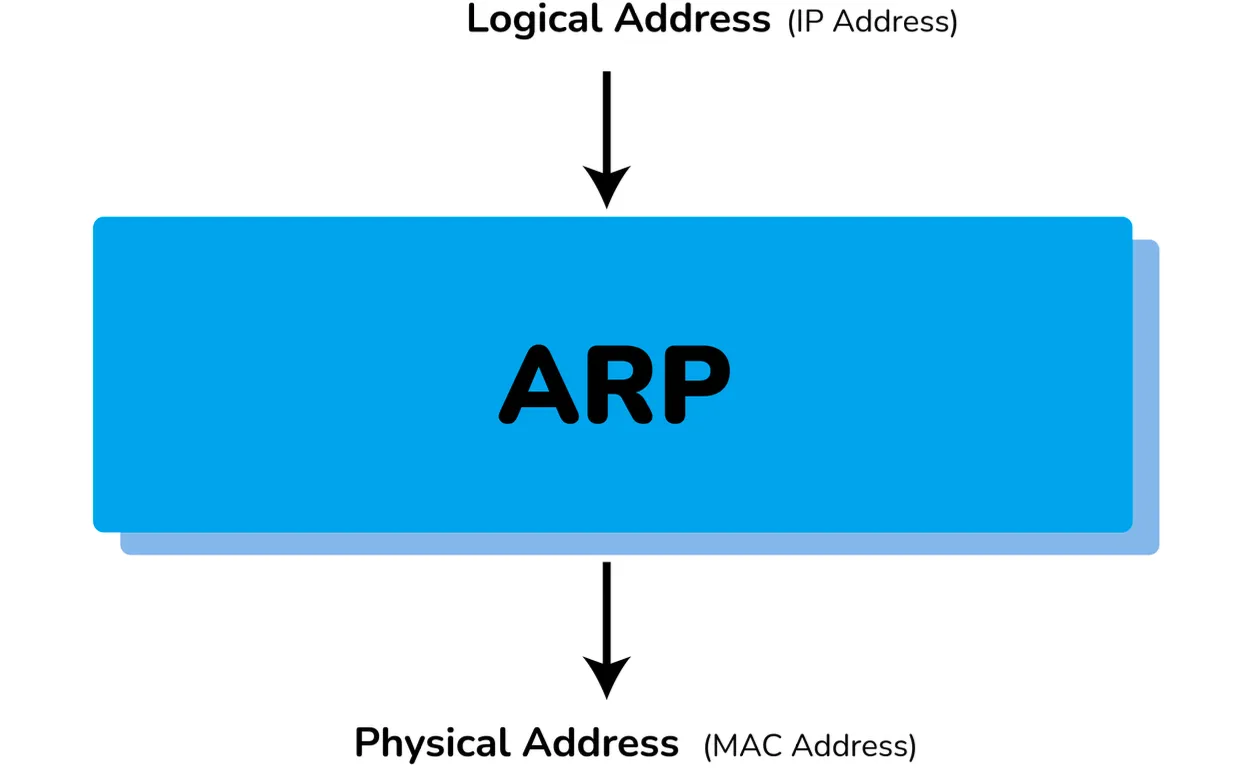
- Converts Logical Address (IP) to Physical Address (MAC).
- Used to get MAC address of devices for local network communication.
FTP (File Transfer Protocol)
- Application layer protocol.
- Used to transfer files/data reliably between hosts.
- Used to download files from remote servers.
- Default Port: 27.
Hardware and Devices
Router vs Gateway
- Router:
- Connects two or more network segments.
- Directs traffic; transfers data (packets) from source to destination.
- Operates at Network Layer.
- Sends data to similar networks.
- Gateway:
- Routes and regulates traffic.
- Can send data between two dissimilar networks.
Hub vs Switch
| Hub | Switch |
|---|---|
| Operates at Physical Layer | Operates at Data Link Layer |
| Half-Duplex transmission mode | Full-Duplex transmission mode |
| Connects Ethernet devices | Connects LAN devices |
| Less complex, less intelligent, cheaper | Intelligent and effective |
| No software support for administration | Administration software support present |
| Less speed (up to 100 MBPS) | High speed (GBPS) |
| Less efficient (collisions possible) | More efficient (avoids/reduces collisions) |
MAC Address vs NIC
- MAC (Media Access Control) Address:
- 48-bit or 64-bit unique identifier.
- Physical address embedded with the NIC.
- Used at Data Link Layer.
- NIC (Network Interface Card):
- Hardware component enabling device connection to the network.
MAC Address vs IP Address
| MAC Address | IP Address |
|---|---|
| Media Access Control Address | Internet Protocol Address |
| 6 or 8-byte hexadecimal number | 4 (IPv4) or 16 (IPv6) Byte address |
| Embedded with NIC | Obtained from the network |
| Physical Address | Logical Address |
| Operates at Data Link Layer | Operates at Network Layer |
| Identifies the device | Identifies device connectivity on the network |
Firewall
- Network security system monitoring incoming/outgoing traffic.
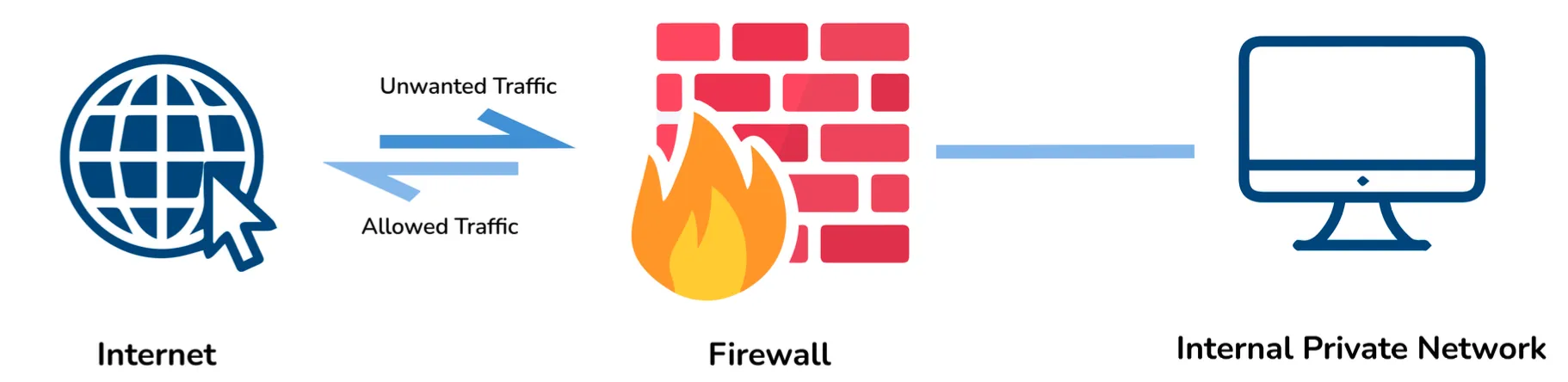
- Blocks traffic based on security policies.
- Acts as a wall between internet (public) and networking devices (private).
- Can be hardware, software, or both.
Commands and Operations
ipconfig vs ifconfig
| ipconfig | ifconfig |
|---|---|
| Internet Protocol Configuration | Interface Configuration |
| Used in Microsoft OS | Used in MAC, Linux, UNIX OS |
| View/configure network interfaces | View/configure network interfaces |
| TCP/IP summary, change DHCP/DNS settings |
Casting Types
- Unicasting: Message sent to a single node from source.
- Use: Establishing new connection.
- Anycasting: Message sent to any node from source.
- Use: Content Delivery Systems (getting content from any server).
- Multicasting: Message sent to a subset of nodes.
- Use: Sending same data to multiple receivers.
- Broadcasting: Message sent to all nodes in a network.
- Use: DHCP and ARP in local network.
Browser Process (Entering google.com)
Steps followed when entering a URL:
- Check Cache: Browser checks its cache for fresh content.
- DNS Lookup:
- If IP not in cache (browser/OS), request OS to do DNS lookup.
- Uses UDP to get IP from DNS server.
- TCP Connection:
- Establish new connection between browser and server.
- Uses three-way handshaking.
- HTTP Request: Sent to server using TCP connection.
- HTTP Response: Web server handles request and sends response.
- Process Response:
- Browser processes response.
- Closes TCP connection or reuses it.
- Cache & Render:
- Browser caches data if cacheable.
- Browser decodes and renders content.
flowchart TD
    A["Enter URL<br/>google.com"]
    B{"Content in<br/>Cache?"}
    C{"IP in Cache?"}
    D["Display<br/>Cached Content"]
    E["DNS Lookup<br/>Get IP Address"]
    F["Establish<br/>TCP Connection"]
    G["Send<br/>HTTP Request"]
    H["Receive<br/>HTTP Response"]
    I{"Cache<br/>Data?"}
    J["Cache<br/>Response"]
    K["Render &<br/>Display Page"]
    A --> B
    B -->|Yes| D
    B -->|No| C
    C -->|No| E
    C -->|Yes| F
    E --> F
    F --> G
    G --> H
    H --> I
    I -->|Yes| J
    I -->|No| K
    J --> K
    D --> K
    style A fill:#1976d2,color:#fff
    style K fill:#43a047,color:#fff
Global Connectivity Fact
- Submarine Cables: As of 2021, there are 1.3 million kilometers of submarine optical fiber cables globally.
- Scale: Enough to revolve around the earth more than 100 times.
Complete Networking Roadmap
flowchart TD
    START["🌐 NETWORKING<br/>Foundation"]

    START --> BASICS["Network Basics<br/>PAN|LAN|MAN|WAN|GAN"]
    BASICS --> CONN["Connection Methods<br/>VPN|Topologies"]
    CONN --> ADDRESSING["IP Addressing<br/>IPv4|Private|Loopback"]

    ADDRESSING --> MODELS["Reference Models<br/>OSI 7-Layer|TCP/IP 4-Layer"]
    MODELS --> PROTO["Protocols Layer"]

    PROTO --> APP["Application<br/>HTTP|SMTP|DNS|FTP"]
    PROTO --> TRANS["Transport<br/>TCP|UDP"]
    PROTO --> NET["Network<br/>ICMP|ARP|DHCP"]

    APP --> HW["Hardware & Devices<br/>Router|Gateway|Hub|Switch"]
    TRANS --> HW
    NET --> HW

    HW --> OPS["Operations<br/>Commands|Casting"]
    OPS --> BROWSER["Browser Process<br/>Cache→DNS→TCP→HTTP→Render"]
    BROWSER --> END["✅ Complete<br/>Network Understanding"]

    style START fill:#f39c12,color:#fff,stroke:#2c3e50,stroke-width:2px
    style BASICS fill:#34495e,color:#f39c12
    style CONN fill:#f39c12,color:#2c3e50
    style ADDRESSING fill:#34495e,color:#f39c12
    style MODELS fill:#f39c12,color:#2c3e50
    style PROTO fill:#34495e,color:#f39c12
    style APP fill:#2c3e50,color:#f39c12
    style TRANS fill:#2c3e50,color:#f39c12
    style NET fill:#2c3e50,color:#f39c12
    style HW fill:#f39c12,color:#2c3e50
    style OPS fill:#34495e,color:#f39c12
    style BROWSER fill:#f39c12,color:#2c3e50
    style END fill:#f39c12,color:#fff,stroke:#2c3e50,stroke-width:2px