DBMS
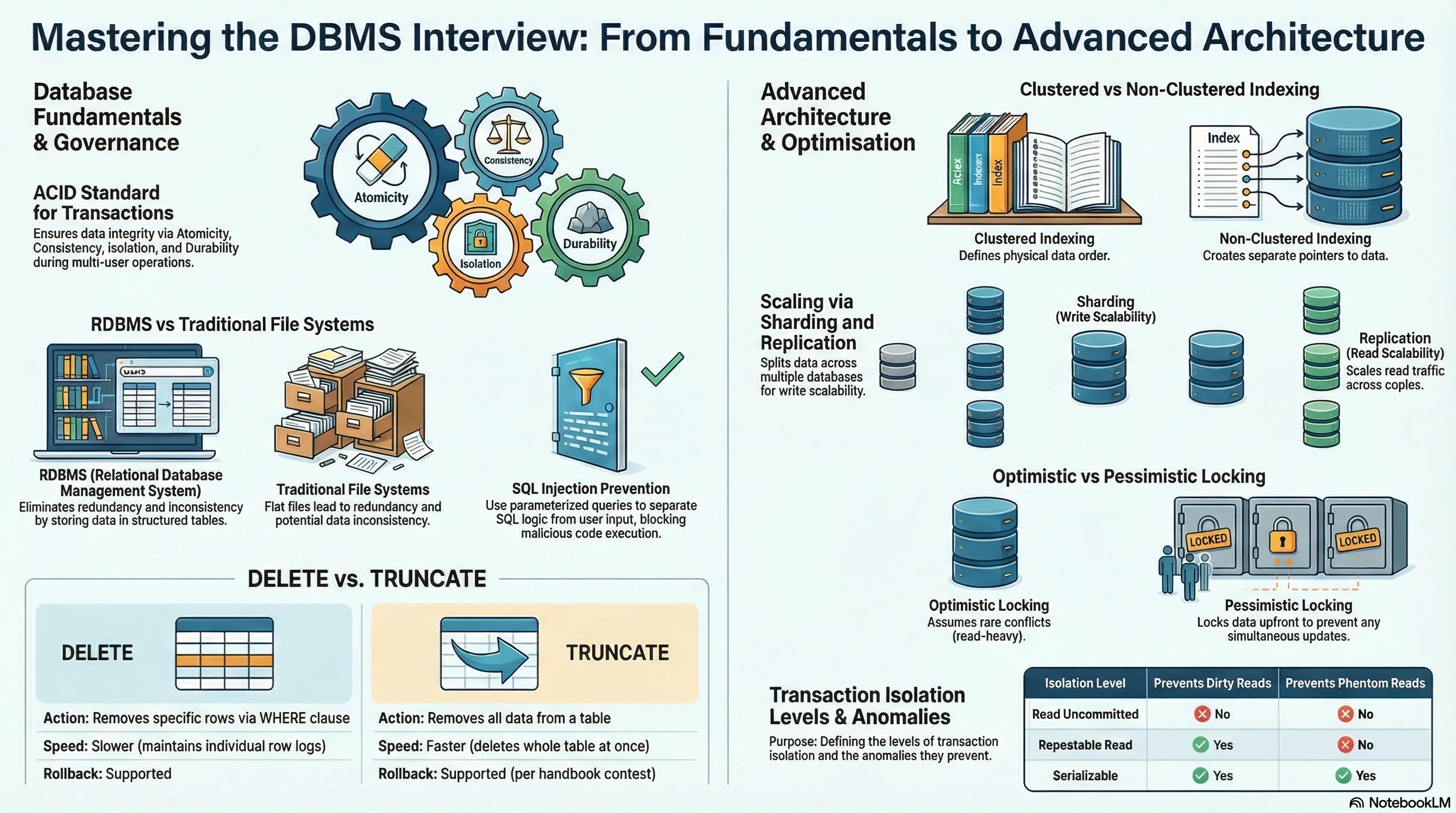
Basic DBMS Interview Questions
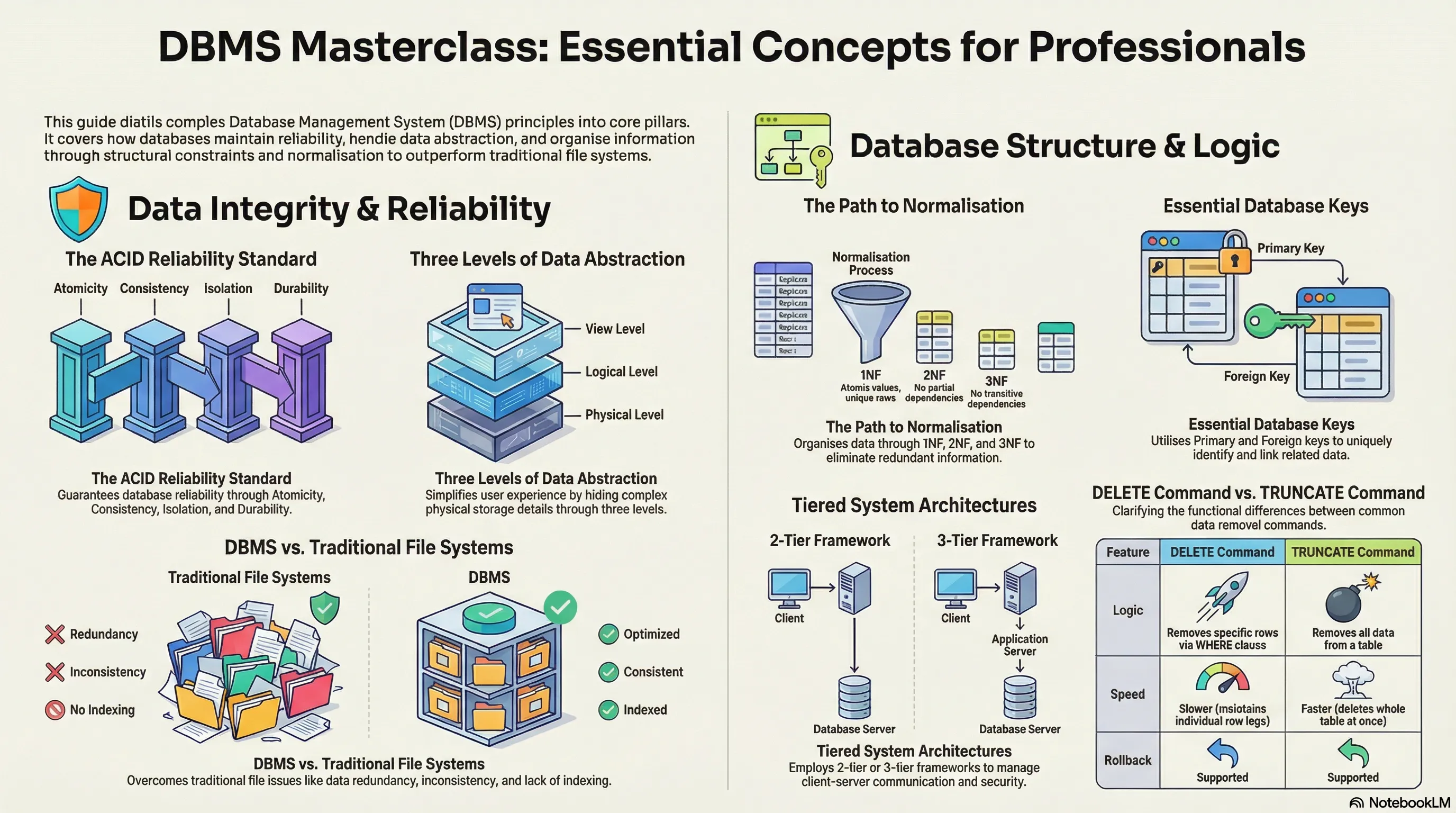
1. What is meant by DBMS and what is its utility? Explain RDBMS with examples.
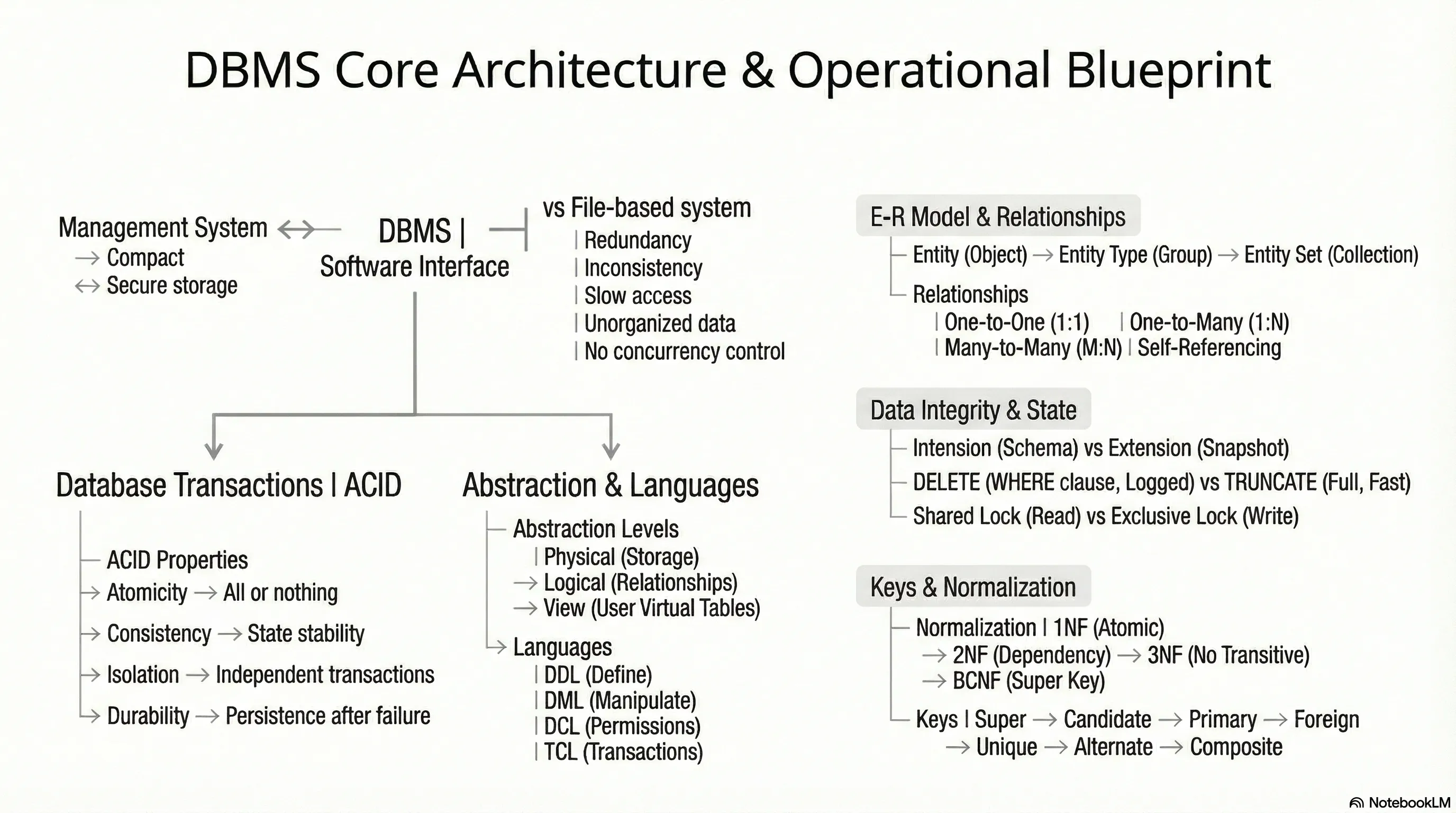
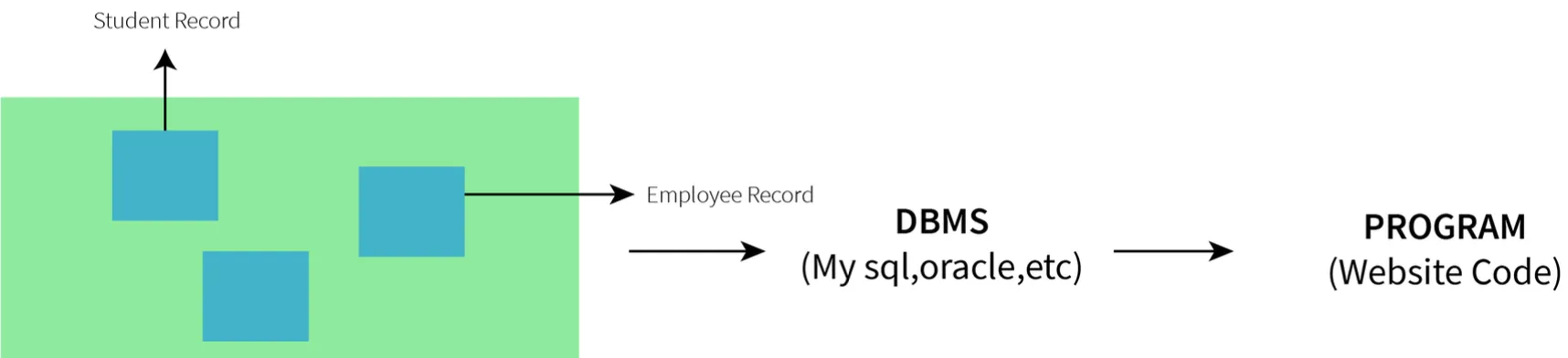
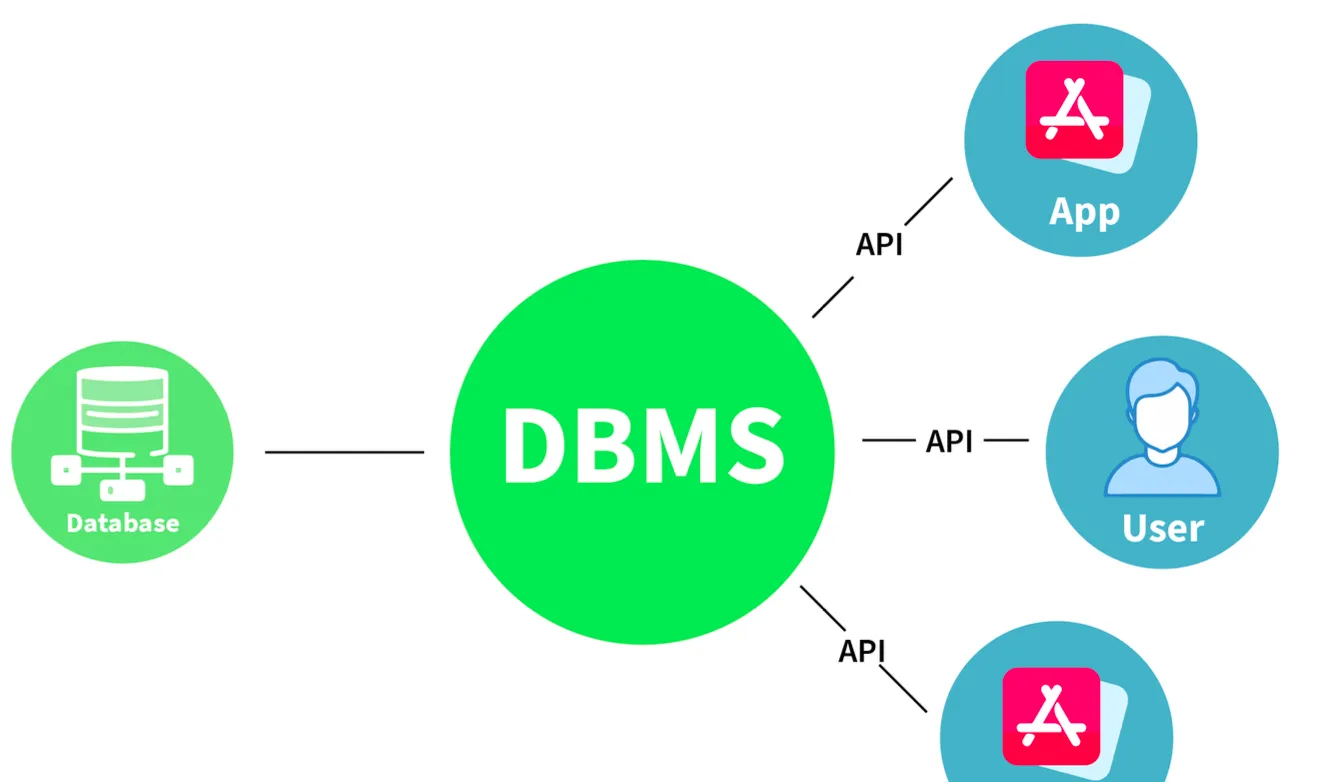
DBMS (Database Management System)
- Definition: A set of applications or programs that enable users to create and maintain a database.
- Utility:
- Provides a tool or interface for performing various operations such as inserting, deleting, updating, etc., into a database.
- Enables the storage of data more compactly and securely compared to a file-based system.
- Helps users overcome problems like data inconsistency and data redundancy in a database.
- Makes using a database more convenient and organized.
- Examples: File systems, XML, Windows Registry, etc.
RDBMS (Relational Database Management System)
- Definition: Introduced in the 1970s to access and store data more efficiently than DBMS.
- Structure: Stores data in the form of tables (rows and columns) compared to DBMS which stores data as files.
- Utility: Storing data as rows and columns makes it easier to locate specific values in the database and makes it more efficient compared to DBMS.
- Examples: MySQL, Oracle DB, etc.
2. What is meant by a database?
- Definition: An organized, consistent, and logical collection of data that can easily be updated, accessed, and managed.
- Content: Mostly contains sets of tables or objects.
- Object: Anything created using the
createcommand is a database object. - Records and Fields: Tables consist of these.
- Object: Anything created using the
- Tuple/Row: Represents a single entry in a table.
- Attribute/Column: Represents the basic units of data storage, containing information about a particular aspect of the table.
- Extraction: DBMS extracts data from a database in the form of queries given by the user.
3. Mention the issues with traditional file-based systems that make DBMS a better choice?
- Absence of Indexing: Leaves the only option of scanning the full page, making access to content tedious and super slow.
- Redundancy and Inconsistency: Files have many duplicate and redundant data; changing one makes all of them inconsistent.
- Data Access: Accessing data is harder because data is unorganized.
- Lack of Concurrency Control: Leads to one operation locking the entire page, whereas DBMS allows multiple operations on a single file simultaneously.
- Other Issues:
- Integrity check issues
- Data isolation issues
- Atomicity issues
- Security issues
4. Explain a few advantages of a DBMS.
- Data Sharing: Data from a single database can be simultaneously shared by multiple users. This enables end-users to react to changes quickly in the database environment.
- Integrity Constraints: The existence of these constraints allows storing data in an organized and refined manner.
- Controlling Redundancy: Eliminates redundancy by providing a mechanism that integrates all data in a single database.
- Data Independence: Allows changing the data structure without altering the composition of any executing application programs.
- Backup and Recovery: Can be configured to automatically create a backup of data and restore it whenever required.
- Data Security: Provides necessary tools to make storage and transfer reliable and secure.
- Authentication: The process of giving restricted access to a user.
- Encryption: Encrypting sensitive data such as OTP, credit card information, etc.
5. Explain different languages present in DBMS.
DDL (Data Definition Language)
- Contains commands required to define the database.
- Examples:
DML (Data Manipulation Language)
- Contains commands required to manipulate the data present in the database.
- Examples:
DCL (Data Control Language)
- Contains commands required to deal with user permissions and controls of the database system.
- Examples:
TCL (Transaction Control Language)
- Contains commands required to deal with the transaction of the database.
- Examples:
6. What is meant by ACID properties in DBMS?
ACID properties ensure a safe and secure way of sharing data among multiple users.
- A - Atomicity:
- Reflects the concept of either executing the whole query or executing nothing at all.
- If an update occurs, it should either be reflected in the whole database or not reflected at all.
- In this Example
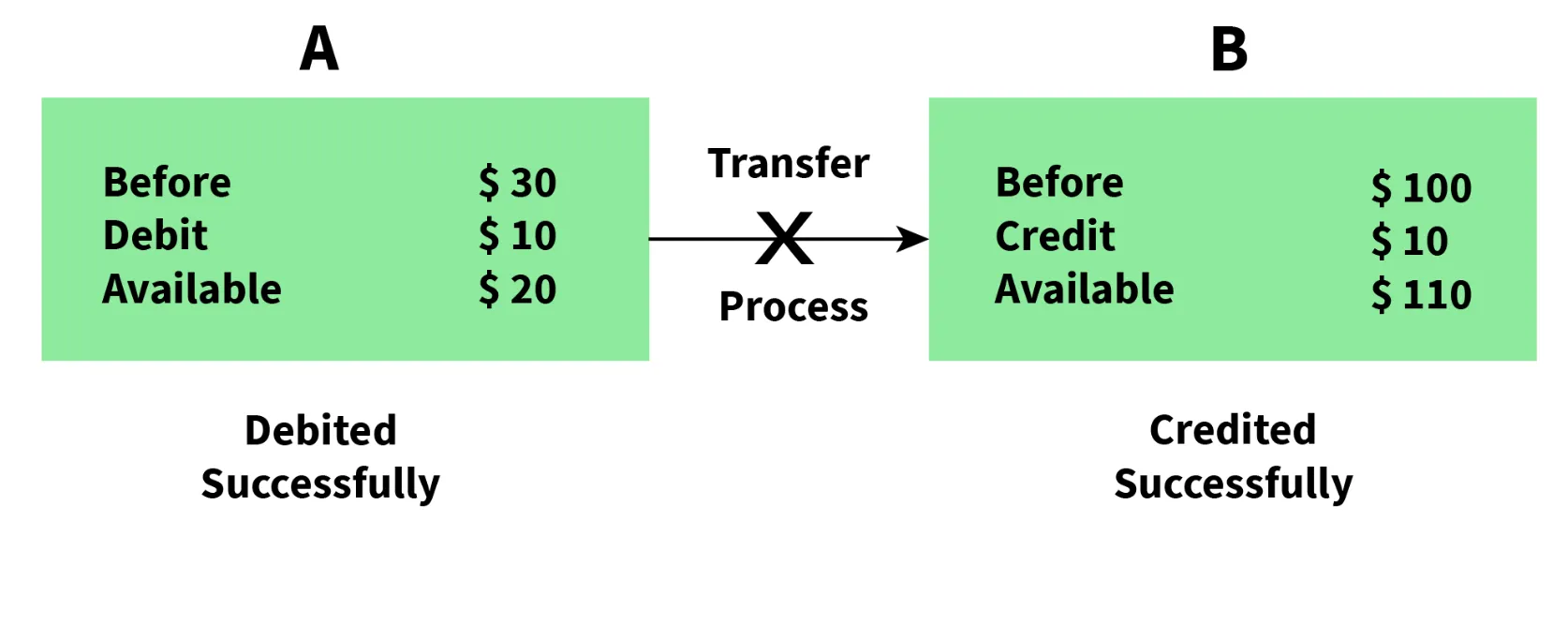
- Partial Execution
- No Atomicity
- Execution Termination
- In this Example
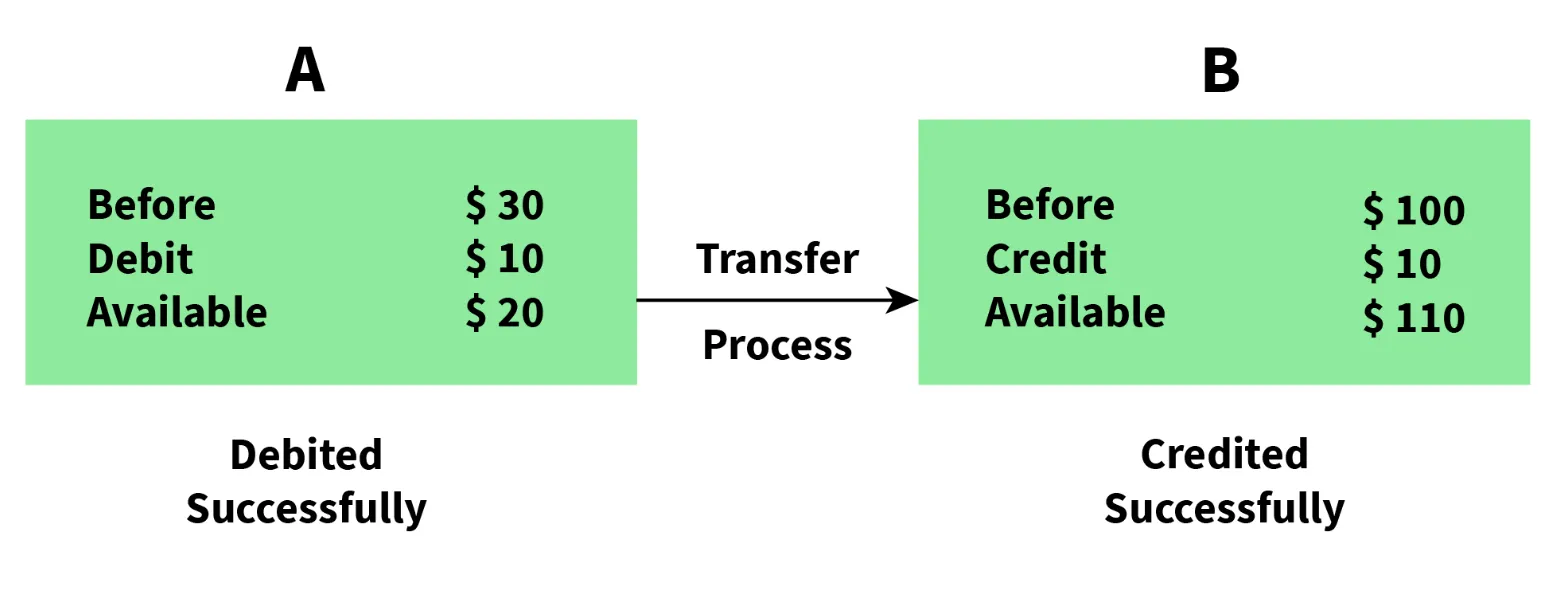
- Complete Execution
- Atomicity
- Execution Successfull
- C - Consistency:
- Ensures that data remains consistent before and after a transaction.
- In this Example
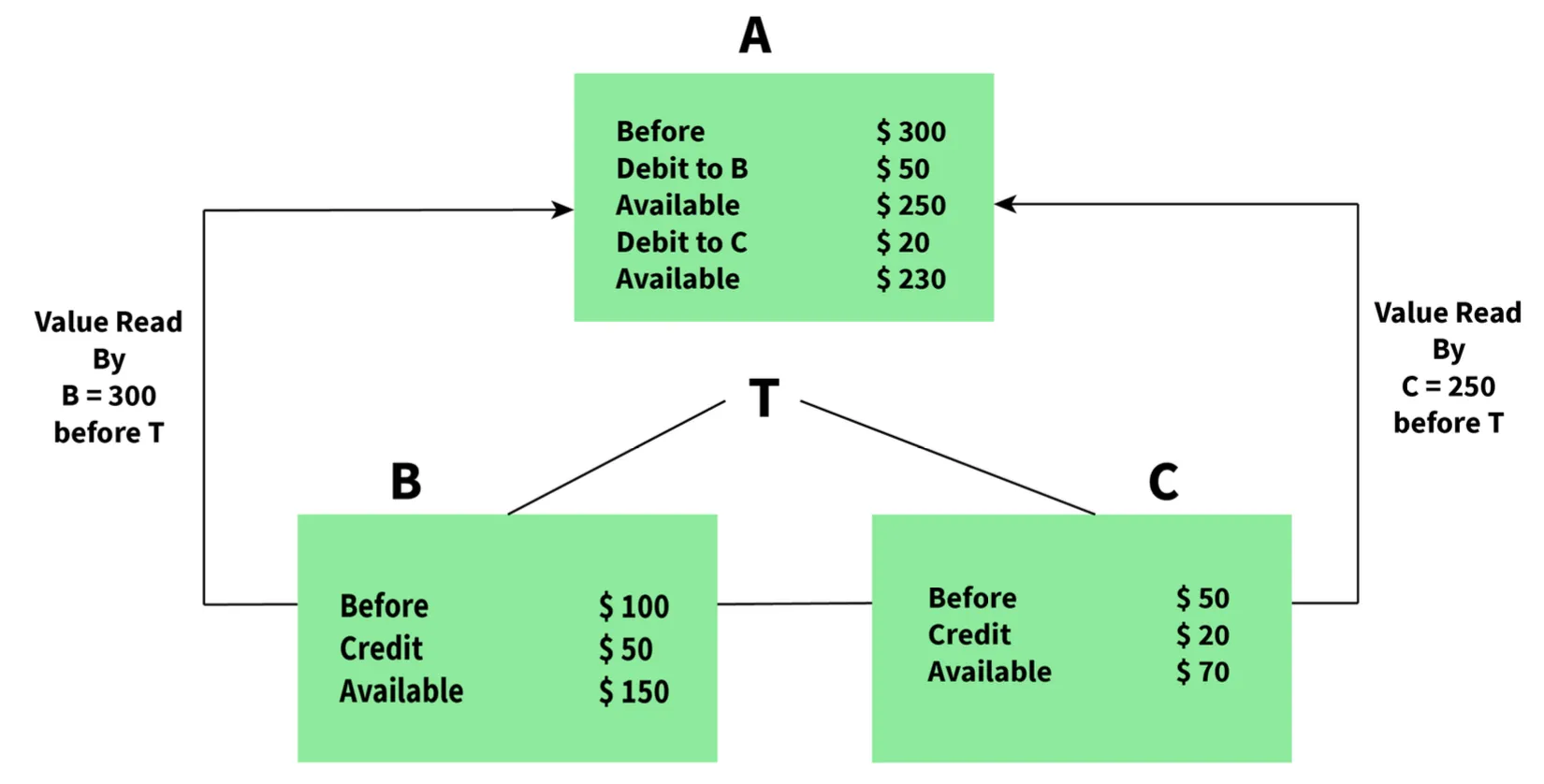
- Data is Consistent
- I - Isolation:
- Ensures each transaction occurs independently of others.
- The state of an ongoing transaction does not affect the state of another ongoing transaction.
- In this Example
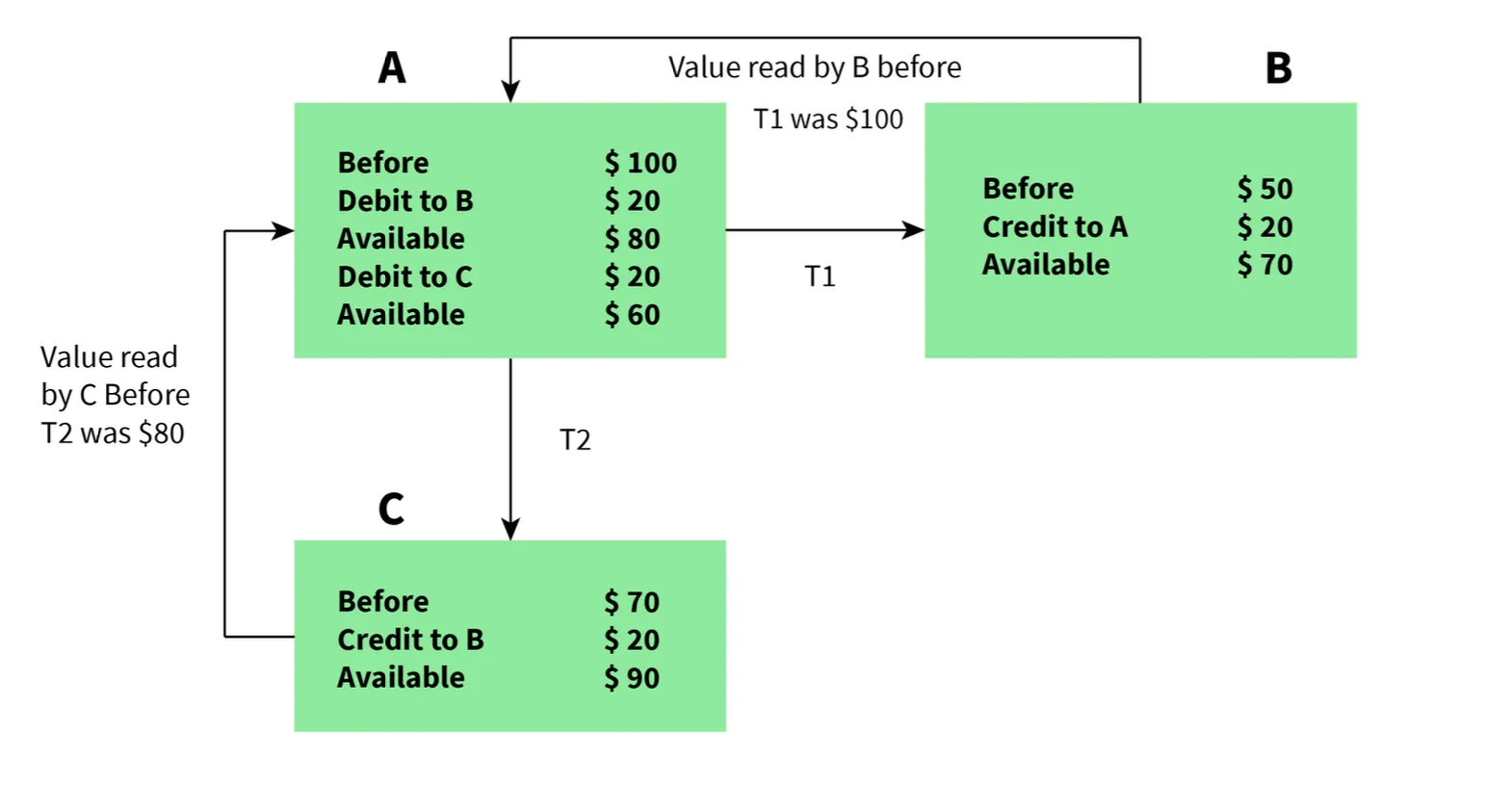
- Isolation, Independent Execution T1 and T2 by A
- D - Durability:
- Ensures data is not lost in cases of system failure or restart.
- Data is present in the same state as it was before the failure/restart.
flowchart LR
    Start([Transaction Start]) --> A{Atomicity Check}
    A -->|All Operations| C{Consistency Check}
    A -->|Partial Failure| Rollback[Rollback All]
    C -->|Valid State| I[Isolation Applied]
    C -->|Invalid State| Rollback
    I --> Execute[Execute Transaction]
    Execute --> D[Durability Ensured]
    D --> Commit([Commit Success])
    Rollback --> Abort([Transaction Aborted])
    style Start fill:#2d3748,stroke:#4a90e2,color:#fff
    style Commit fill:#276749,stroke:#48bb78,color:#fff
    style Abort fill:#742a2a,stroke:#f56565,color:#fff
    style A fill:#1e3a5f,stroke:#4a90e2,color:#fff
    style C fill:#1e3a5f,stroke:#4a90e2,color:#fff
    style I fill:#2c5282,stroke:#4a90e2,color:#fff
    style Execute fill:#2c5282,stroke:#4a90e2,color:#fff
    style D fill:#2c5282,stroke:#4a90e2,color:#fff
    style Rollback fill:#742a2a,stroke:#f56565,color:#fff
7. Are NULL values in a database the same as that of blank space or zero?
- No, a NULL value is very different from zero and blank space.
- NULL: Represents a value that is assigned, unknown, unavailable, or not applicable.
- Blank Space: Represents a character.
- Zero: Represents a number.
- Example: A NULL value in "number_of_courses" means the value is unknown, whereas 0 means the student has not taken any courses.
Intermediate DBMS Interview Questions
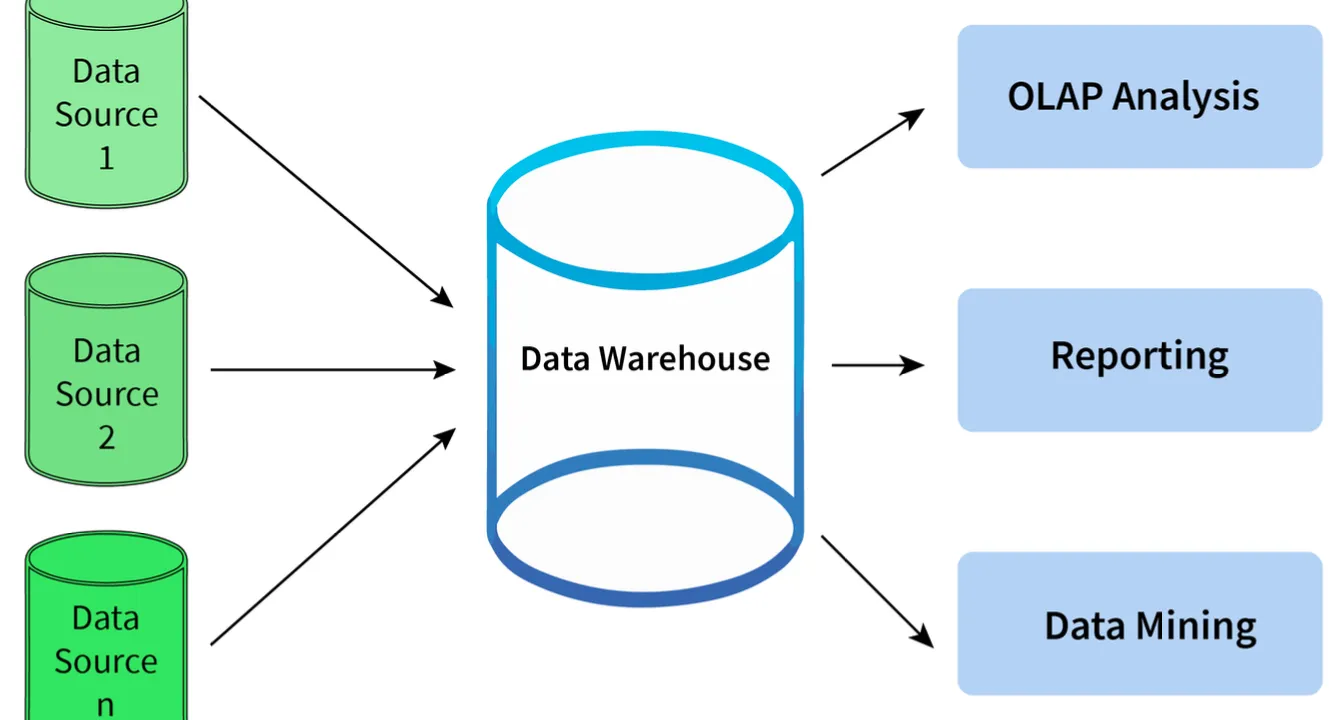
8. What is meant by Data Warehousing?
- Definition: The process of collecting, extracting, transforming, and loading data from multiple sources and storing them into one database.
- Function:
- Acts as a central repository where data flows from transactional systems and other relational databases.
- Used for data analytics.
- Comprises a wide variety of an organization’s historical data.
- Supports the decision-making process in an organization.
flowchart LR
    S1[(Transactional DB)] --> Extract[Extract]
    S2[(Relational DB)] --> Extract
    S3[(External Sources)] --> Extract
    Extract --> Transform[Transform]
    Transform --> Load[Load]
    Load --> DW[(Data Warehouse)]
    DW --> Analytics[Data Analytics]
    Analytics --> Decision[Decision Making]
    style S1 fill:#1a365d,stroke:#4a90e2,color:#fff
    style S2 fill:#1a365d,stroke:#4a90e2,color:#fff
    style S3 fill:#1a365d,stroke:#4a90e2,color:#fff
    style Extract fill:#2c5282,stroke:#4a90e2,color:#fff
    style Transform fill:#2c5282,stroke:#4a90e2,color:#fff
    style Load fill:#2c5282,stroke:#4a90e2,color:#fff
    style DW fill:#1e3a5f,stroke:#4a90e2,color:#fff
    style Analytics fill:#2d3748,stroke:#4a90e2,color:#fff
    style Decision fill:#276749,stroke:#48bb78,color:#fff
9. Explain different levels of data abstraction in a DBMS.
Data abstraction is the process of hiding irrelevant details from users. It is divided into 3 levels:
- Physical Level:
- The lowest level, managed by DBMS.
- Consists of data storage descriptions.
- Details are typically hidden from system admins, developers, and users.
- Conceptual or Logical Level:
- Level on which developers and system admins work.
- Determines what data is stored and the relationships between data points.
- External or View Level:
- Describes only part of the database.
- Hides details of table schema and physical storage from users.
- Example: The result of a query is View level data abstraction. A view is a virtual table created by selecting fields from one or more tables.
flowchart TB
    subgraph External["External/View Level"]
        V1[View 1]
        V2[View 2]
        V3[View N]
    end
    subgraph Conceptual["Conceptual/Logical Level"]
        L1[Tables & Relationships]
        L2[Schema Definitions]
    end
    subgraph Physical["Physical Level"]
        P1[Data Storage]
        P2[File Structures]
        P3[Indexing]
    end
    V1 --> L1
    V2 --> L1
    V3 --> L2
    L1 --> P1
    L2 --> P2
    L2 --> P3
    style External fill:#1e3a5f,stroke:#4a90e2,color:#fff
    style Conceptual fill:#2c5282,stroke:#4a90e2,color:#fff
    style Physical fill:#1a365d,stroke:#4a90e2,color:#fff
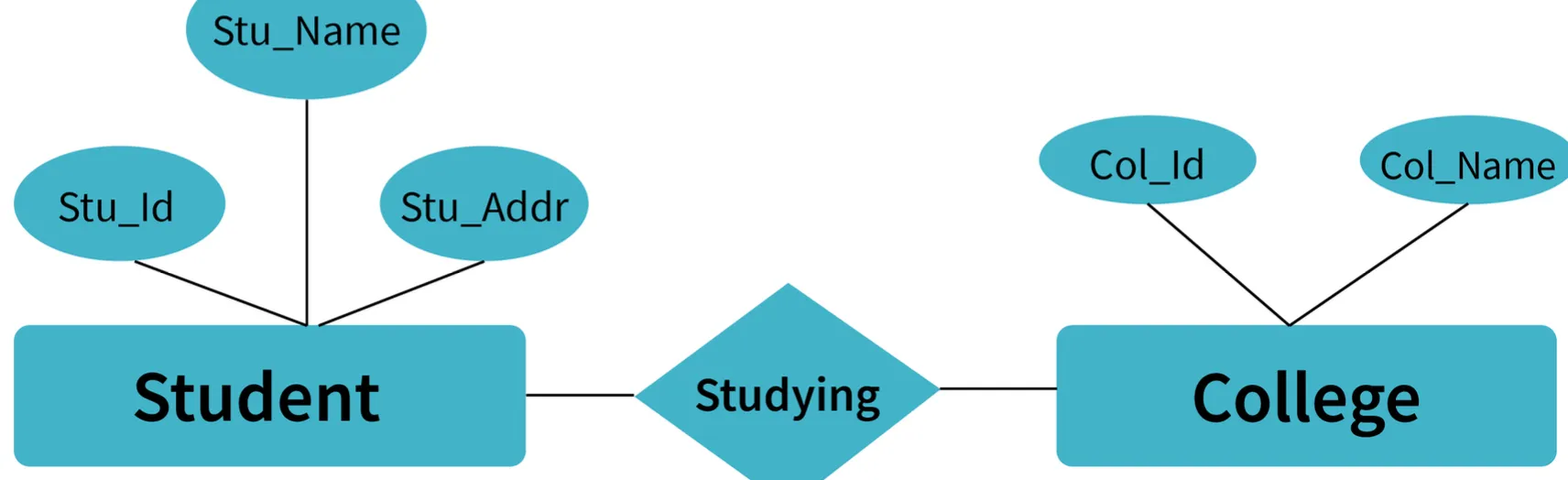
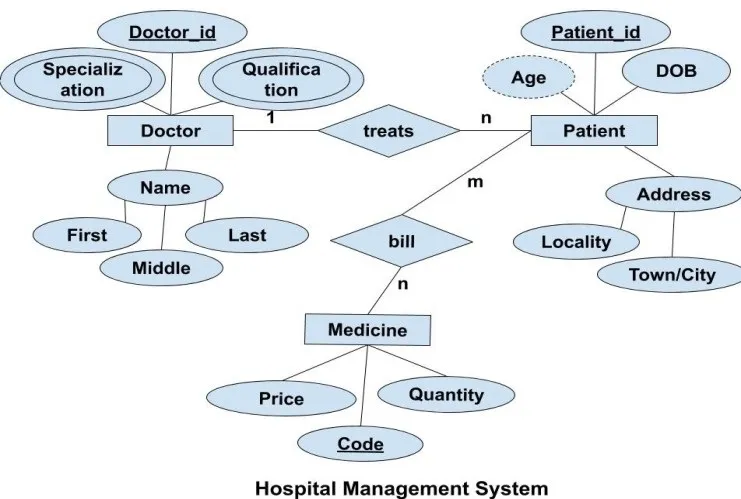
10. What is meant by an entity-relationship (E-R) model? Explain the terms Entity, Entity Type, and Entity Set in DBMS.
- E-R Model: A diagrammatic approach to database design where real-world objects are represented as entities and relationships between them are mentioned.
Terms:
- Entity: A real-world object having attributes that represent characteristics of that particular object.
- Example: A student, an employee, or a teacher.
- Entity Type: A collection of entities that have the same attributes.
- One or more related tables in a database represent an entity type.
- Attributes uniquely identify the entity.
- Example: A student entity type has attributes like
student_id,student_name, etc.
- Entity Set: A set of all the entities present in a specific entity type in a database.
- Example: A set of all students, employees, teachers, etc.
Example: Student Management System Sample
Example: Hospital Management System Sample
11. Explain different types of relationships amongst tables in a DBMS.
- One to One Relationship: Applied when a particular row in table X is linked to a singular row in table Y.
- One to Many Relationship: Applied when a single row in table X is related to many rows in table Y.
- Many to Many Relationship: Applied when multiple rows in table X can be linked to multiple rows in table Y.
- Self Referencing Relationship: Applied when a particular row in table X is associated with the same table.



erDiagram
    USER ||--|| PROFILE : "One-to-One"
    USER {
        int userId PK
        string name
    }
    PROFILE {
        int profileId PK
        int userId FK
        string bio
    }

    CUSTOMER ||--o{ ORDER : "One-to-Many"
    CUSTOMER {
        int customerId PK
        string customerName
    }
    ORDER {
        int orderId PK
        int customerId FK
        date orderDate
    }

    STUDENT }o--o{ COURSE : "Many-to-Many"
    STUDENT {
        int studentId PK
        string studentName
    }
    COURSE {
        int courseId PK
        string courseName
    }

    EMPLOYEE ||--o{ EMPLOYEE : "Self-Referencing"
    EMPLOYEE {
        int employeeId PK
        string employeeName
        int managerId FK
    }
12. Explain the difference between intension and extension in a database.
- Intension (Database Schema):
- Used to define the description of the database.
- Specified during the design of the database.
- Mostly remains unchanged.
- Extension (Snapshot):
- The measure of the number of tuples present in the database at any given point in time.
- Value keeps changing as tuples are created, updated, or destroyed.
13. Explain the difference between the DELETE and TRUNCATE command in a DBMS.
DELETE Command
- Needed to delete rows from a table based on the condition provided by the
WHEREclause. - Deletes only rows specified by the
WHEREclause. - Can be rolled back if required.
- Maintains a log to lock the row of the table before deleting it; hence, it is slow.
TRUNCATE Command
- Needed to remove complete data from a table.
- Like a DELETE command with no
WHEREclause. - Removes complete data from a table.
- Can be rolled back even if required.
- Does not maintain a log and deletes the whole table at once; hence, it is fast.
14. What is a lock? Explain the major difference between a shared lock and an exclusive lock during a transaction in a database.
- Lock: A mechanism to protect a shared piece of data from getting updated by two or more database users at the same time. When a single user/session acquires a lock, no other user/session can modify that data until the lock is released.
Shared Lock
- Required for reading a data item.
- Many transactions may hold a lock on the same data item.
- Multiple transactions are allowed to read data items.
Exclusive Lock
- Required for any transaction about to perform a write operation.
- Does not allow more than one transaction.
- Prevents inconsistency in the database.
stateDiagram-v2
    [*] --> Unlocked
    Unlocked --> SharedLock : Read Request
    Unlocked --> ExclusiveLock : Write Request
    SharedLock --> SharedLock : More Read Requests
    SharedLock --> Unlocked : All Reads Complete
    SharedLock --> Waiting : Write Request
    ExclusiveLock --> Unlocked : Write Complete
    Waiting --> ExclusiveLock : Shared Lock Released
    ExclusiveLock --> [*]

    note right of SharedLock
        Multiple transactions
        can read simultaneously
    end note

    note right of ExclusiveLock
        Only one transaction
        can write at a time
    end note
15. What is meant by normalization and denormalization?
- Normalization:
- A process of reducing redundancy by organizing data into multiple tables.
- Leads to better usage of disk spaces.
- Makes it easier to maintain database integrity.
- Denormalization:
- The reverse process of normalization.
- Combines tables which have been normalized into a single table.
- Makes data retrieval faster.
- JOIN operation allows creating a denormalized form by reversing normalization.
Advanced DBMS Interview Questions
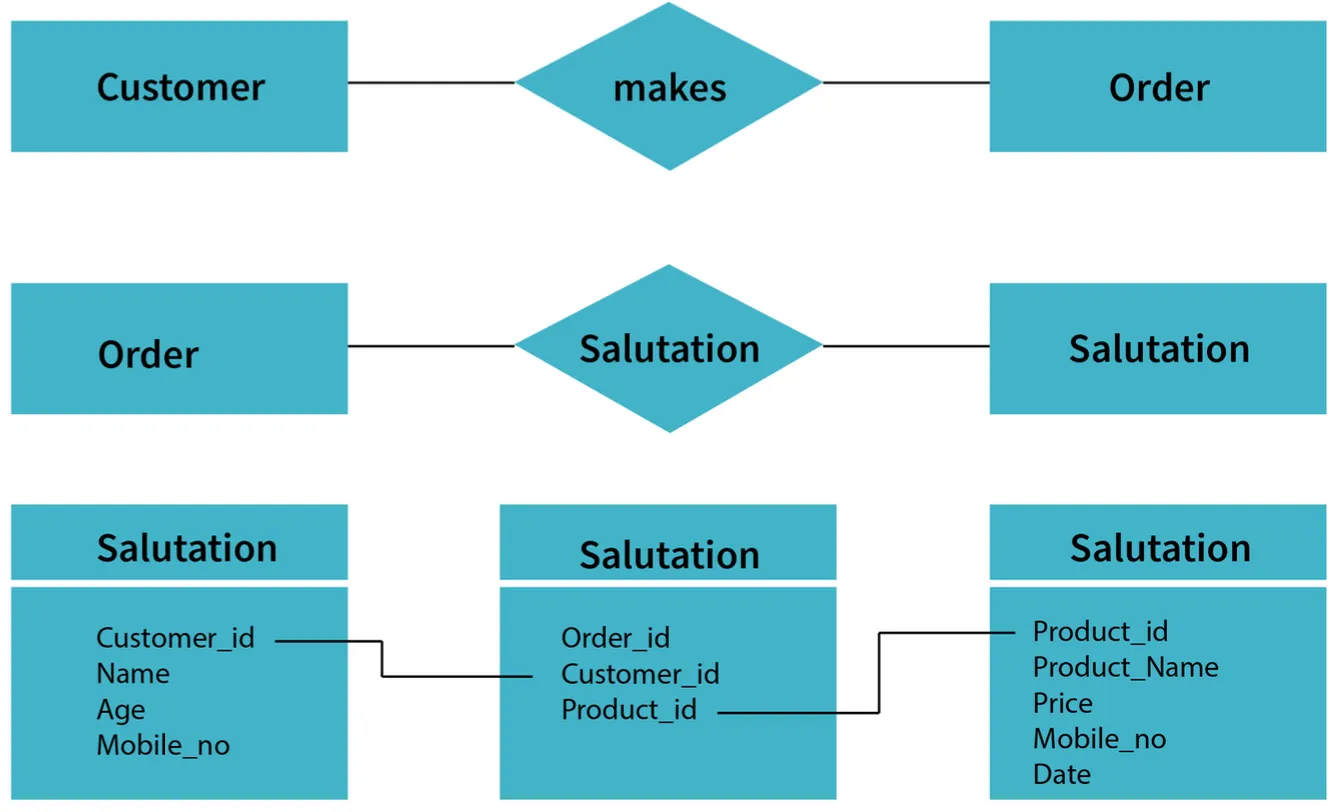
16. Explain different types of Normalization forms in a DBMS.
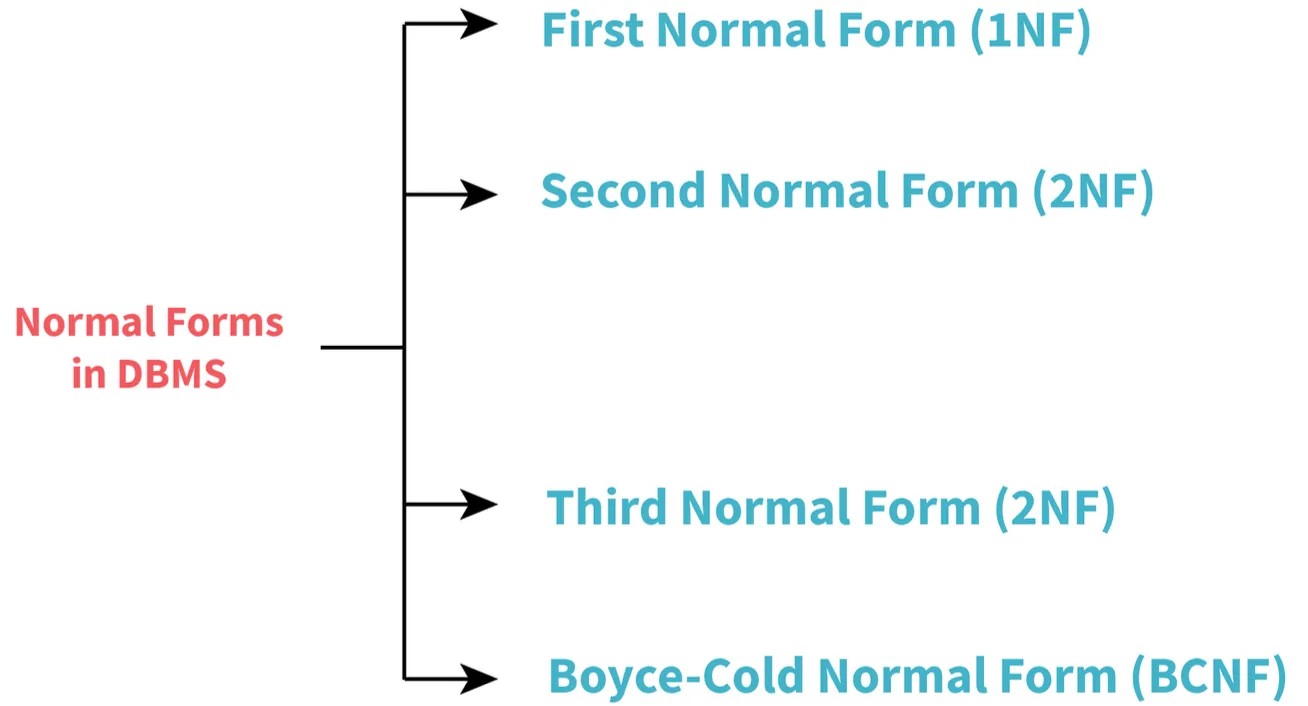
Reference Example Sample:
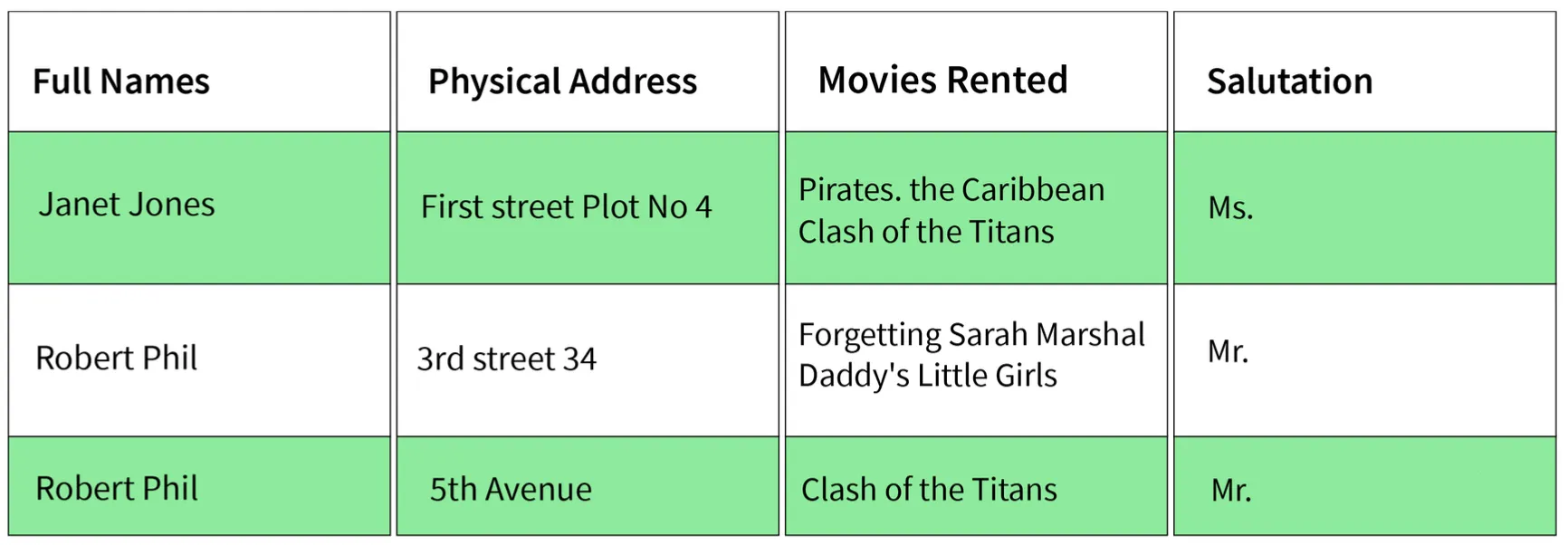
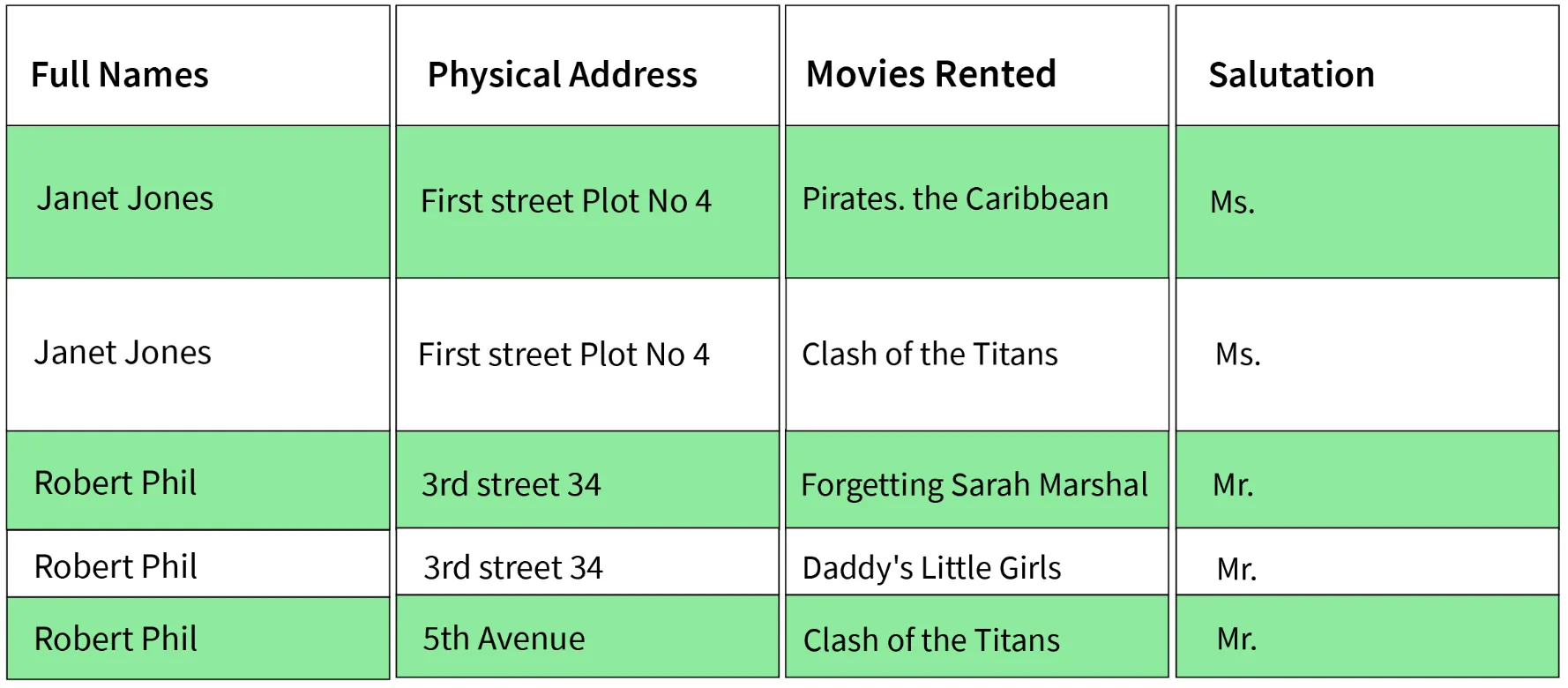
1. First Normal Form (1NF)
- Simplest type. Conditions:
- Every column must have a single value and should be atomic.
- Duplicate columns from the same table should be removed.
- Separate tables should be created for each group of related data.
- Each row should be identified with a unique column.
Sample's 1NF form:
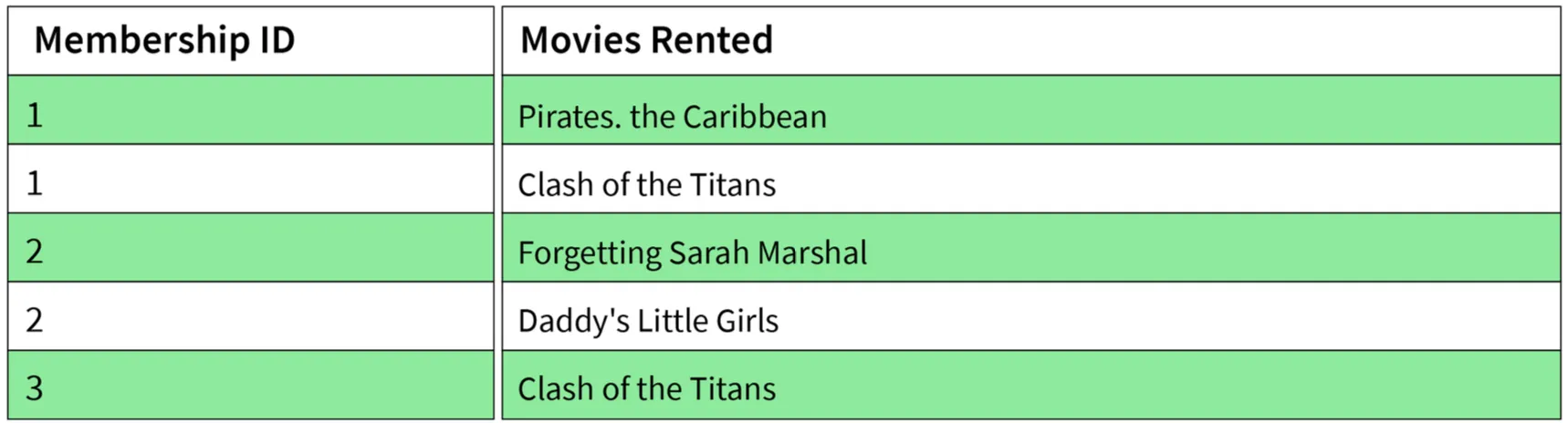
2. Second Normal Form (2NF)
- Conditions:
- Table must be in 1NF.
- Every non-prime attribute should be fully functionally dependent on the primary key.
- Explanation: Every non-key attribute must depend on the primary key such that if any key element is deleted, the non-key element will be saved.
Sample's 2NF form:

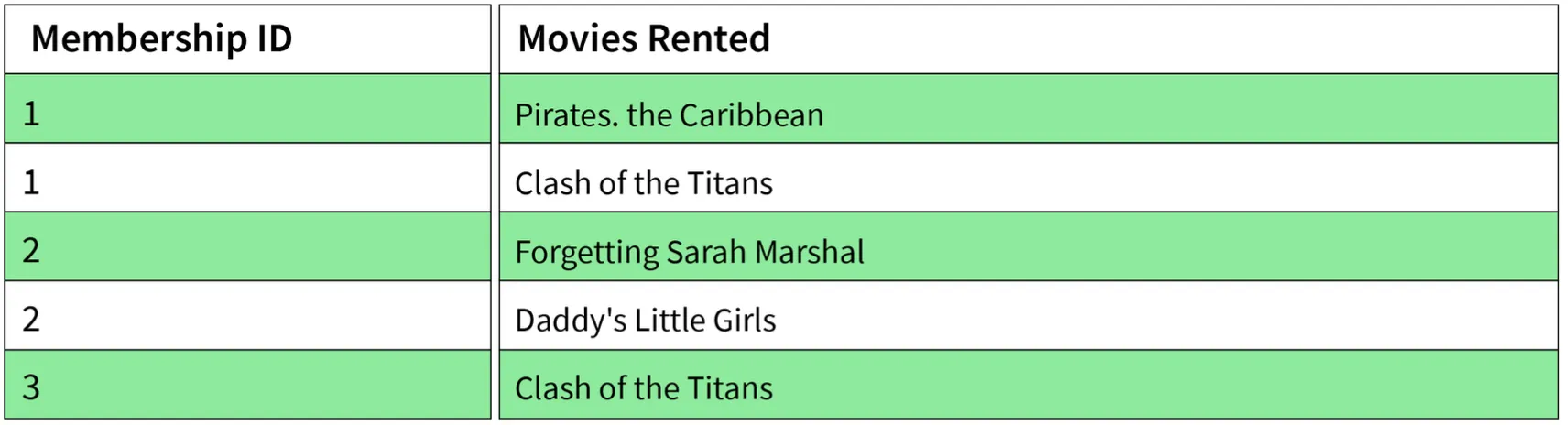
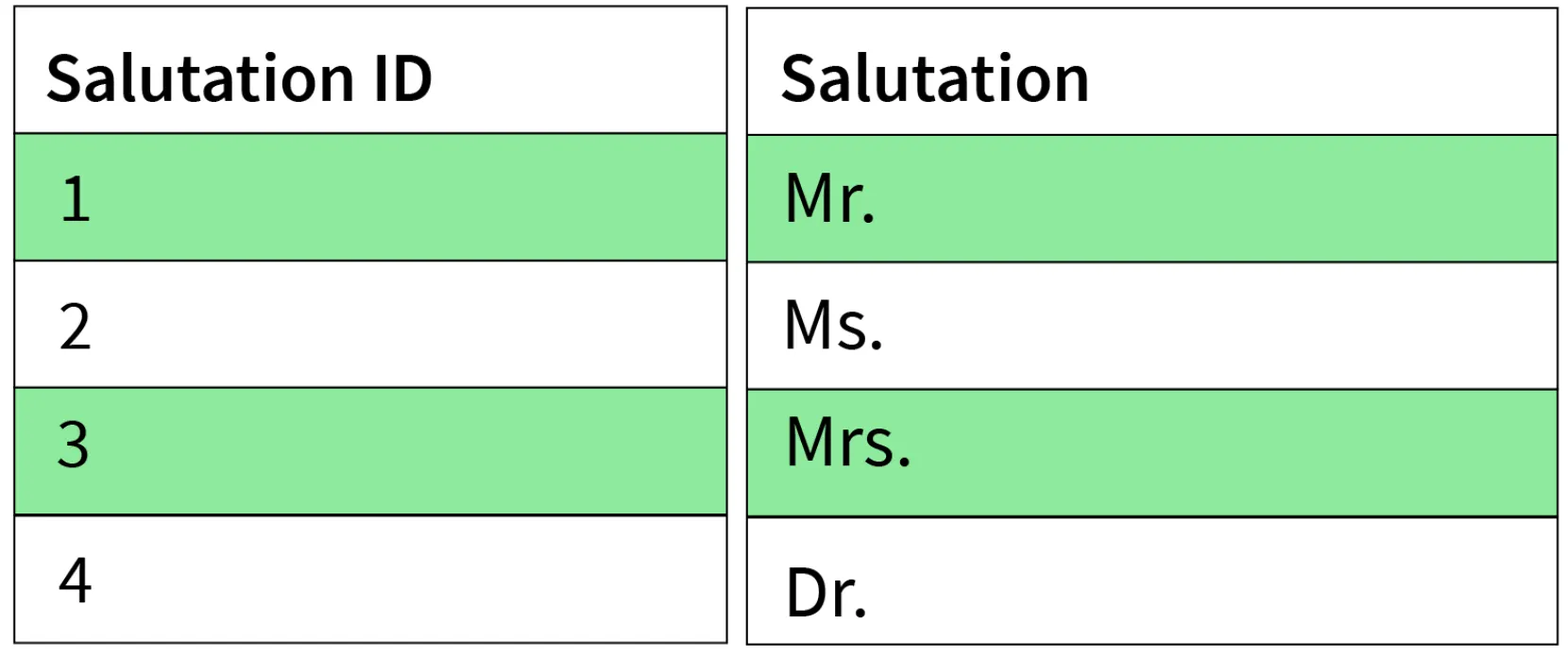
3. Third Normal Form (3NF)
- Conditions:
- Table must be in 2NF.
- There is no transitive functional dependency of one attribute on any attribute in the same table.
Sample's 3NF form:

4. Boyce-Codd Normal Form (BCNF) / 3.5NF
- Advanced form of 3NF. Conditions:
- Table must be in 3NF.
- For every functional dependency
A -> B, A should be the super key of the table. - Implication: A can't be a non-prime attribute if B is a prime attribute.
flowchart LR
    Unnormalized[Unnormalized Data] --> 1NF
    1NF["1NF<br/>Atomic Values<br/>Unique Rows"] --> 2NF
    2NF["2NF<br/>1NF +<br/>Full Functional Dependency"] --> 3NF
    3NF["3NF<br/>2NF +<br/>No Transitive Dependency"] --> BCNF
    BCNF["BCNF<br/>3NF +<br/>Determinant is Super Key"]
    style Unnormalized fill:#742a2a,stroke:#f56565,color:#fff
    style 1NF fill:#2c5282,stroke:#4a90e2,color:#fff
    style 2NF fill:#2c5282,stroke:#4a90e2,color:#fff
    style 3NF fill:#2c5282,stroke:#4a90e2,color:#fff
    style BCNF fill:#276749,stroke:#48bb78,color:#fff
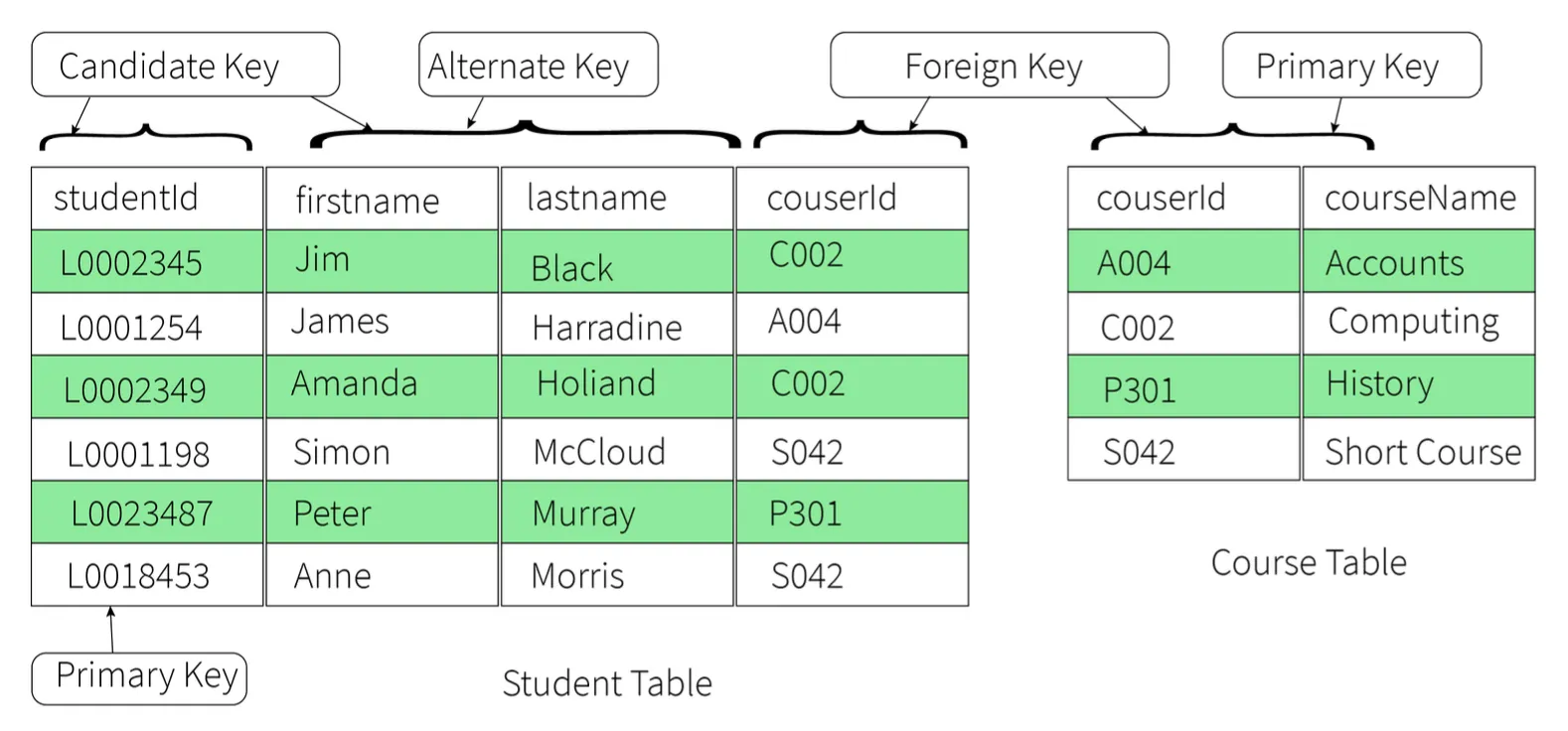
17. Explain different types of keys in a database.
1. Candidate Key
- A set of properties that can uniquely identify a table.
- Each table may have multiple candidate keys.
- One key amongst them is chosen as the primary key.
- Example:
studentIdandfirstNamecan both be Candidate Keys if they uniquely identify every tuple.
2. Super Key
- A set of attributes that can uniquely identify a tuple.
- Candidate key and primary key are subsets of the super key (the super key is their superset).
3. Primary Key
- A set of attributes used to uniquely identify every tuple.
- Chosen from the candidate keys.
- Does not allow NULL values.
- Example:
studentIdchosen overfirstNamefor the student table.
4. Unique Key
- Similar to primary key but allows NULL values in the column.
- Essentially primary keys with NULL values.
5. Alternate Key
- All candidate keys not chosen as primary keys.
- Example: If
studentIdis Primary,firstNameandlastnameare alternate keys.
6. Foreign Key
- An attribute that can only take values present in one table common to the attribute present in another table.
- Example:
courseIdin the Student table is a foreign key to the Course table.
7. Composite Key
- A combination of two or more columns that can uniquely identify each tuple in a table.
- Example: Grouping
studentIdandfirstname.
flowchart TB
    SK[Super Key<br/>All Possible Combinations] --> CK
    CK[Candidate Key<br/>Minimal Super Key] --> PK
    CK --> AK
    PK[Primary Key<br/>Selected Candidate<br/>No NULL] --> UK
    AK[Alternate Key<br/>Non-selected Candidates]
    UK[Unique Key<br/>Like Primary<br/>Allows NULL]
    FK[Foreign Key<br/>References Primary Key<br/>in Another Table]
    COMP[Composite Key<br/>Multiple Columns Combined]
    style SK fill:#1a365d,stroke:#4a90e2,color:#fff
    style CK fill:#2c5282,stroke:#4a90e2,color:#fff
    style PK fill:#276749,stroke:#48bb78,color:#fff
    style AK fill:#2c5282,stroke:#4a90e2,color:#fff
    style UK fill:#2c5282,stroke:#4a90e2,color:#fff
    style FK fill:#744210,stroke:#ed8936,color:#fff
    style COMP fill:#2d3748,stroke:#4a90e2,color:#fff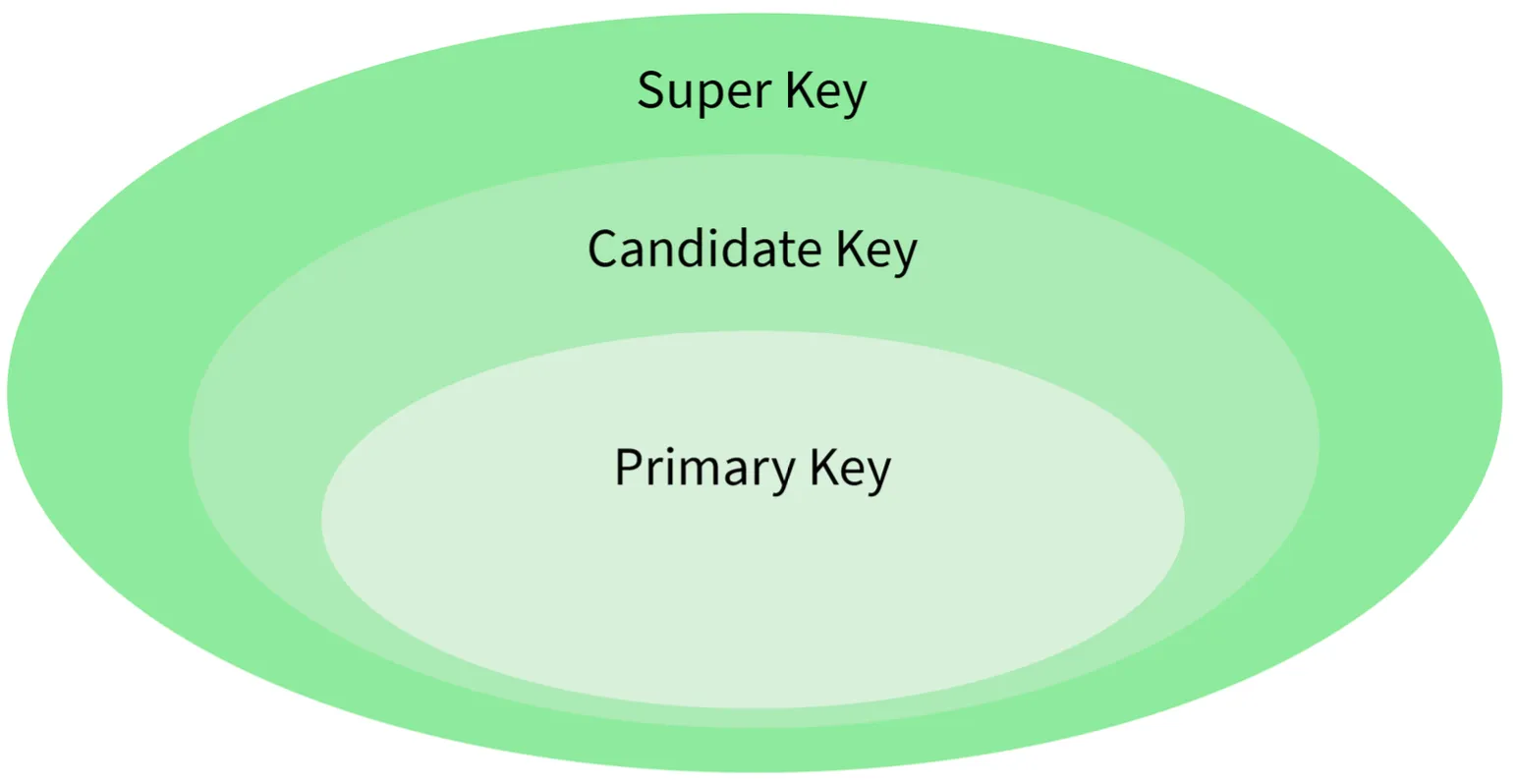
18. Explain the difference between a 2-tier and 3-tier architecture in a DBMS.
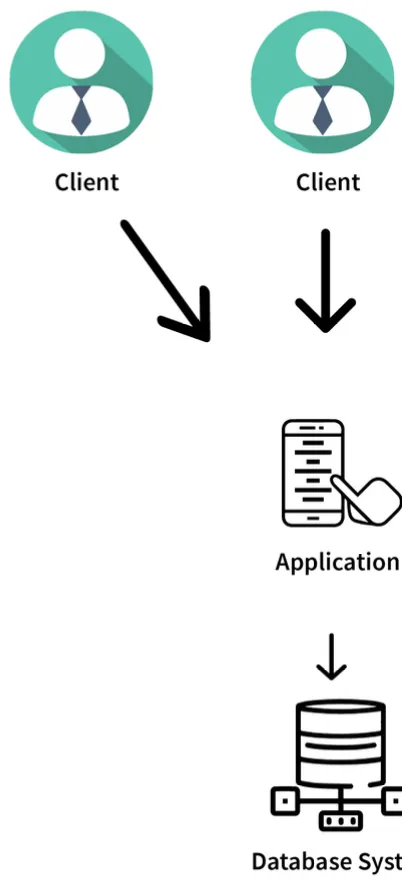
2-Tier Architecture
- Client-Server architecture.
- Applications at the client end directly communicate with the database at the server end.
- No middleware involved.
- Examples: Contact Management System created using MS-Access, Railway Reservation System.
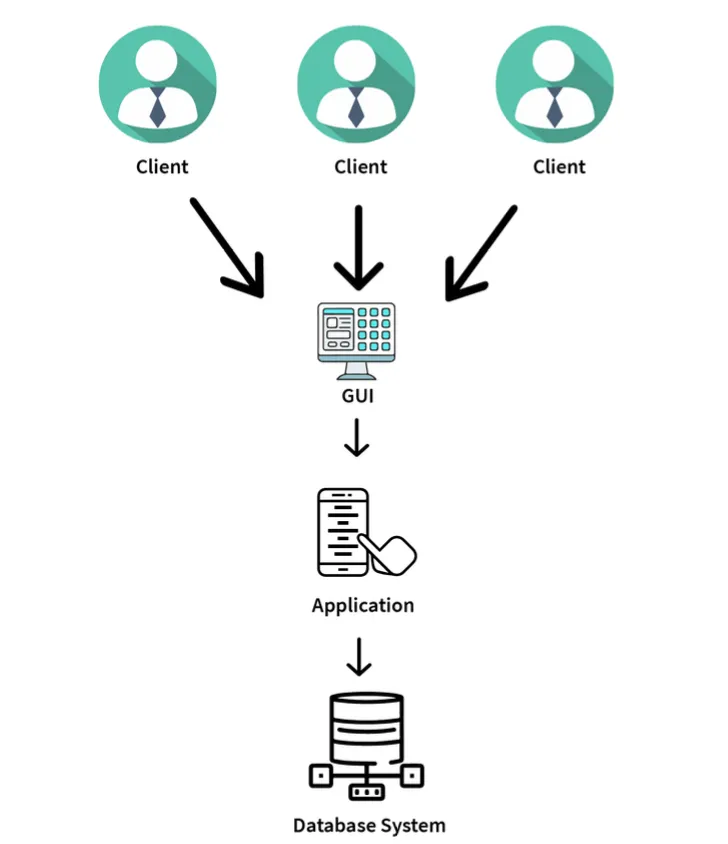
3-Tier Architecture
- Contains another layer (Middleware) between the client and the server.
- Provides GUI to users.
- Makes the system much more secure and accessible.
- Flow: Client Application <-> Server Application <-> Database System.
- Examples: Designing registration forms (text box, label, button), large websites on the Internet.
flowchart TB
    subgraph TwoTier["2-Tier Architecture"]
        C1[Client Application<br/>Presentation + Business Logic]
        D1[(Database Server<br/>Data Layer)]
        C1 --> D1
        D1 --> C1
    end

    subgraph ThreeTier["3-Tier Architecture"]
        C2[Client Application<br/>Presentation Layer]
        M[Middleware / Application Server<br/>Business Logic Layer]
        D2[(Database Server<br/>Data Layer)]
        C2 --> M
        M --> C2
        M --> D2
        D2 --> M
    end

    style C1 fill:#2c5282,stroke:#4a90e2,color:#fff
    style D1 fill:#1a365d,stroke:#4a90e2,color:#fff
    style C2 fill:#2c5282,stroke:#4a90e2,color:#fff
    style M fill:#744210,stroke:#ed8936,color:#fff
    style D2 fill:#1a365d,stroke:#4a90e2,color:#fff
    style TwoTier fill:#1e293b,stroke:#4a90e2,color:#fff
    style ThreeTier fill:#1e293b,stroke:#4a90e2,color:#fff
DBMS Indexing & Query Optimization
19. What is selectivity/cardinality and why does it matter for indexing?
- Selectivity refers to how unique the values in a column are.
- High selectivity means most values are unique (e.g., user IDs). Low selectivity means many rows share the same value (e.g., status flags).
- Indexes work best on high-selectivity columns. Indexing low-selectivity columns often gives little benefit.
- Understanding data distribution helps decide which columns should be indexed.
20. What is an index and why can indexing slow down INSERT/UPDATE/DELETE?
- An index is a data structure that helps the database find rows faster without scanning the full table.
- It improves read performance by reducing the amount of data searched.
- However, every time you insert, update, or delete data, the index also needs to be updated.
- This extra write overhead slows down write operations. The more indexes a table has, the slower writes become.
- Indexing is always a balance between read speed and write performance.
21. Difference between clustered and non-clustered index
- Clustered Index: Defines the physical order of data in the table. A table can have only one clustered index. Faster for range queries.
- Non-Clustered Index: Stores a separate structure that points to the actual rows. Does not change how data is stored on disk. Better for specific lookups.
- Choosing the wrong type can lead to inefficient queries.
flowchart LR
    subgraph CI["Clustered Index"]
        direction TB
        CD[(Table Data\nordered by index key)] --> CR1[Row 1: id=1]
        CD --> CR2[Row 2: id=2]
        CD --> CR3[Row 3: id=3]
    end
    subgraph NCI["Non-Clustered Index"]
        direction TB
        NI[Index Structure\nsorted by key] --> P1[Pointer → Row A]
        NI --> P2[Pointer → Row B]
        NI --> P3[Pointer → Row C]
        P1 --> ND[(Table Data\nunordered)]
        P2 --> ND
        P3 --> ND
    end
    style CI fill:#1e3a5f,stroke:#4a90e2,color:#fff
    style NCI fill:#1a365d,stroke:#4a90e2,color:#fff
    style CD fill:#2c5282,stroke:#4a90e2,color:#fff
    style ND fill:#2c5282,stroke:#4a90e2,color:#fff
    style NI fill:#744210,stroke:#ed8936,color:#fff
22. When does a query not use an index even if one exists?
- The query optimizer thinks a full table scan is faster (e.g., when a large percentage of rows match the condition).
- Using functions on indexed columns can prevent index usage.
- Mismatched data types or implicit conversions can break index access.
- Poorly written queries confuse the optimizer.
23. What is a composite index and the leftmost prefix rule?
- A composite index is an index created on multiple columns together.
- The leftmost prefix rule means the index is used only if the query filters starting from the first column.
- Example: An index on
(user_id, order_date)works for queries filtering byuser_id, but not for queries filtering only byorder_date. - Always match index column order with real query usage.
flowchart TD
    IDX["Composite Index\n(user_id, order_date, amount)"]
    IDX --> Q1["WHERE user_id = 5\n✅ Uses index"]
    IDX --> Q2["WHERE user_id = 5\nAND order_date = '2024-01-01'\n✅ Uses index"]
    IDX --> Q3["WHERE user_id = 5\nAND order_date = '2024-01-01'\nAND amount > 100\n✅ Uses index"]
    IDX --> Q4["WHERE order_date = '2024-01-01'\n❌ Skips index\n(no leftmost prefix)"]
    IDX --> Q5["WHERE amount > 100\n❌ Skips index\n(no leftmost prefix)"]
    style IDX fill:#744210,stroke:#ed8936,color:#fff
    style Q1 fill:#276749,stroke:#48bb78,color:#fff
    style Q2 fill:#276749,stroke:#48bb78,color:#fff
    style Q3 fill:#276749,stroke:#48bb78,color:#fff
    style Q4 fill:#742a2a,stroke:#f56565,color:#fff
    style Q5 fill:#742a2a,stroke:#f56565,color:#fff
24. What is a covering index and how does it reduce table lookups?
- A covering index contains all the columns needed by a query.
- This allows the database to fetch results directly from the index without accessing the table, resulting in fewer disk reads.
- Especially useful for read-heavy/reporting queries.
- Trade-off: They increase index size and slow down writes.
25. What is an execution plan and what do you check first?
- An execution plan shows how the database executes a query step by step — which indexes are used, how tables are joined, etc.
- First checks:
- Are indexes being used or ignored?
- Are there full table scans on large tables?
- What are the estimated vs actual row counts?
- A bad execution plan usually points to missing or incorrect indexes.
flowchart TD
    Q([Run Query]) --> EP[Get Execution Plan]
    EP --> C1{Index Used?}
    C1 -->|Yes| C2{Full Table Scan\non Large Table?}
    C1 -->|No| Fix1[Add or Fix Index]
    C2 -->|No| C3{Estimated vs Actual\nRow Count Match?}
    C2 -->|Yes| Fix2[Rewrite Query or\nAdd Index]
    C3 -->|Yes| OK([Plan is Healthy])
    C3 -->|No| Fix3[Update Statistics\nor Rewrite Query]
    style Q fill:#2d3748,stroke:#4a90e2,color:#fff
    style EP fill:#2c5282,stroke:#4a90e2,color:#fff
    style OK fill:#276749,stroke:#48bb78,color:#fff
    style Fix1 fill:#742a2a,stroke:#f56565,color:#fff
    style Fix2 fill:#742a2a,stroke:#f56565,color:#fff
    style Fix3 fill:#744210,stroke:#ed8936,color:#fff
26. Index scan vs index seek and when they occur
- Index Seek: The database jumps directly to matching rows using the index. Fast and efficient. Indicates good indexing and selective filters.
- Index Scan: The database scans a large part or all of the index. Happens when many rows match the condition.
- Frequent scans on large datasets can hurt performance.
flowchart LR
    subgraph Seek["Index Seek ✅ (Fast)"]
        direction TB
        SK1[Index Root] --> SK2[Branch Node]
        SK2 --> SK3[Target Leaf]
        SK3 --> SK4["Matching Row\n(Direct Jump)"]
    end
    subgraph Scan["Index Scan ⚠️ (Slower)"]
        direction TB
        SC1[Index Start] --> SC2[Leaf 1]
        SC2 --> SC3[Leaf 2]
        SC3 --> SC4[Leaf 3]
        SC4 --> SC5["... N Leaves\n(Full Traversal)"]
    end
    style Seek fill:#1e3a5f,stroke:#48bb78,color:#fff
    style Scan fill:#1e293b,stroke:#ed8936,color:#fff
    style SK4 fill:#276749,stroke:#48bb78,color:#fff
    style SC5 fill:#744210,stroke:#ed8936,color:#fff
27. What is index fragmentation or bloat and its impact?
- Index fragmentation happens when index pages become disorganized over time due to frequent inserts, updates, and deletes.
- Fragmented indexes require more disk reads, causing query performance to slowly degrade.
- Fix: Rebuilding or reorganizing indexes. Regular maintenance is important for long-running production systems.
28. Common production reasons for slow queries and debugging flow
- Slow queries are often caused by missing indexes, bad joins, or large data growth.
- Debugging steps:
- Check query execution time and execution plans.
- Look for full scans, high I/O, or blocking locks.
- Tune indexes to fix most issues.
- Performance debugging is about data size, not just SQL syntax.
DBMS Security & Governance
29. Risk of giving apps superuser DB permissions
- Superuser access allows full control over the database.
- If an app is compromised, attackers gain unlimited power — leading to data loss or system damage.
- It also increases the impact of bugs or bad queries.
- Best practice: Production apps should never use superuser accounts. Limiting permissions reduces risk significantly.
30. What is SQL injection and how do parameterized queries prevent it?
- SQL Injection happens when user input is treated as part of a SQL command, allowing attackers to modify the query to access or change data.
- Parameterized queries separate SQL logic from user input — the database treats inputs only as values, not executable code.
- This completely blocks injection attacks and is the safest, most common defense.
flowchart TD
    subgraph Unsafe["❌ SQL Injection Vulnerable"]
        U1[User Input: '\' OR 1=1 --'] --> U2["Query: SELECT * FROM users\nWHERE name = '' OR 1=1 --'"]
        U2 --> U3["Returns ALL rows\n🔓 Data breach!"]
    end
    subgraph Safe["✅ Parameterized Query"]
        S1[User Input: '\' OR 1=1 --'] --> S2["Query: SELECT * FROM users\nWHERE name = ?"]
        S2 --> S3[DB treats input as literal value]
        S3 --> S4["Returns 0 rows\n🔒 Safe"]
    end
    style Unsafe fill:#742a2a,stroke:#f56565,color:#fff
    style Safe fill:#1e3a5f,stroke:#48bb78,color:#fff
    style U3 fill:#742a2a,stroke:#f56565,color:#fff
    style S4 fill:#276749,stroke:#48bb78,color:#fff
31. DB authentication vs authorization and roles in practice
- Authentication: Checks who you are (username/password).
- Authorization: Decides what actions you are allowed to perform.
- Roles group permissions (read, write, admin) and are assigned to users instead of individual privileges.
- This makes access easier to manage and audit.
32. What is row-level security and a real use-case?
- Row-level security restricts which rows a user can see in a table — the same query returns different results for different users.
- Use-case: Multi-tenant systems where each customer sees only their own data.
- The logic is enforced by the database itself, preventing accidental data leaks at the app layer.
33. Encryption at rest vs encryption in transit
- Encryption at Rest: Protects data stored on disk. Prevents data theft if disks or backups are accessed.
- Encryption in Transit: Protects data moving between the app and database (e.g., using TLS/SSL).
- Both are required for full security — one does not replace the other.
flowchart LR
    App[Application] -->|TLS/SSL Encrypted\nEncryption in Transit| DB[(Database Server)]
    DB -->|Encrypted at Rest\non disk & backups| Disk[💾 Disk / Storage]
    style App fill:#2c5282,stroke:#4a90e2,color:#fff
    style DB fill:#1a365d,stroke:#4a90e2,color:#fff
    style Disk fill:#744210,stroke:#ed8936,color:#fff
34. How do you store DB credentials safely?
- DB credentials should never be hardcoded in source code.
- Stored in a secrets manager or secure vault; applications fetch credentials at runtime.
- Access is controlled using IAM or service identities.
- Secrets can be rotated without code changes, reducing the risk of leaks.
35. What does least privilege mean in DB access control?
- Least privilege means giving only the permissions strictly required.
- Applications should not have admin or schema-altering access; read-only users should not be able to write data.
- This limits damage if credentials are compromised and reduces the chance of human error.
36. What is auditing and what should be logged?
- Auditing tracks important actions performed in the database.
- What to log: Logins, permission changes, schema updates, and sensitive data access.
- Audit logs help in security investigations and compliance. They must be protected from tampering.
37. How do you protect PII data?
- PII can be protected using masking, tokenization, or encryption.
- Masking: Hides parts of the data for non-privileged users.
- Tokenization: Replaces sensitive values with safe references.
- Encryption: Protects data at rest and in backups.
- The goal is minimizing exposure by using the right technique for each access need.
DBMS SQL & Querying
38. Difference between WHERE and HAVING
- WHERE filters rows before any grouping or aggregation. It works on individual records and cannot use aggregate functions.
- HAVING is applied after
GROUP BYand is meant for filtering aggregated results. - Example: Filter orders by status → use
WHERE. Filter customers with total orders > 5 → useHAVING. - A good rule: filter early using WHERE whenever possible.
flowchart LR
    T[(Raw Table Rows)] --> W[WHERE Filter\nearly, row-by-row]
    W --> GB[GROUP BY]
    GB --> AGG[Aggregate\nCOUNT / SUM / AVG]
    AGG --> H[HAVING Filter\non aggregated results]
    H --> R([Result Set])
    style T fill:#1a365d,stroke:#4a90e2,color:#fff
    style W fill:#744210,stroke:#ed8936,color:#fff
    style GB fill:#2c5282,stroke:#4a90e2,color:#fff
    style AGG fill:#2c5282,stroke:#4a90e2,color:#fff
    style H fill:#6a1b9a,stroke:#ce93d8,color:#fff
    style R fill:#276749,stroke:#48bb78,color:#fff
39. INNER JOIN vs LEFT JOIN and when LEFT JOIN behaves like INNER JOIN
- INNER JOIN: Returns only rows that exist in both tables.
- LEFT JOIN: Returns all rows from the left table, even if there is no matching row on the right side.
- Gotcha: A LEFT JOIN can accidentally behave like an INNER JOIN if you add conditions on the right table in the
WHEREclause (removes NULL rows). Fix: put right-table conditions inside theONclause instead.
flowchart LR
    subgraph IJ["INNER JOIN"]
        direction LR
        LA([Table A]) --> AB([Matching Rows Only])
        LB([Table B]) --> AB
    end
    subgraph LJ["LEFT JOIN"]
        direction LR
        LL([All of Table A]) --> LJ2([Matched Rows])
        LL --> LN([Unmatched rows: NULL on right])
        LB2([Table B]) --> LJ2
    end
    style IJ fill:#1e3a5f,stroke:#4a90e2,color:#fff
    style LJ fill:#1a365d,stroke:#48bb78,color:#fff
    style AB fill:#2c5282,stroke:#4a90e2,color:#fff
    style LJ2 fill:#276749,stroke:#48bb78,color:#fff
    style LN fill:#2d3748,stroke:#4a90e2,color:#fff
40. What causes duplicate rows after a JOIN, and how to fix it
- Duplicate rows appear when one row in a table matches multiple rows in another (one-to-many relationships).
- Fixes:
- Aggregate data before joining.
- Ensure you are joining on the correct keys.
- Use
DISTINCTcautiously (it can hide real data issues).
- Understanding the data structure is more important than forcing uniqueness.
41. What is a correlated subquery, and when is it slower than a JOIN?
- A correlated subquery depends on values from the outer query and runs once for each row returned by the main query.
- Because of this repeated execution, it can be slow on large datasets.
- In many cases, the same logic can be rewritten using a
JOIN, which executes more efficiently. - Best avoided in high-volume production queries.
42. UNION vs UNION ALL from a performance viewpoint
- UNION: Combines results and removes duplicate rows. Requires extra sorting/comparison — slower.
- UNION ALL: Appends results without checking for duplicates — faster and uses fewer resources.
- If datasets do not overlap, always prefer
UNION ALL.
flowchart TD
    Q1[Query 1 Results] --> U{UNION Type?}
    Q2[Query 2 Results] --> U
    U -->|UNION| SORT[Sort + Deduplicate\nExtra overhead ⚠️]
    U -->|UNION ALL| FAST[Direct Append\nNo deduplication ✅]
    SORT --> R1([Final Result\nNo duplicates])
    FAST --> R2([Final Result\nMay have duplicates])
    style U fill:#2c5282,stroke:#4a90e2,color:#fff
    style SORT fill:#744210,stroke:#ed8936,color:#fff
    style FAST fill:#276749,stroke:#48bb78,color:#fff
    style R1 fill:#2d3748,stroke:#4a90e2,color:#fff
    style R2 fill:#2d3748,stroke:#4a90e2,color:#fff
43. How to write Top-N per group queries
- Use window functions like
ROW_NUMBER()withPARTITION BYto rank rows within each group, then filter the top N. - Alternative: Use a correlated subquery comparing values within the same group (older databases).
- Window functions are clearer, faster, and easier to maintain in modern SQL.
44. What is a CTE and how it differs from a subquery
- A CTE (Common Table Expression), written using the
WITHclause, is a temporary named result set used within a query. - Makes complex queries easier to read and maintain compared to nested subqueries.
- CTEs can be referenced multiple times in the same query.
- Recursive CTEs handle hierarchical data (e.g., employee reporting structures).
45. What is a VIEW and when should you avoid it
- A view is a stored SQL query that behaves like a virtual table. It simplifies complex queries and provides consistent data access.
- Views do not store data — the underlying query runs every time the view is accessed.
- Avoid views for heavy calculations or frequently accessed large datasets, as they can hide inefficient SQL and make debugging harder.
46. What is a materialized view and its trade-offs
- A materialized view stores the actual result of a query, making read operations very fast — useful for reporting and analytics.
- Trade-offs: Data can become stale and needs to be refreshed (manually or on a schedule). Refreshing can be expensive.
- Best used when fast reads are more important than real-time accuracy.
Replication, Sharding & Distributed DB Concepts
47. What is partitioning or sharding and when should you shard?
- Sharding splits data across multiple databases based on a key, distributing reads and writes to improve scalability.
- Used when a single database can no longer handle the load or data size.
- Downsides: Increases system complexity; cross-shard queries become harder.
- Teams usually shard only after vertical scaling is no longer enough.
flowchart TD
    App[Application] --> Router[Shard Router / Proxy]
    Router -->|shard_key mod 3 = 0| S1[(Shard 1\nUser IDs 0,3,6...)]
    Router -->|shard_key mod 3 = 1| S2[(Shard 2\nUser IDs 1,4,7...)]
    Router -->|shard_key mod 3 = 2| S3[(Shard 3\nUser IDs 2,5,8...)]
    style App fill:#2c5282,stroke:#4a90e2,color:#fff
    style Router fill:#744210,stroke:#ed8936,color:#fff
    style S1 fill:#1a365d,stroke:#4a90e2,color:#fff
    style S2 fill:#1a365d,stroke:#4a90e2,color:#fff
    style S3 fill:#1a365d,stroke:#4a90e2,color:#fff
48. What is replication lag and how should apps handle it?
- Replication lag is the delay between when data is written on the primary and when it appears on replicas.
- Apps must not assume replicas are always up to date.
- Critical reads should go to the primary database; non-critical reads can tolerate some delay.
- Handling lag correctly avoids user-facing inconsistencies.
sequenceDiagram
    participant App
    participant Primary
    participant Replica
    App->>Primary: WRITE (insert order)
    Primary-->>App: OK
    Note over Primary,Replica: Replication lag (ms to seconds)
    App->>Replica: READ (get order)
    Replica-->>App: ⚠️ Stale / Missing row
    Note over App: Critical reads should go to Primary
    App->>Primary: READ (critical)
    Primary-->>App: ✅ Fresh data
49. Leader–follower vs multi-leader replication
- Leader–Follower: One node handles writes; others only replicate. Simpler and safer but has a single write bottleneck.
- Multi-Leader: Allows writes on multiple nodes. Improves write availability but introduces conflict risks and added complexity.
- Most teams prefer leader–follower unless multi-region writes are required.
flowchart LR
    subgraph LF["Leader-Follower"]
        LFW[Leader\nWrites Only] -->|Replicate| LFF1[Follower 1\nReads Only]
        LFW -->|Replicate| LFF2[Follower 2\nReads Only]
    end
    subgraph ML["Multi-Leader"]
        ML1[Leader A\nWrites + Reads] -->|Sync to B| ML2[Leader B\nWrites + Reads]
        ML2 -->|Sync to A| ML1
        ML1 -->|Replicate| MLF1[Follower]
        ML2 -->|Replicate| MLF2[Follower]
    end
    style LF fill:#1e3a5f,stroke:#4a90e2,color:#fff
    style ML fill:#3b1f4e,stroke:#ce93d8,color:#fff
    style LFW fill:#276749,stroke:#48bb78,color:#fff
    style ML1 fill:#6a1b9a,stroke:#ce93d8,color:#fff
    style ML2 fill:#6a1b9a,stroke:#ce93d8,color:#fff
50. What is replication, and why do teams add read replicas?
- Replication means copying data from one database to one or more others.
- Read replicas scale read traffic — reads go to replicas while writes go to the primary.
- This reduces load on the main system and also helps with availability if the primary has issues.
51. Hash-based vs range-based sharding
- Hash-based: Distributes data evenly using a hash function. Avoids hot spots but makes range queries harder.
- Range-based: Groups data by value ranges (e.g., date or ID). Good for range queries but can cause uneven load (hot partitions).
- The choice depends on query patterns and workload characteristics.
flowchart TD
    D[(All Data)] --> S{Sharding Strategy}
    S -->|Hash-based| H1["Shard 1\nhash(key) mod 3 = 0"]
    S -->|Hash-based| H2["Shard 2\nhash(key) mod 3 = 1"]
    S -->|Hash-based| H3["Shard 3\nhash(key) mod 3 = 2"]
    S -->|Range-based| R1["Shard A\nID: 1 - 1000"]
    S -->|Range-based| R2["Shard B\nID: 1001 - 2000"]
    S -->|Range-based| R3["Shard C\nID: 2001+"]
    style H1 fill:#276749,stroke:#48bb78,color:#fff
    style H2 fill:#276749,stroke:#48bb78,color:#fff
    style H3 fill:#276749,stroke:#48bb78,color:#fff
    style R1 fill:#1565c0,stroke:#90caf9,color:#fff
    style R2 fill:#1565c0,stroke:#90caf9,color:#fff
    style R3 fill:#1565c0,stroke:#90caf9,color:#fff
    style D fill:#2d3748,stroke:#4a90e2,color:#fff
    style S fill:#2c5282,stroke:#4a90e2,color:#fff
52. What is a hot shard or partition and how do you mitigate it?
- A hot shard occurs when too much traffic hits a single shard due to skewed data or popular keys.
- Mitigation: Better shard keys, adding randomness, splitting hot shards, or caching hot data.
- Monitoring is key to early detection.
53. What is eventual consistency in simple terms?
- Eventual consistency means data will become consistent over time, not immediately. Different nodes may temporarily show different values.
- The system prioritizes availability and performance over immediate accuracy.
- Works well for social feeds or analytics; not suitable for financial transactions.
sequenceDiagram
    participant User
    participant NodeA
    participant NodeB
    User->>NodeA: WRITE: likes = 100
    NodeA-->>User: OK
    User->>NodeB: READ: likes?
    NodeB-->>User: 99 (stale — not yet synced)
    Note over NodeA,NodeB: Replication in progress...
    NodeA->>NodeB: Sync: likes = 100
    User->>NodeB: READ: likes?
    NodeB-->>User: ✅ 100 (eventually consistent)
54. Strong reads vs stale reads and when to use stale reads
- Strong reads: Always return the latest committed data, usually from the primary. Accurate but slower.
- Stale reads: May return slightly outdated data from replicas. Faster and more scalable.
- Stale reads are acceptable for non-critical data like dashboards. Choose based on business correctness needs.
55. Why are distributed transactions hard and how do teams avoid them?
- Distributed transactions span multiple databases/services, can fail partially, and make error handling and recovery complex.
- Two-phase commit is slow and fragile at scale.
- Teams avoid distributed transactions by redesigning workflows using event-driven systems and eventual consistency as common alternatives.
56. Designing a DB setup for multi-region high availability
- Multi-region setups replicate data across geographic locations; one region acts as the primary for writes, others serve reads and act as failover targets.
- Key requirements: Automated failover, health checks, and handling replication lag at the app level.
- The design balances availability, consistency, and cost.
Storage, Logging & Recovery
57. How do you design safe schema migrations with minimal downtime?
- Safe migrations avoid locking tables for long periods.
- Use small, backward-compatible steps: add new columns first, update code, then remove old columns later.
- Test migrations on production-like data before rollout to reduce downtime and rollback risk.
flowchart LR
    S1["Step 1:\nAdd new column\n(nullable)"] --> S2["Step 2:\nDeploy new code\n(writes to both columns)"]
    S2 --> S3["Step 3:\nBackfill old rows"]
    S3 --> S4["Step 4:\nSwitch reads to new column"]
    S4 --> S5["Step 5:\nDrop old column"]
    style S1 fill:#2c5282,stroke:#4a90e2,color:#fff
    style S2 fill:#2c5282,stroke:#4a90e2,color:#fff
    style S3 fill:#744210,stroke:#ed8936,color:#fff
    style S4 fill:#276749,stroke:#48bb78,color:#fff
    style S5 fill:#742a2a,stroke:#f56565,color:#fff
58. What are RPO and RTO and why do interviewers ask them?
- RPO (Recovery Point Objective): How much data loss is acceptable in a failure.
- RTO (Recovery Time Objective): How long the system can stay down.
- These metrics connect database design to business requirements, showing you understand backups, recovery, and system reliability.
flowchart LR
    Failure([Failure Event]) --> |Time to restore| RTO
    LastBackup([Last Backup]) --> |Data loss window| RPO
    RPO[RPO: Recovery Point Objective\nHow much data loss is OK?]
    RTO[RTO: Recovery Time Objective\nHow long can system be down?]
    RPO --> Backup[Drives backup frequency]
    RTO --> HA[Drives HA and failover speed]
    style Failure fill:#742a2a,stroke:#f56565,color:#fff
    style LastBackup fill:#2c5282,stroke:#4a90e2,color:#fff
    style RPO fill:#744210,stroke:#ed8936,color:#fff
    style RTO fill:#6a1b9a,stroke:#ce93d8,color:#fff
    style Backup fill:#276749,stroke:#48bb78,color:#fff
    style HA fill:#276749,stroke:#48bb78,color:#fff
59. Difference between replication and backup
- Replication: Copies data continuously to another system for availability. Helps keep systems running but does not protect against bad data changes.
- Backup: Snapshots taken at intervals for recovery. Allows restoring old correct data.
- Both are needed but serve different goals.
flowchart LR
    Primary[(Primary DB)] -->|Continuous Sync| Replica[(Replica\nHigh Availability)]
    Primary -->|Periodic Snapshot| Backup[(Backup\nPoint-in-Time Recovery)]
    Replica -->|Failover| Available([System Stays Up])
    Backup -->|Restore| Recovered([Data Corruption Fixed])
    style Primary fill:#2c5282,stroke:#4a90e2,color:#fff
    style Replica fill:#1a365d,stroke:#4a90e2,color:#fff
    style Backup fill:#744210,stroke:#ed8936,color:#fff
    style Available fill:#276749,stroke:#48bb78,color:#fff
    style Recovered fill:#276749,stroke:#48bb78,color:#fff
60. What happens during crash recovery (high-level steps)?
- The database reads the transaction logs.
- It redoes committed transactions that were not written to disk.
- It undoes uncommitted transactions to remove partial changes.
- This restores the database to a consistent state automatically when the database restarts.
flowchart TD
    Crash([System Crash]) --> Start[DB Restarts]
    Start --> ReadLog[Read Transaction Logs]
    ReadLog --> Redo[REDO Phase\nReapply committed transactions\nnot yet on disk]
    Redo --> Undo[UNDO Phase\nRoll back uncommitted\ntransactions]
    Undo --> Consistent([DB is Consistent ✅])
    style Crash fill:#742a2a,stroke:#f56565,color:#fff
    style Start fill:#2c5282,stroke:#4a90e2,color:#fff
    style ReadLog fill:#2c5282,stroke:#4a90e2,color:#fff
    style Redo fill:#744210,stroke:#ed8936,color:#fff
    style Undo fill:#6a1b9a,stroke:#ce93d8,color:#fff
    style Consistent fill:#276749,stroke:#48bb78,color:#fff
61. Redo log vs undo log (conceptual difference)
- Redo Log: Records changes that need to be reapplied after a crash. Ensures durability of committed transactions.
- Undo Log: Stores old values so changes can be rolled back. Ensures consistency when transactions fail.
- Both work together to keep data correct.
62. What are checkpoints and how do they reduce recovery time?
- Checkpoints flush modified data from memory to disk at regular intervals.
- After a crash, recovery starts from the last checkpoint instead of the beginning, significantly shortening startup time.
- Frequent checkpoints improve recovery speed but can add write overhead.
flowchart LR
    T0([DB Start]) --> CP1[Checkpoint 1]
    CP1 --> CP2[Checkpoint 2]
    CP2 --> CP3[Checkpoint 3]
    CP3 --> Crash([Crash ❌])
    Crash --> Restart[DB Restarts]
    Restart -->|Replay from CP3 only| CP3
    CP3 --> Recovered([Consistent State ✅])
    style T0 fill:#2d3748,stroke:#4a90e2,color:#fff
    style CP1 fill:#2c5282,stroke:#4a90e2,color:#fff
    style CP2 fill:#2c5282,stroke:#4a90e2,color:#fff
    style CP3 fill:#276749,stroke:#48bb78,color:#fff
    style Crash fill:#742a2a,stroke:#f56565,color:#fff
    style Restart fill:#744210,stroke:#ed8936,color:#fff
    style Recovered fill:#276749,stroke:#48bb78,color:#fff
63. What is Point-in-Time Recovery (PITR)?
- PITR allows restoring the database to an exact moment in the past using a full backup combined with transaction logs (e.g., WAL).
- Useful when data is accidentally deleted or corrupted — instead of restoring to the last backup, you recover just before the mistake.
- Essential for real-world failure recovery.
64. Full vs incremental backups and when to use each
- Full Backup: Captures the entire database. Simple to restore but takes more time and storage.
- Incremental Backup: Stores only changes since the last backup. Faster and smaller but requires multiple steps to restore.
- Most production systems use a mix of both — full backups periodically, incremental backups frequently.
65. Difference between logical backup and physical backup
- Logical Backup: Stores data as SQL statements or logical records. Portable across systems/versions; easier to inspect.
- Physical Backup: Copies raw database files as they are on disk. Much faster to restore but less flexible.
- Physical backups are better for large databases; logical backups are better for portability.
66. What is Write-Ahead Logging (WAL) and why is it critical for durability?
- WAL means all changes are first written to a log before being applied to actual data files.
- Even if the system crashes, the database knows what changes were intended and can replay the log during recovery.
- WAL guarantees committed data is not lost. Without WAL, crashes could corrupt data permanently.
flowchart LR
    TX([Transaction]) --> WL[Write to WAL Log]
    WL --> DF[Apply to Data Files]
    WL --> Commit([Commit Success])
    Crash([Crash!]) --> Replay[Replay WAL on Restart]
    Replay --> Recover([Data Recovered ✅])
    style TX fill:#2d3748,stroke:#4a90e2,color:#fff
    style WL fill:#744210,stroke:#ed8936,color:#fff
    style DF fill:#2c5282,stroke:#4a90e2,color:#fff
    style Commit fill:#276749,stroke:#48bb78,color:#fff
    style Crash fill:#742a2a,stroke:#f56565,color:#fff
    style Replay fill:#744210,stroke:#ed8936,color:#fff
    style Recover fill:#276749,stroke:#48bb78,color:#fff
Transactions, Isolation & Concurrency
67. When should you use a read-only transaction or snapshot?
- Read-only transactions are useful when you need consistent data for reports — they show data as it existed at a specific time.
- They prevent data changes from affecting long-running reads while not blocking writers.
- This improves both concurrency and consistency.
sequenceDiagram
    participant Report
    participant DB
    participant Writer
    Report->>DB: BEGIN READ ONLY (snapshot at T1)
    Writer->>DB: UPDATE orders SET status='shipped'
    DB-->>Writer: OK (new version created)
    Report->>DB: SELECT * FROM orders
    DB-->>Report: ✅ Returns data as of T1 (unaffected by write)
    Report->>DB: COMMIT
68. What is a transaction and what does autocommit mean?
- A transaction is a set of database operations treated as one logical unit — all succeed together or are all rolled back.
- Autocommit means each statement is automatically committed as soon as it runs (every query is its own transaction).
- For multi-step operations, autocommit is usually turned off.
flowchart TD
    subgraph AC["Autocommit ON"]
        AS1[INSERT] --> AC1([Auto Commit ✅])
        AS2[UPDATE] --> AC2([Auto Commit ✅])
        AS3[DELETE] --> AC3([Auto Commit ✅])
    end
    subgraph TX["Explicit Transaction"]
        BEGIN([BEGIN]) --> TS1[INSERT]
        TS1 --> TS2[UPDATE]
        TS2 --> TS3[DELETE]
        TS3 --> TXOK([COMMIT ✅ All succeed])
        TS2 -->|Error| TXFAIL([ROLLBACK ❌ All undone])
    end
    style AC fill:#1e3a5f,stroke:#4a90e2,color:#fff
    style TX fill:#1a365d,stroke:#48bb78,color:#fff
    style TXOK fill:#276749,stroke:#48bb78,color:#fff
    style TXFAIL fill:#742a2a,stroke:#f56565,color:#fff
69. Explain the four isolation levels
| Level | Behavior |
|---|---|
| Read Uncommitted | Can read uncommitted data; can give incorrect results |
| Read Committed | Only committed data is visible; values can change between reads |
| Repeatable Read | Rows already read won't change during the transaction |
| Serializable | Strictest; behaves as if transactions run one by one |
Higher isolation reduces concurrency but improves consistency.
flowchart LR
    RU["Read Uncommitted\n❌ Dirty Reads possible"] --> RC
    RC["Read Committed\n✅ No Dirty Reads\n❌ Non-Repeatable Reads"] --> RR
    RR["Repeatable Read\n✅ No Non-Repeatable Reads\n❌ Phantom Reads possible"] --> SER
    SER["Serializable\n✅ No Anomalies\n🐢 Lowest Concurrency"]
    style RU fill:#742a2a,stroke:#f56565,color:#fff
    style RC fill:#744210,stroke:#ed8936,color:#fff
    style RR fill:#1565c0,stroke:#90caf9,color:#fff
    style SER fill:#276749,stroke:#48bb78,color:#fff
70. Dirty read, non-repeatable read, and phantom read
- Dirty Read: Reads uncommitted data that may be rolled back.
- Non-Repeatable Read: Same row shows different values within a transaction (due to another transaction updating it).
- Phantom Read: New rows appear in repeated queries with the same condition (due to another transaction inserting rows).
- Isolation levels exist to control these problems.
sequenceDiagram
    participant T1
    participant DB
    participant T2

    Note over T1,T2: Dirty Read
    T2->>DB: UPDATE balance = 0 (not committed)
    T1->>DB: READ balance
    DB-->>T1: 0 (dirty read)
    T2->>DB: ROLLBACK

    Note over T1,T2: Non-Repeatable Read
    T1->>DB: READ price = 100
    T2->>DB: UPDATE price = 200
    T2->>DB: COMMIT
    T1->>DB: READ price again
    DB-->>T1: 200 (value changed)

    Note over T1,T2: Phantom Read
    T1->>DB: SELECT WHERE age > 18 (5 rows)
    T2->>DB: INSERT new adult row
    T2->>DB: COMMIT
    T1->>DB: SELECT WHERE age > 18
    DB-->>T1: 6 rows (phantom row appeared)
71. What is a lost update and how do you prevent it?
- A lost update happens when two transactions update the same data based on an old value — the second update overwrites the first.
- Prevention: Use proper isolation levels, version checks, or optimistic locking.
sequenceDiagram
    participant T1
    participant DB
    participant T2

    T1->>DB: READ stock = 10
    T2->>DB: READ stock = 10

    T1->>DB: UPDATE stock = 7
    T1->>DB: COMMIT

    T2->>DB: UPDATE stock = 5
    T2->>DB: COMMIT

    Note over DB: Lost Update!
    Note over DB: Correct value should be 2
    Note over DB: Final value becomes 5
72. Optimistic locking vs pessimistic locking
- Optimistic Locking: Assumes conflicts are rare. Checks for changes before committing (via a version number or timestamp). Suits read-heavy systems.
- Pessimistic Locking: Locks data upfront to block other transactions. Avoids conflicts but reduces concurrency.
flowchart TD
    subgraph OPT["Optimistic Locking"]
        OR[Read row + version=5] --> OW["Modify data"]
        OW --> OC{"version still = 5?"}
        OC -->|Yes| OS([Commit ✅])
        OC -->|No| OF([Retry / Conflict ❌])
    end
    subgraph PESS["Pessimistic Locking"]
        PL[Acquire Lock] --> PR[Read row]
        PR --> PW[Modify data]
        PW --> PC([Commit + Release Lock ✅])
        PL -->|Others wait| PW2[Other T waits...]
    end
    style OPT fill:#1e3a5f,stroke:#4a90e2,color:#fff
    style PESS fill:#1a365d,stroke:#4a90e2,color:#fff
    style OS fill:#276749,stroke:#48bb78,color:#fff
    style OF fill:#742a2a,stroke:#f56565,color:#fff
    style PC fill:#276749,stroke:#48bb78,color:#fff
73. What is MVCC and how does it improve read concurrency?
- MVCC (Multi-Version Concurrency Control) allows multiple versions of data to exist simultaneously.
- Readers see a consistent snapshot without blocking writers. Writers create new versions instead of modifying existing rows.
- This greatly improves performance under heavy read load. Old versions are cleaned up later.
flowchart LR
    T1([Reader T1\nat snapshot T=100]) --> V1["Reads row version\nv1: balance=500"]
    T2([Writer T2]) --> V2["Creates new version\nv2: balance=450"]
    V2 --> DB[(DB stores both versions\nv1 + v2)]
    V1 --> DB
    DB --> GC[Garbage Collector\ncleans old versions later]
    style T1 fill:#276749,stroke:#48bb78,color:#fff
    style T2 fill:#744210,stroke:#ed8936,color:#fff
    style V1 fill:#2c5282,stroke:#4a90e2,color:#fff
    style V2 fill:#6a1b9a,stroke:#ce93d8,color:#fff
    style GC fill:#742a2a,stroke:#f56565,color:#fff
74. What is a deadlock and how do databases resolve it?
- A deadlock happens when transactions wait on each other's locks indefinitely — each holds a lock the other needs.
- Databases detect deadlocks by checking for wait cycles and resolve them by rolling back one transaction.
- The rolled-back transaction can then be retried.
flowchart LR
    T1([Transaction T1]) -->|Holds Lock on| RA[(Row A)]
    T1 -->|Waiting for| RB
    T2([Transaction T2]) -->|Holds Lock on| RB[(Row B)]
    T2 -->|Waiting for| RA
    RA -.->|Blocked| T2
    RB -.->|Blocked| T1
    DETECT[DB Detects\nWait Cycle] --> KILL[Rolls back T2]
    KILL --> RESOLVE([T1 Completes ✅])
    style T1 fill:#2c5282,stroke:#4a90e2,color:#fff
    style T2 fill:#6a1b9a,stroke:#ce93d8,color:#fff
    style DETECT fill:#744210,stroke:#ed8936,color:#fff
    style KILL fill:#742a2a,stroke:#f56565,color:#fff
    style RESOLVE fill:#276749,stroke:#48bb78,color:#fff
75. What is lock escalation and why can it slow systems down?
- Lock escalation replaces many small locks with a larger lock (e.g., row-level locks become a table-level lock).
- This reduces lock overhead but blocks more queries, causing system-wide slowdowns under heavy load.
flowchart TD
    RL1[Row Lock 1] --> TL
    RL2[Row Lock 2] --> TL
    RL3[Row Lock 3] --> TL
    RL4["... N Row Locks"] --> TL
    TL["DB Escalates to\nTable-Level Lock ⚠️"]
    TL --> Block["All other queries\nblocked on this table"]
    style RL1 fill:#2c5282,stroke:#4a90e2,color:#fff
    style RL2 fill:#2c5282,stroke:#4a90e2,color:#fff
    style RL3 fill:#2c5282,stroke:#4a90e2,color:#fff
    style RL4 fill:#2c5282,stroke:#4a90e2,color:#fff
    style TL fill:#744210,stroke:#ed8936,color:#fff
    style Block fill:#742a2a,stroke:#f56565,color:#fff
76. What is write skew and why is it tricky?
- Write skew occurs when two transactions read the same data and update different rows. Each transaction sees valid data, but the final result breaks a rule.
- This can happen even under Repeatable Read isolation, because the rows aren't directly updated — locks don't prevent it.
- Serializable isolation is usually required to prevent write skew.
sequenceDiagram
    participant T1
    participant DB
    participant T2
    Note over T1,T2: Rule: At least 1 doctor on-call
    T1->>DB: READ on-call doctors = [Dr.A, Dr.B]
    T2->>DB: READ on-call doctors = [Dr.A, Dr.B]
    T1->>DB: UPDATE Dr.A = off-call (sees 2, thinks safe)
    T2->>DB: UPDATE Dr.B = off-call (sees 2, thinks safe)
    Note over DB: ❌ Write Skew! No doctors on-call.\nRule violated despite both transactions seeming valid.
    Note over DB: ✅ Fix: Use SERIALIZABLE isolation.
Complete DBMS Roadmap
flowchart TD
    Start([DBMS Mastery]) --> Basic

    %% BASIC
    Basic["🟣 Basic DBMS\nQ1-7"] --> B1["DBMS & Utility\nRDBMS Examples"]
    Basic --> B2["What is a Database?"]
    Basic --> B3["File-Based System Issues"]
    Basic --> B4["Advantages of DBMS"]
    Basic --> B5["DDL / DML / DCL / TCL"]
    Basic --> B6["ACID Properties"]
    Basic --> B7["NULL vs Zero vs Blank"]
    Basic --> Intermediate

    %% INTERMEDIATE
    Intermediate["🔵 Intermediate DBMS\nQ8-15"] --> I1["Data Warehousing & ETL"]
    Intermediate --> I2["Data Abstraction Levels\nPhysical / Logical / View"]
    Intermediate --> I3["ER Model\nEntity / Entity Type / Set"]
    Intermediate --> I4["Relationship Types\n1-1 / 1-N / N-N / Self"]
    Intermediate --> I5["Intension vs Extension"]
    Intermediate --> I6["DELETE vs TRUNCATE"]
    Intermediate --> I7["Locks\nShared vs Exclusive"]
    Intermediate --> I8["Normalization vs Denormalization"]
    Intermediate --> Advanced

    %% ADVANCED
    Advanced["🟠 Advanced DBMS\nQ16-18"] --> AD1["Normalization Forms\n1NF / 2NF / 3NF / BCNF"]
    Advanced --> AD2["Types of Keys\nPK / FK / CK / SK / UK / AK"]
    Advanced --> AD3["2-Tier vs 3-Tier Architecture"]
    Advanced --> Indexing

    %% INDEXING & QUERY OPTIMIZATION
    Indexing["🟡 Indexing & Query Opt\nQ19-28"] --> IX1["Selectivity & Cardinality"]
    Indexing --> IX2["Index Basics\nRead vs Write Trade-off"]
    Indexing --> IX3["Clustered vs Non-Clustered"]
    Indexing --> IX4["When Queries Skip Indexes"]
    Indexing --> IX5["Composite Index\nLeftmost Prefix Rule"]
    Indexing --> IX6["Covering Index"]
    Indexing --> IX7["Execution Plans\nSeek vs Scan"]
    Indexing --> IX8["Index Fragmentation & Bloat"]
    Indexing --> IX9["Slow Query Debugging Flow"]
    Indexing --> Security

    %% SECURITY & GOVERNANCE
    Security["🔴 Security & Governance\nQ29-37"] --> SE1["Risk of Superuser Permissions"]
    Security --> SE2["SQL Injection & Parameterized Queries"]
    Security --> SE3["Authentication vs Authorization"]
    Security --> SE4["Row-Level Security"]
    Security --> SE5["Encryption at Rest vs in Transit"]
    Security --> SE6["Safe Credential Storage"]
    Security --> SE7["Least Privilege"]
    Security --> SE8["Auditing & Logging"]
    Security --> SE9["Protecting PII"]
    Security --> SQL

    %% SQL & QUERYING
    SQL["🟢 SQL & Querying\nQ38-46"] --> SQ1["WHERE vs HAVING"]
    SQL --> SQ2["INNER JOIN vs LEFT JOIN"]
    SQL --> SQ3["Duplicate Rows After JOIN"]
    SQL --> SQ4["Correlated Subquery vs JOIN"]
    SQL --> SQ5["UNION vs UNION ALL"]
    SQL --> SQ6["Top-N per Group & Row Number"]
    SQL --> SQ7["CTE vs Subquery"]
    SQL --> SQ8["VIEW - When to Avoid"]
    SQL --> SQ9["Materialized View Trade-offs"]
    SQL --> Replication

    %% REPLICATION, SHARDING & DISTRIBUTED
    Replication["🔵 Replication, Sharding\n& Distributed Q47-56"] --> R1["Sharding & When to Shard"]
    Replication --> R2["Replication Lag & App Handling"]
    Replication --> R3["Leader-Follower vs Multi-Leader"]
    Replication --> R4["Read Replicas & Scaling"]
    Replication --> R5["Hash vs Range Sharding"]
    Replication --> R6["Hot Shard Mitigation"]
    Replication --> R7["Eventual Consistency"]
    Replication --> R8["Strong vs Stale Reads"]
    Replication --> R9["Distributed Transactions"]
    Replication --> R10["Multi-Region High Availability"]
    Replication --> Storage

    %% STORAGE, LOGGING & RECOVERY
    Storage["🟠 Storage, Logging\n& Recovery Q57-66"] --> ST1["Safe Schema Migrations"]
    Storage --> ST2["RPO & RTO"]
    Storage --> ST3["Replication vs Backup"]
    Storage --> ST4["Crash Recovery Steps"]
    Storage --> ST5["Redo Log vs Undo Log"]
    Storage --> ST6["Checkpoints"]
    Storage --> ST7["Point-in-Time Recovery PITR"]
    Storage --> ST8["Full vs Incremental Backup"]
    Storage --> ST9["Logical vs Physical Backup"]
    Storage --> ST10["Write-Ahead Logging WAL"]
    Storage --> Concurrency

    %% TRANSACTIONS, ISOLATION & CONCURRENCY
    Concurrency["🟣 Transactions, Isolation\n& Concurrency Q67-76"] --> CO1["Read-Only Transactions & Snapshots"]
    Concurrency --> CO2["Transactions & Autocommit"]
    Concurrency --> CO3["Four Isolation Levels"]
    Concurrency --> CO4["Dirty / Non-Repeatable / Phantom Reads"]
    Concurrency --> CO5["Lost Update Prevention"]
    Concurrency --> CO6["Optimistic vs Pessimistic Locking"]
    Concurrency --> CO7["MVCC & Read Concurrency"]
    Concurrency --> CO8["Deadlocks & Resolution"]
    Concurrency --> CO9["Lock Escalation"]
    Concurrency --> CO10["Write Skew"]
    Concurrency --> End(["Mastery"])

    %% STYLES - Section nodes
    style Start fill:#4a148c,stroke:#ce93d8,color:#fff,stroke-width:3px
    style End fill:#1b5e20,stroke:#a5d6a7,color:#fff,stroke-width:3px
    style Basic fill:#6a1b9a,stroke:#ce93d8,color:#fff,stroke-width:2px
    style Intermediate fill:#1565c0,stroke:#90caf9,color:#fff,stroke-width:2px
    style Advanced fill:#e65100,stroke:#ffcc80,color:#fff,stroke-width:2px
    style Indexing fill:#f57f17,stroke:#fff9c4,color:#000,stroke-width:2px
    style Security fill:#b71c1c,stroke:#ef9a9a,color:#fff,stroke-width:2px
    style SQL fill:#1b5e20,stroke:#a5d6a7,color:#fff,stroke-width:2px
    style Replication fill:#0d47a1,stroke:#90caf9,color:#fff,stroke-width:2px
    style Storage fill:#bf360c,stroke:#ffccbc,color:#fff,stroke-width:2px
    style Concurrency fill:#4a148c,stroke:#ce93d8,color:#fff,stroke-width:2px

    %% STYLES - Basic leaf nodes
    style B1 fill:#8e24aa,stroke:#ce93d8,color:#fff
    style B2 fill:#8e24aa,stroke:#ce93d8,color:#fff
    style B3 fill:#8e24aa,stroke:#ce93d8,color:#fff
    style B4 fill:#8e24aa,stroke:#ce93d8,color:#fff
    style B5 fill:#8e24aa,stroke:#ce93d8,color:#fff
    style B6 fill:#8e24aa,stroke:#ce93d8,color:#fff
    style B7 fill:#8e24aa,stroke:#ce93d8,color:#fff

    %% STYLES - Intermediate leaf nodes
    style I1 fill:#1976d2,stroke:#90caf9,color:#fff
    style I2 fill:#1976d2,stroke:#90caf9,color:#fff
    style I3 fill:#1976d2,stroke:#90caf9,color:#fff
    style I4 fill:#1976d2,stroke:#90caf9,color:#fff
    style I5 fill:#1976d2,stroke:#90caf9,color:#fff
    style I6 fill:#1976d2,stroke:#90caf9,color:#fff
    style I7 fill:#1976d2,stroke:#90caf9,color:#fff
    style I8 fill:#1976d2,stroke:#90caf9,color:#fff

    %% STYLES - Advanced leaf nodes
    style AD1 fill:#ef6c00,stroke:#ffcc80,color:#fff
    style AD2 fill:#ef6c00,stroke:#ffcc80,color:#fff
    style AD3 fill:#ef6c00,stroke:#ffcc80,color:#fff

    %% STYLES - Indexing leaf nodes
    style IX1 fill:#f9a825,stroke:#fff9c4,color:#000
    style IX2 fill:#f9a825,stroke:#fff9c4,color:#000
    style IX3 fill:#f9a825,stroke:#fff9c4,color:#000
    style IX4 fill:#f9a825,stroke:#fff9c4,color:#000
    style IX5 fill:#f9a825,stroke:#fff9c4,color:#000
    style IX6 fill:#f9a825,stroke:#fff9c4,color:#000
    style IX7 fill:#f9a825,stroke:#fff9c4,color:#000
    style IX8 fill:#f9a825,stroke:#fff9c4,color:#000
    style IX9 fill:#f9a825,stroke:#fff9c4,color:#000

    %% STYLES - Security leaf nodes
    style SE1 fill:#c62828,stroke:#ef9a9a,color:#fff
    style SE2 fill:#c62828,stroke:#ef9a9a,color:#fff
    style SE3 fill:#c62828,stroke:#ef9a9a,color:#fff
    style SE4 fill:#c62828,stroke:#ef9a9a,color:#fff
    style SE5 fill:#c62828,stroke:#ef9a9a,color:#fff
    style SE6 fill:#c62828,stroke:#ef9a9a,color:#fff
    style SE7 fill:#c62828,stroke:#ef9a9a,color:#fff
    style SE8 fill:#c62828,stroke:#ef9a9a,color:#fff
    style SE9 fill:#c62828,stroke:#ef9a9a,color:#fff

    %% STYLES - SQL leaf nodes
    style SQ1 fill:#2e7d32,stroke:#a5d6a7,color:#fff
    style SQ2 fill:#2e7d32,stroke:#a5d6a7,color:#fff
    style SQ3 fill:#2e7d32,stroke:#a5d6a7,color:#fff
    style SQ4 fill:#2e7d32,stroke:#a5d6a7,color:#fff
    style SQ5 fill:#2e7d32,stroke:#a5d6a7,color:#fff
    style SQ6 fill:#2e7d32,stroke:#a5d6a7,color:#fff
    style SQ7 fill:#2e7d32,stroke:#a5d6a7,color:#fff
    style SQ8 fill:#2e7d32,stroke:#a5d6a7,color:#fff
    style SQ9 fill:#2e7d32,stroke:#a5d6a7,color:#fff

    %% STYLES - Replication leaf nodes
    style R1 fill:#1565c0,stroke:#90caf9,color:#fff
    style R2 fill:#1565c0,stroke:#90caf9,color:#fff
    style R3 fill:#1565c0,stroke:#90caf9,color:#fff
    style R4 fill:#1565c0,stroke:#90caf9,color:#fff
    style R5 fill:#1565c0,stroke:#90caf9,color:#fff
    style R6 fill:#1565c0,stroke:#90caf9,color:#fff
    style R7 fill:#1565c0,stroke:#90caf9,color:#fff
    style R8 fill:#1565c0,stroke:#90caf9,color:#fff
    style R9 fill:#1565c0,stroke:#90caf9,color:#fff
    style R10 fill:#1565c0,stroke:#90caf9,color:#fff

    %% STYLES - Storage leaf nodes
    style ST1 fill:#d84315,stroke:#ffccbc,color:#fff
    style ST2 fill:#d84315,stroke:#ffccbc,color:#fff
    style ST3 fill:#d84315,stroke:#ffccbc,color:#fff
    style ST4 fill:#d84315,stroke:#ffccbc,color:#fff
    style ST5 fill:#d84315,stroke:#ffccbc,color:#fff
    style ST6 fill:#d84315,stroke:#ffccbc,color:#fff
    style ST7 fill:#d84315,stroke:#ffccbc,color:#fff
    style ST8 fill:#d84315,stroke:#ffccbc,color:#fff
    style ST9 fill:#d84315,stroke:#ffccbc,color:#fff
    style ST10 fill:#d84315,stroke:#ffccbc,color:#fff

    %% STYLES - Concurrency leaf nodes
    style CO1 fill:#6a1b9a,stroke:#ce93d8,color:#fff
    style CO2 fill:#6a1b9a,stroke:#ce93d8,color:#fff
    style CO3 fill:#6a1b9a,stroke:#ce93d8,color:#fff
    style CO4 fill:#6a1b9a,stroke:#ce93d8,color:#fff
    style CO5 fill:#6a1b9a,stroke:#ce93d8,color:#fff
    style CO6 fill:#6a1b9a,stroke:#ce93d8,color:#fff
    style CO7 fill:#6a1b9a,stroke:#ce93d8,color:#fff
    style CO8 fill:#6a1b9a,stroke:#ce93d8,color:#fff
    style CO9 fill:#6a1b9a,stroke:#ce93d8,color:#fff
    style CO10 fill:#6a1b9a,stroke:#ce93d8,color:#fff