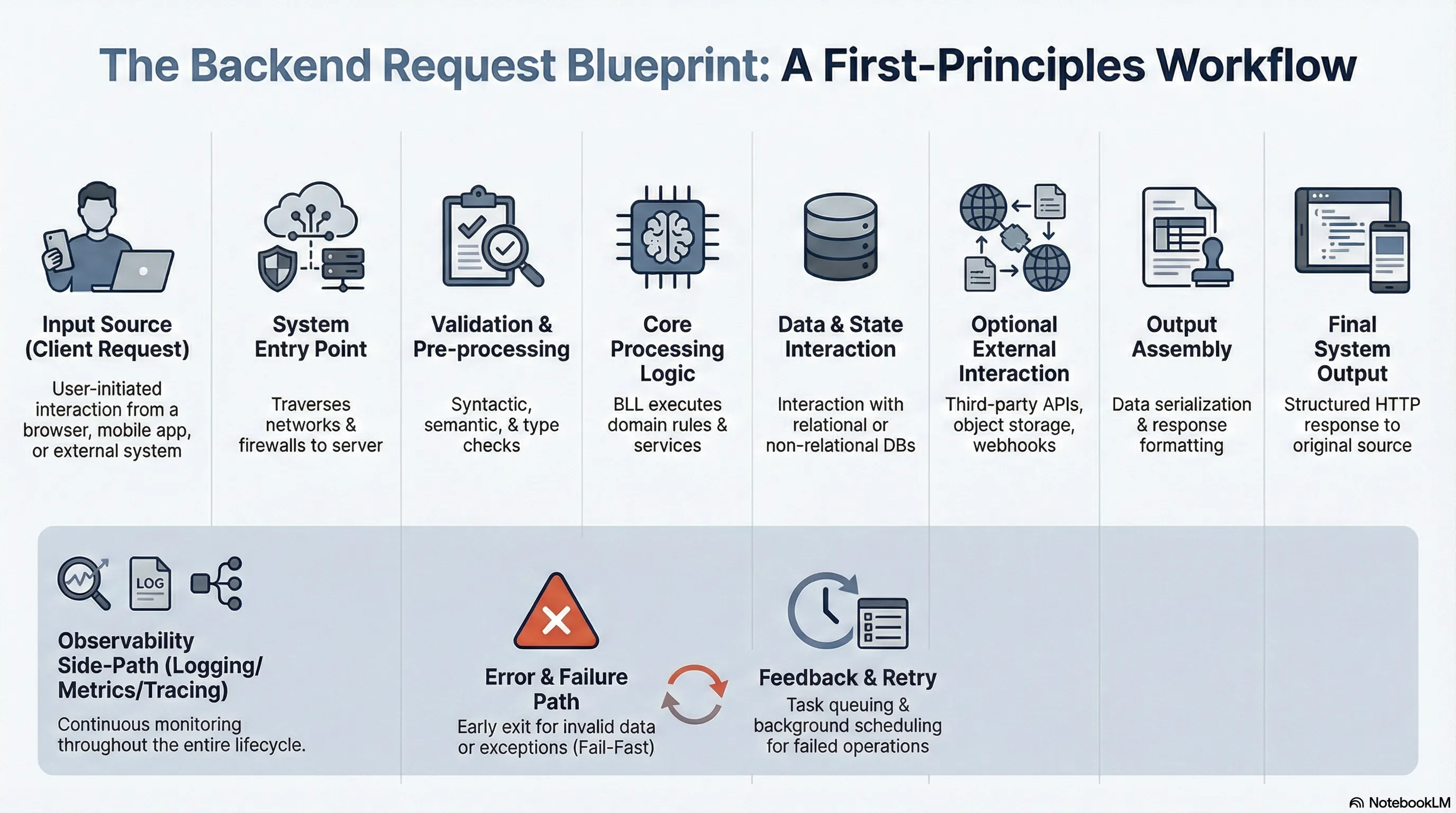
Overview
VIDEO
1. Introduction to Backend Engineering
Definition : Backend engineering extends beyond building CRUD APIs. It involves building codebases and systems that are:
Reliable Scalable Fault-tolerant Maintainable Efficient
Learning Challenges :
Extremely wide scope.
Difficulty in prioritization and seeing the "big picture."
Concepts often learned in isolation (college, bootcamps) leading to reliance on trial and error.
Pitfalls of Language-First Learning :
Starting with a specific framework (e.g., Express, Spring Boot, Ruby on Rails) creates "blind spots."
Solutions are viewed through the lens of a specific ecosystem.
Transferability issues : Knowledge is hard to transfer if underlying systems are not understood (e.g., migrating from Ruby on Rails to Golang for performance).
2. High-Level System Architecture
Request Flow :
Request originates from a browser.
Travels through network hops and firewalls over the internet.
Routed to a remote server (e.g., AWS).
Server processes and responds.
Core Understanding : Visualizing how clients communicate with servers and what the response looks like.
%%{init: {"theme": "dark", "themeVariables": {"primaryColor": "#1f2a33", "primaryTextColor": "#e6edf3", "primaryBorderColor": "#4b5563", "lineColor": "#9aa0a6", "secondaryColor": "#2b3a42", "tertiaryColor": "#202a33", "fontFamily": "Georgia, serif"}}}%%
flowchart LR
    Browser[Browser] --> Hops[Network Hops]
    Hops --> Firewalls[Firewalls]
    Firewalls --> Server[Remote Server]
    Server --> Browser
3. HTTP Protocol
Communication : How connection is established.Raw Messages : Understanding the structure.HTTP Headers :
Request Headers Representational Headers General Headers Security Headers
HTTP Methods :
GET, POST, PUT, DELETESemantics and principles behind usage.
CORS (Cross-Origin Resource Sharing) :
Pre-flight requests: Flow from browser to server and back.
%%{init: {"theme": "dark", "themeVariables": {"primaryColor": "#1f2a33", "primaryTextColor": "#e6edf3", "primaryBorderColor": "#4b5563", "lineColor": "#9aa0a6", "secondaryColor": "#2b3a42", "tertiaryColor": "#202a33", "fontFamily": "Georgia, serif"}}}%%
sequenceDiagram
    participant Browser
    participant Server
    Browser->>Server: OPTIONS (Pre-flight)
    Server-->>Browser: Pre-flight Response
    Browser->>Server: Actual Request
    Server-->>Browser: Response
HTTP Responses :
Structure.
Status Codes : When to return which code; common codes.
HTTP Caching :
Techniques: ETags, max-age headers.
Versions :
Differences between HTTP/1.1, HTTP/2.0, and HTTP/3.0.
Content Negotiation : Using headers to determine content format.Persistent Connections : How they work.HTTP Compression :
Techniques: gzip, deflate, br.
Common usage.
Security :
4. Routing
Definition : Mapping URLs to server-side logic.Components :
Path parameters.
Query parameters.
Types of Routes :
Static routes.
Dynamic routes.
Nested routes.
Hierarchical routes.
Catch-all / Wildcard routes.
Regular expression-based routes.
API Versioning :
Techniques using HTTP.
Best practices for deprecating routes.
Route Grouping :
Benefits for versioning.
Permissions.
Shared middleware.
Optimization : Secure routes and route matching performance.
5. Serialization and Deserialization
Definitions :
Serialization : Translating native data to a network format before sending.Deserialization : Translating received network data back to native format.Role in interoperability standards .
Formats :
Text-based : JSON, XML (Trade-off: Readability vs Performance).Binary : Protobuf (Faster performance).
JSON Deep Dive :
Structure and Data Types: Strings, numbers, booleans, arrays, objects.
Handling nested objects and collections.
Deserialization to Native Structures :
Python dictionaries.
Golang structs.
JavaScript objects.
Common Errors :
Missing or extra fields.
Null values.
Date serialization and time zone issues.
Custom serialization implementation.
Error Handling :
Invalid data.
Data conversion errors.
Unknown fields.
Security Concerns :
Injection attacks.
Validation before deserialization.
JSON Schema validation .
Performance :
Reducing serialized data size (compression, eliminating unnecessary fields).
Trade-offs between readability (text) and speed (binary).
6. Authentication and Authorization
Concepts : Why they are used.Types of Authentication :
Stateful vs. Stateless.
Basic Authentication.
Bearer Token Authentication.
Components :
Sessions.
JWTs (JSON Web Tokens).
Cookies.
Protocols :
Mechanisms :
API Keys.
Multi-factor Authentication (MFA).
Salting and Hashing.
Cryptographic techniques.
Access Control Models :
ABAC (Attribute-Based Access Control).
RBAC (Role-Based Access Control).
ReBAC (Relationship-Based Access Control).
Security Best Practices :
Securing cookies.
Avoiding CSRF, XSS, MITM (Man-in-the-Middle).
Audit Logging : Recording events for audits, monitoring failed logins, privilege escalation, and access to sensitive resources.Obfuscation : Preventing information leakage through detailed error messages.Consistency : Handling failure modes (rate limiting, account lockout) consistently.Timing Attacks : Preventing attackers from inferring credentials based on response time differences (e.g., password hashing time vs. username lookup time).
Types of Validation :
Syntactic : Format checks (Email, valid phone number, date format).Semantic : Logical checks (Date of birth not in future, age between 1-120).Type : Input matches expected type (String, Integer, Array, Object).Relationship : Comparing fields (Password vs. Confirm Password).Conditional : Requirements based on other fields (Partner name required if married=true).Chain : Sequential checks (Lower casing -> Remove special chars -> Check length).
%%{init: {"theme": "dark", "themeVariables": {"primaryColor": "#1f2a33", "primaryTextColor": "#e6edf3", "primaryBorderColor": "#4b5563", "lineColor": "#9aa0a6", "secondaryColor": "#2b3a42", "tertiaryColor": "#202a33", "fontFamily": "Georgia, serif"}}}%%
flowchart LR
    Input[Input] --> Lowercase[Lower casing]
    Lowercase --> RemoveChars[Remove special chars]
    RemoveChars --> CheckLength[Check length]
Client vs. Server Side :
Client : Improves UX (instant feedback).Server : True security gateway (essential for business logic protection).
Principles :
Fail Fast : Reduce unnecessary processing by returning early.Consistency between front-end and back-end logic.
Transformation :
Type Casting : Converting strings (from query/path params) to numbers/IDs.Date Formats : Standardizing timestamps.
Normalization :
Lowercasing emails.
Trimming whitespace.
Adding country codes.
Sanitization : Preventing security issues like SQL injection.Error Handling :
Meaningful messages for users.
Aggregating errors (single response for client display).
Obfuscation : Using "Invalid credentials" instead of "Invalid password".Handling failed transformations (Invalid JSON, failed date conversion).
Performance : Optimize by returning early and avoiding redundant validations.
8. Middleware
Definition : Code executing in the request cycle.Role : Pre-request processing or Post-response processing.Flow :
Chaining : Executed in sequence.Control : Passing to next function or exiting early.Short-circuiting : Handling errors (e.g., 404) immediately.
%%{init: {"theme": "dark", "themeVariables": {"primaryColor": "#1f2a33", "primaryTextColor": "#e6edf3", "primaryBorderColor": "#4b5563", "lineColor": "#9aa0a6", "secondaryColor": "#2b3a42", "tertiaryColor": "#202a33", "fontFamily": "Georgia, serif"}}}%%
flowchart LR
    Request[Request] --> Logging[Logging]
    Logging --> Auth[Authentication]
    Auth --> Validation[Validation]
    Validation --> Route[Route Handling]
    Route --> Response[Response]
    Validation -.-> ErrorHandling[Error Handling]
Ordering Importance :
Logging.
Authentication.
Validation.
Route Handling.
Error Handling.
Incorrect order affects performance and security.
Common Middlewares :
Security : Adding headers (X-Content-Type, HSTS, Content Security Policy), CORS headers.Protection : CSRF avoidance, Rate limiting.Authentication : Reusable route protection logic.Observability : Request logging, structured logging.Error Handling : Catching and formatting application-level errors.Compression : Reducing response body size.Data Parsing : Handling JSON, URL-encoded forms, file uploads (multipart).
Scalability : Keep lightweight and efficient.
9. Request Context
Definition : Metadata and request-scoped state passed through layers (middleware, controllers, services).Lifecycle : Valid only for the duration of the request.Purpose : Sharing data without coupling.Components :
Metadata : HTTP method, URL, headers, query params, body.User Info : Session/User details injected by Auth middleware.Tracking : Unique Request IDs, Trace IDs.Custom Data : Caching data, permission checks.
Use Cases : Authentication, Rate limiting, Tracing, Logging.Timeouts :
Request timeouts.
Custom timeouts.
Cancellation signals.
Best Practices :
Keep lightweight (prevent memory overhead).
Clean up after request lifecycle (prevent memory leaks).
Avoid tight coupling or over-reliance.
10. Handlers and Controllers
Architecture : MVC Pattern (Handlers, Controllers, Services).Responsibilities :
Centralized error handling.
Consistent success/error message formats.
CRUD Operations :
POST : Creation/Submission (Status: 201 Created or 400 Bad Request).GET : Fetching lists or single resources.PUT/PATCH : Updating resources.DELETE : Deleting resources.
Implementation Details :
Pagination.
Search APIs.
Sorting and Filtering.
Best Practices :
Strict validation.
Consistent response formatting.
Limiting payload.
Redacting sensitive fields.
11. RESTful Architecture
Principles : Designing APIs around resources and HTTP semantics.Versioning Types :
URI versioning.
Header versioning.
Query string versioning.
Media type versioning.
Design Considerations :
OpenAPI specification.
Content Negotiation.
Capturing exceptions with meaningful messages.
Caching : Client-side support (ETags).Optimizing large requests/responses.
12. Databases
Types : Relational vs. Non-relational (Differences and use cases).Theoretical Concepts :
ACID properties.
CAP theorem.
Operations :
Basic querying and joins.
Design : Schema design, Indexing.
Optimization :
Query optimization.
Caching.
Connection pooling.
Data Integrity :
Constraints and validations.
Transactions and concurrency.
Tooling :
ORMs : Trade-offs.Migrations : Managing schema changes.
13. Business Logic Layer (BLL)
Role : The core layer between Presentation (handlers/routes) and Data Access (database).Design Principles :
Separation of concerns.
Single Responsibility.
Open-Closed Principle.
Dependency Inversion.
Components :
Services.
Domain Models (Core entities like User, Order).
Business Tools.
Business Validation Logic.
Best Practices :
Service layer design.
Proper error handling and propagation to presentation layer.
14. Caching
Purpose : Difference from database persistence.Types :
Memory caching.
Browser caching.
Database caching.
Client-side vs. Server-side.
Strategies :
Cache aside.
Write-through.
Write-behind (Write-back).
Read-through.
Eviction Strategies :
LRU (Least Recently Used).
LFU (Least Frequently Used).
TTL (Time To Live).
FIFO (First In First Out).
Invalidation :
Manual.
Time To Live (TTL).
Event-based.
Levels :
Level 1 : In-memory (Fast, Small).Level 2 : Network distributed (Slower, Large).Hierarchical : Combining L1 and L2.
Implementations :
Web Apps: Static assets, API responses (headers).
Databases: Query caching (e.g., storing heavy join results in Redis).
Metrics: Optimizing Cache Hit vs. Cache Miss ratio.
15. Transactional Emails
Use Cases : Common scenarios.Anatomy :
Subject, Pre-header, Body header, Main content, CTA (Call to Action), Footer.
Personalization : Dynamic parameters.
16. Task Queuing and Scheduling
Task Queuing Use Cases :
Sending emails.
Processing image files.
Third-party API integrations (Payment processing, Webhooks).
Offloading heavy computation (Batch processing, e.g., "Clear all data" requests).
Scheduling Use Cases :
Database backups.
Recurring notifications/reminders.
Data synchronization.
Maintenance (Clearing logs/caches).
Components :
Producer, Queue, Consumer, Broker, Backend.
%%{init: {"theme": "dark", "themeVariables": {"primaryColor": "#1f2a33", "primaryTextColor": "#e6edf3", "primaryBorderColor": "#4b5563", "lineColor": "#9aa0a6", "secondaryColor": "#2b3a42", "tertiaryColor": "#202a33", "fontFamily": "Georgia, serif"}}}%%
flowchart LR
    Producer[Producer] --> Queue[Queue]
    Queue --> Broker[Broker]
    Broker --> Consumer[Consumer]
    Consumer --> Backend[Backend]
Flow & Features :
Dependencies : Chain dependency, Parent-Child relationships.Task Groups : Concurrent execution (waiting for all to complete).Reliability : Error handling, Retries.Control : Task prioritization (Payment > Notification), Rate limiting.
17. ElasticSearch
Mechanisms :
Inverted index.
Term frequency & Inverse document frequency.
Segments and Shards.
Use Cases :
Type-ahead experience.
Log analytics.
Social media search (User profiles, posts, comments).
Management :
Creating/Managing indexes.
Defining field mappings explicitly.
Searching :
Basic vs. Full-text search.
Relevance scoring.
Optimization: Text vs. Keyword fields, Analyzers, Boosting, Pagination.
Advanced Patterns: Filtering, Aggregation, Fuzzy search.
Tooling : Kibana (User-friendly interface).Best Practices :
Optimizing shard numbers.
Indexing in batches.
Avoiding wildcards.
18. Error Handling
Types of Errors : Syntax, Runtime, Logical.Strategies :
Fail-safe vs. Fail-fast.
Graceful degradation.
Prevention.
Practices :
Catching early (don't swallow errors).
Custom error types.
Failing gracefully.
Logging with stack traces.
Global error handlers.
User-Facing : Friendly messages, Actionable feedback.Monitoring :
Tools: Sentry, ELK stack.
Alerts: Email, Slack.
19. Config Management
Definition : Decoupling environment-specific settings from logic.Use Cases :
Different environments.
Managing sensitive data (API keys, DB passwords, Certificates).
Feature flags (Dynamic enabling/disabling).
Types of Configs :
Static : DB credentials, Endpoints.Dynamic : Feature flags, Rate limits.Sensitive : Credentials, Tokens, Secrets.
Sources : .env files, JSON, YAML.Comparison : Environment variables vs. Command line flags vs. Static files.
20. Logging, Monitoring, and Observability
Logging :
Types: System, Application, Access, Security.
Levels: Debug, Info, Warn, Error, Fatal.
Format: Structured vs. Unstructured.
Best Practices: Centralized logging, Rotation/Retention, Contextual logs, Avoiding sensitive data.
Monitoring :
Types: Infrastructure, Application Performance (APM), Uptime.
Tools: Prometheus, Grafana.
Alerts: Defining thresholds, Avoiding "alert fatigue" (ensure alerts are actionable/meaningful).
Observability :
Three Pillars : Logs, Metrics, Traces.Security and compliance of log management.
21. Graceful Shutdown
Need : Server restarts, Cloud scaling, Microservices, Long-running jobs.Mechanism :
Signal handling: SIGTERM, SIGINT, SIGKILL.
Steps :
Capture signal.
Stop accepting new requests.
Complete in-flight requests.
Close external resources (DB connections, open files).
Terminate app.
22. Security
Attack Prevention :
SQL Injection, NoSQL Injection.
XSS (Cross-Site Scripting).
CSRF (Cross-Site Request Forgery).
Broken Authentication.
Insecure Deserialization.
Design Principles :
Least privilege.
Defense in depth.
Fail secure.
Defaults.
Separation of duties.
Security by design.
Mechanisms :
Input validation and sanitization.
Rate limits.
Content Security Policy (CSP).
CORS.
SameSite cookies.
Monitoring events.
Metrics : Response time, Resource utilization.Bottlenecks : Identifying issues.Database Optimization :
Avoiding N+1 query problems .
Proper use of Joins.
Lazy loading.
Indexes: Foreign keys, Search fields.
Batch processing for large datasets.
Resource Management :
Avoid memory leaks (closing handles/connections).
Minimize network overhead (payload size, compression).
Testing : Performance testing and profiling.Best Practices :
Write clear/maintainable code first (avoid premature optimization).
Modular code for individual optimization.
Graceful Degradation : System survives if resources are unavailable.Offloading : Move non-critical tasks (Email, Logging) to background queues.
24. Concurrency and Parallelism
Differences :
Concurrency : Helps in I/O bound tasks.Parallelism : Helps in CPU bound tasks.
25. Object Storage and Large Files
Object Storage : AWS S3 usage.Large File Management :
Chunking.
Streaming.
Multipart file uploads.
26. Real-time Backend Systems
Technologies :
WebSockets.
Server-Sent Events (SSE).
Architecture : Pub/Sub.
27. Testing and Code Quality
Types of Testing :
Unit, Integration, End-to-End (E2E).
Functional, Regression.
Performance, Load, Stress.
User Acceptance Testing (UAT).
Security testing.
Methodologies : Test Driven Development (TDD).Automation : Tests in CI/CD environments.Code Quality :
Linting and Formatting tools.
Cyclomatic Complexity : Measures complexity by counting possible paths.Maintainability Index : Quantifies ease of maintenance based on complexity/lines of code.
28. 12 Factor App
Set of principles for building software-as-a-service apps.
29. OpenAPI Standards
Benefits :
Standardization.
Documentation Automation.
Ecosystem: Swagger, Codegen, Postman.
History : Swagger to OpenAPI transition.Key Concepts (Document Structure) :
API Paths.
Request/Response definitions.
Parameters and Schemas.
Metadata, Components, Security definitions.
Versions : Features of 3.0 and 3.1.Tools : Swagger UI, Codegen, Postman.API First Development : Defining spec first, then creating APIs.
30. Webhooks
Use Cases : Notifications, Third-party integrations.Comparison :
API : Polling (Client-initiated).Webhooks : Pushing (Server-initiated).
Components :
Webhook URL.
Event triggers.
Payload.
HTTP Method.
Response handling.
Best Practices :
Signature verification.
Using HTTPS.
Quick response.
Retry logic.
Logging.
Testing with tools like Ngrok.
Examples : Stripe Payment Processing, GitHub, Slack, Discord, Twilio.
31. DevOps Concepts
Core Concepts :
Continuous Integration (CI).
Continuous Delivery (CD).
Continuous Deployment.
Practices :
Infrastructure as Code (IaC).
Config Management.
Version Control.
Tools :
Containers: Docker.
Orchestration: Kubernetes.
CI/CD Pipelines.
Scaling : Horizontal vs. Vertical.Deployment Strategies :
Red-Green Deployment.
Rolling Deployment.
Final Learning Outcomes
Requirements for success:
Decide to take the journey.
Internalize everything.
Follow along with all projects.
Resulting Capabilities :
Safely call yourself a Backend Engineer .
Build real systems .
Build systems that scale (from zero users to a million users).
Build systems that are maintainable over a long period of time.
Complete Overview Roadmap
%%{init: {"theme": "dark"}}%%
flowchart TD
    A["Overview"] --> B["1. Introduction to Backend Engineering"]
    B --> C["2. High-Level System Architecture"]
    C --> D["3. HTTP Protocol"]
    D --> E["4. Routing"]
    E --> F["5. Serialization and Deserialization"]
    F --> G["6. Authentication and Authorization"]
    G --> H["7. Validation and Transformation"]
    H --> I["8. Middleware"]
    I --> J["9. Request Context"]
    J --> K["10. Handlers and Controllers"]
    K --> L["11. RESTful Architecture"]
    L --> M["12. Databases"]
    M --> N["13. Business Logic Layer (BLL)"]
    N --> O["14. Caching"]
    O --> P["15. Transactional Emails"]
    P --> Q["16. Task Queuing and Scheduling"]
    Q --> R["17. ElasticSearch"]
    R --> S["18. Error Handling"]
    S --> T["19. Config Management"]
    T --> U["20. Logging, Monitoring, and Observability"]
    U --> V["21. Graceful Shutdown"]
    V --> W["22. Security"]
    W --> X["23. Scaling and Performance"]
    X --> Y["24. Concurrency and Parallelism"]
    Y --> Z["25. Object Storage and Large Files"]
    Z --> AA["26. Real-time Backend Systems"]
    AA --> AB["27. Testing and Code Quality"]
    AB --> AC["28. 12 Factor App"]
    AC --> AD["29. OpenAPI Standards"]
    AD --> AE["30. Webhooks"]
    AE --> AF["31. DevOps Concepts"]

    classDef level1 fill:#2d2d2d,stroke:#444444,color:#ffffff
    classDef level2 fill:#3a3a3a,stroke:#555555,color:#ffffff

    class A level1
    class B,C,D,E,F,G,H,I,J,K,L,M,N,O,P,Q,R,S,T,U,V,W,X,Y,Z,AA,AB,AC,AD,AE,AF level2
February 13, 2026
February 13, 2026