Introduction to Backend Engineering
What Is a Backend, How It works and Why Does It Matter?
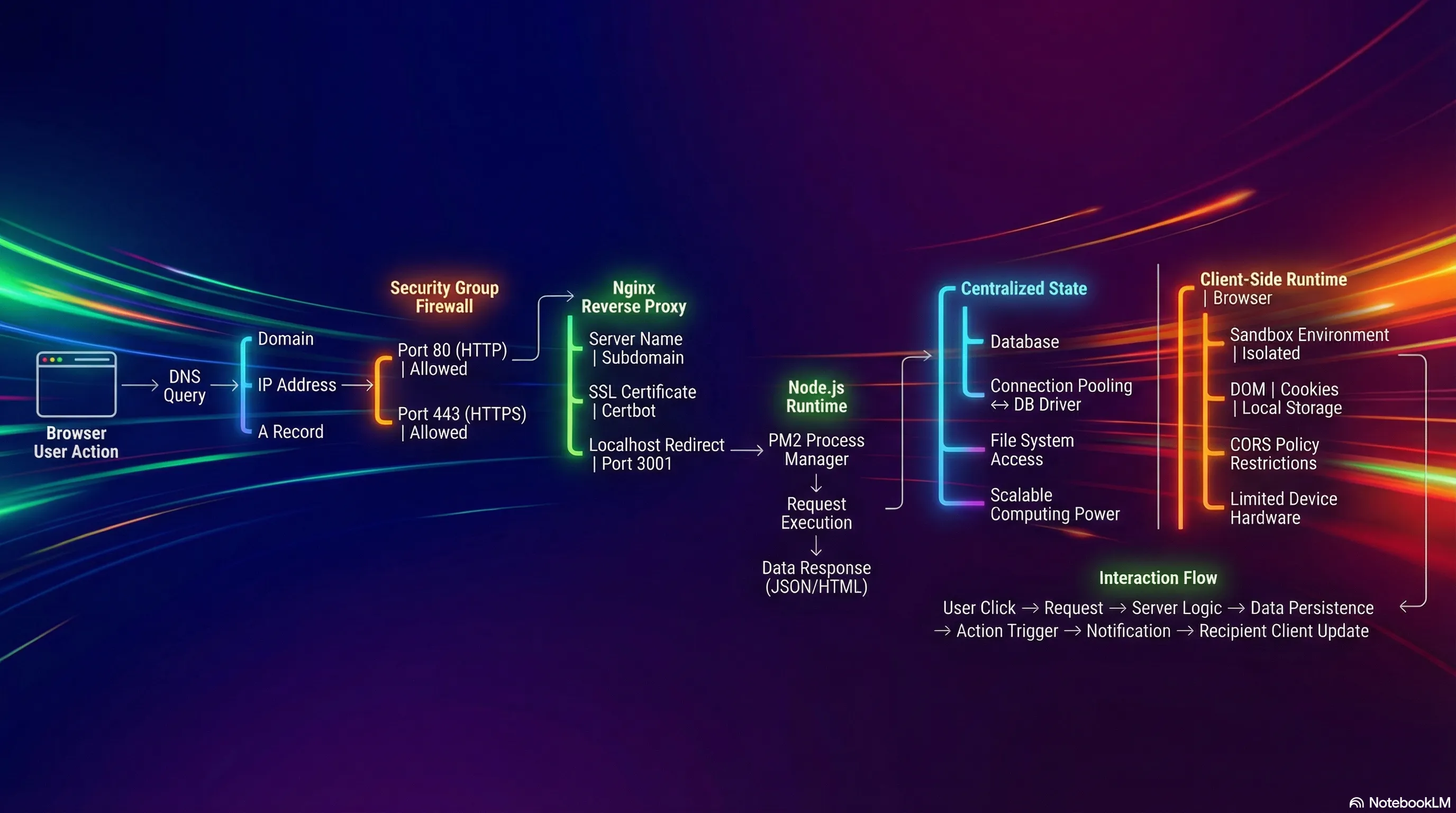
1. Definition of a Backend
1.1. Traditional Definition
A backend is a computer that listens for requests through an open port (accessible over the internet) to allow clients or frontends to connect, send data, or receive data.
- Communication Protocols: HTTP, WebSocket, gRPC.
- Common Ports:
- 80: Standard HTTP.
- 443: Secure HTTPS.
- Role: It is called a "Server" because it provides or "serves" content.
- Content Types Served:
- Static files (Images, JavaScript, HTML).
- Data formats (JSON).
- Data Ingestion: It accepts data sent by the client.
%%{init: {"theme": "dark", "themeVariables": {"primaryColor": "#2d2d2d", "primaryTextColor": "#e6edf3", "primaryBorderColor": "#444444", "lineColor": "#9aa0a6", "secondaryColor": "#3a3a3a", "tertiaryColor": "#2d2d2d"}}}%%
flowchart LR
    Client[Client/Frontend] -->|HTTP :80| Server[Backend Server]
    Client -->|HTTPS :443| Server
    Client -->|WebSocket| Server
    Client -->|gRPC| Server
    Server -->|JSON| Client
    Server -->|HTML/CSS/JS| Client
    Server -->|Images| Client
2. End-to-End Request Flow (Backend Demo)
This trace follows a request starting from a browser and reaching a backend server deployed on AWS.
2.1. Step 1: The Browser & Domain Name
- Action: A request is initiated by entering a domain name in the browser (e.g.,
backend-demo.senus.doxyz). - Initial Lookup: The browser must resolve this domain name to an IP address to know where to connect.
2.2. Step 2: DNS Server (Domain Name System)
The DNS server translates domain names into IP addresses. It contains specific record types:
- A Records: Used to point a domain or subdomain to a specific IP Address.
- Example: The subdomain
backend-demopoints to a specific Public IP address of an AWS EC2 instance.
- Example: The subdomain
- CNAME Records: Used to point a domain or subdomain to another domain name.
%%{init: {"theme": "dark", "themeVariables": {"primaryColor": "#2d2d2d", "primaryTextColor": "#e6edf3", "primaryBorderColor": "#444444", "lineColor": "#9aa0a6", "secondaryColor": "#3a3a3a", "tertiaryColor": "#2d2d2d"}}}%%
flowchart TB
    Domain[backend-demo.senus.doxyz] --> DNS[DNS Server]
    DNS --> ARecord{Record Type?}
    ARecord -->|A Record| IP[IP Address: 52.23.45.67]
    ARecord -->|CNAME Record| AnotherDomain[Another Domain]
    IP --> EC2[AWS EC2 Instance]
2.3. Step 3: Cloud Infrastructure (AWS EC2)
- Destination: The IP address obtained from the A Record belongs to an EC2 instance (a virtual server) located in a specific AWS subnet.
- Public IP: The request travels through the internet to reach this specific Public IP address.
2.4. Step 4: The Firewall (AWS Security Groups)
Before the request enters the actual computer (instance), it passes through a cloud-native firewall.
- Function: Filters traffic based on allowed ports.
- AWS Security Groups: define which ports are accessible over the internet.
- Configuration in Demo:
- Port 22: Allowed for SSH access (logging into terminals/command prompts).
- Port 443: Allowed for HTTPS traffic.
- Port 80: Allowed for HTTP traffic.
- Warning: If ports 80 or 443 are not explicitly allowed in the Security Group, AWS blocks the request immediately. It will never reach the server.
%%{init: {"theme": "dark", "themeVariables": {"primaryColor": "#2d2d2d", "primaryTextColor": "#e6edf3", "primaryBorderColor": "#444444", "lineColor": "#9aa0a6", "secondaryColor": "#3a3a3a", "tertiaryColor": "#2d2d2d"}}}%%
flowchart LR
    Request[Incoming Request] --> Firewall{AWS Security Groups}
    Firewall -->|Port 22 SSH| Allow22[Allowed ✓]
    Firewall -->|Port 80 HTTP| Allow80[Allowed ✓]
    Firewall -->|Port 443 HTTPS| Allow443[Allowed ✓]
    Firewall -->|Other Ports| Block[Blocked ✗]
    Allow22 --> Instance[EC2 Instance]
    Allow80 --> Instance
    Allow443 --> Instance
    Block -.-> Reject[Request Rejected]
2.5. Step 5: Reverse Proxy (Nginx)
Once the request passes the firewall and enters the instance, it hits a Reverse Proxy.
- Definition: A server sitting in front of other servers to manage redirects, configurations, and SSL from a centralized place (rather than configuring every application server individually).
- Tool Used: Nginx.
- SSL Management: Certbot is used to assign SSL certificates automatically.
- Nginx Configuration Logic:
- Listen: Listens for requests on Port 80.
- Redirect: Redirects Port 80 requests to Port 443 (HTTPS).
- Server Name: Checks the domain name (e.g.,
backend-demo). - Proxy Pass: Forwards traffic matching that domain to the local application server running on a specific internal port.
- Example Code Logic:
%%{init: {"theme": "dark", "themeVariables": {"primaryColor": "#2d2d2d", "primaryTextColor": "#e6edf3", "primaryBorderColor": "#444444", "lineColor": "#9aa0a6", "secondaryColor": "#3a3a3a", "tertiaryColor": "#2d2d2d"}}}%%
flowchart TD
    Request[Incoming Request] --> Listen{Port 80?}
    Listen -->|Yes| Redirect[Redirect to Port 443]
    Listen -->|No Port 443| CheckName{Check Server Name}
    Redirect --> CheckName
    CheckName -->|backend-demo.senus.doxyz| SSL[Apply SSL/TLS]
    CheckName -->|Other Domain| OtherApp[Other Application]
    SSL --> Proxy[Proxy Pass]
    Proxy --> LocalApp[localhost:3001]
2.6. Step 6: The Application Server (Node.js)
- Final Destination: Nginx forwards the request to localhost:3001.
- Process Management: PM2 is used to manage the Node processes.
- Example:
pm2 listshows processes for frontend and backend.
- Example:
- Execution: The Node server processes the request and returns the response (e.g., JSON data).
- Localhost Parity: From the perspective of the EC2 instance, the server is running on
localhost.- Note: Running
curl localhost:3001/usersinside the instance returns the same response as accessing the public domain from the browser.
- Note: Running
2.7. Summary of the Flow
- Browser: Initiates request.
- DNS: Resolves domain to AWS Public IP.
- AWS Firewall: Allows traffic on Port 443/80.
- Instance: Receives request.
- Nginx (Reverse Proxy): Receives request, handles SSL, identifies domain, forwards to internal port.
- Node Server: Receives request on
localhost:3001, processes it, returns response.
%%{init: {"theme": "dark", "themeVariables": {"primaryColor": "#2d2d2d", "primaryTextColor": "#e6edf3", "primaryBorderColor": "#444444", "lineColor": "#9aa0a6", "secondaryColor": "#3a3a3a", "tertiaryColor": "#2d2d2d"}}}%%
flowchart LR
    Browser[Browser] -->|Domain Name| DNS[DNS Server]
    DNS -->|Public IP| Firewall[AWS Security Groups]
    Firewall -->|Port 443/80| Instance[EC2 Instance]
    Instance --> Nginx[Nginx Reverse Proxy]
    Nginx -->|SSL, Domain Check| Node[Node.js Server :3001]
    Node -->|Response| Nginx
    Nginx --> Instance
    Instance --> Firewall
    Firewall --> DNS
    DNS --> Browser
3. The Purpose of Backend Systems
Why are backends necessary?
3.1. The Core Concept: Centralized Data
If you strip down the responsibility of a backend to a single word, it is Data.
- The need to fetch data.
- The need to receive data.
- The need to persist (save) data.
%%{init: {"theme": "dark", "themeVariables": {"primaryColor": "#2d2d2d", "primaryTextColor": "#e6edf3", "primaryBorderColor": "#444444", "lineColor": "#9aa0a6", "secondaryColor": "#3a3a3a", "tertiaryColor": "#2d2d2d"}}}%%
flowchart TB
    Backend[Backend Server] --> Data{Data Operations}
    Data --> Fetch[Fetch Data]
    Data --> Receive[Receive Data]
    Data --> Persist[Persist Data]

    Fetch --> Database[(Centralized Database)]
    Receive --> Database
    Persist --> Database

    Client1[Client 1] <-->|Request/Response| Backend
    Client2[Client 2] <-->|Request/Response| Backend
    Client3[Client 3] <-->|Request/Response| Backend
    ClientN[Client N...] <-->|Request/Response| Backend
3.2. Example: The "Like" Button Flow
Imagine a user liking a friend's post on Instagram:
- User Action: User clicks the "Like" button.
- Request: The app sends a request to the server.
- Identification: The server parses the request to identify the user (ID/Name).
- Persistence: The server saves the action (the "like") to a database.
- Logic: The server identifies the owner of the post.
- Notification: The server triggers an action to send a notification to the post owner's phone.
%%{init: {"theme": "dark", "themeVariables": {"primaryColor": "#2d2d2d", "primaryTextColor": "#e6edf3", "primaryBorderColor": "#444444", "lineColor": "#9aa0a6", "secondaryColor": "#3a3a3a", "tertiaryColor": "#2d2d2d"}}}%%
sequenceDiagram
    participant User
    participant App
    participant Server
    participant Database
    participant PostOwner

    User->>App: Clicks Like Button
    App->>Server: Send Like Request
    Server->>Server: Parse Request (Identify User ID)
    Server->>Database: Save Like Action
    Database-->>Server: Confirmation
    Server->>Server: Identify Post Owner
    Server->>PostOwner: Send Notification
    Server-->>App: Success Response
    App-->>User: Update UI
3.3. Why this requires a Backend
- Centralization: The server must hold information about all users and all states.
- Client Limitation: A user's app/frontend only contains data relevant to that specific user (their profile, their feed). It does not possess the global state required to route notifications to other users.
- State Management: Interactions between different users require a centralized computer to mediate and persist these changes.
%%{init: {"theme": "dark", "themeVariables": {"primaryColor": "#2d2d2d", "primaryTextColor": "#e6edf3", "primaryBorderColor": "#444444", "lineColor": "#9aa0a6", "secondaryColor": "#3a3a3a", "tertiaryColor": "#2d2d2d"}}}%%
flowchart TB
    subgraph Server["Backend: Global State"]
        Backend[Backend Server] --> AllUsers[All Users Data]
        Backend --> AllPosts[All Posts Data]
        Backend --> AllStates[All App States]
        Backend --> Route[Route Between Users]
    end

    subgraph Client1["User 1 App: Limited State"]
        App1[User 1 Frontend] --> Profile1[Own Profile]
        App1 --> Feed1[Own Feed]
        App1 -.Cannot Access.-> OtherUsers[Other Users ✗]
    end

    subgraph Client2["User 2 App: Limited State"]
        App2[User 2 Frontend] --> Profile2[Own Profile]
        App2 --> Feed2[Own Feed]
        App2 -.Cannot Access.-> OtherUsers2[Other Users ✗]
    end

    App1 <-->|Mediated by Backend| Backend
    App2 <-->|Mediated by Backend| Backend
4. Frontend Architecture vs. Backend Architecture
To understand why backend logic cannot live in the frontend, we must look at how the frontend works end-to-end.
4.1. Frontend Request Flow (Next.js Demo)
- Initial Fetch: Browser requests the frontend domain (e.g.,
frontend-demo). - DNS & Firewall: Same flow as backend (Resolves IP -> Passes Firewall 80/443).
-
Nginx: Listens for frontend domain, redirects to frontend application port (e.g.,
localhost:3000).- Example Code Logic:
- Commands to explore configuration:
cd /etc/nginx/conf.d/- Navigate to the nginx configuration directory where all server configurations are stored.batcat frontend.conf- View the frontend nginx configuration file with syntax highlighting (displays the actual config).pm2 list- List all running PM2 processes to see both frontend and backend servers.
Note: Backend runs at port 3001, Frontend runs at port 3000
-
Server Response: The Next.js server sends back:
- The main HTML file.
- CSS files (Styles).
- JavaScript files (Logic).
- Static resources (Images/Fonts).
- Browser Execution:
- Painting: Browser fetches CSS and paints the UI (backgrounds, fonts, buttons).
- Hydration: Browser fetches JavaScript and "hydrates" the page, adding event listeners to buttons and interactions.
Here Browser is Runtime !!!
%%{init: {"theme": "dark", "themeVariables": {"primaryColor": "#2d2d2d", "primaryTextColor": "#e6edf3", "primaryBorderColor": "#444444", "lineColor": "#9aa0a6", "secondaryColor": "#3a3a3a", "tertiaryColor": "#2d2d2d"}}}%%
flowchart LR
    Browser[Browser] -->|Request| DNS[DNS & Firewall]
    DNS --> Nginx[Nginx :3000]
    Nginx --> NextJS[Next.js Server]
    NextJS -->|HTML| Browser
    NextJS -->|CSS| Browser
    NextJS -->|JavaScript| Browser
    NextJS -->|Static Assets| Browser
    Browser -->|Paint UI| Render[Render Engine]
    Browser -->|Hydrate| Execute[Execute JS]
4.2. Key Difference: Execution Environment
- Backend: The server receives a request, processes the logic on the server, and sends back the result.
- Frontend: The server sends the code (HTML/JS/CSS) to the client. The browser (client's machine) runs the code.
%%{init: {"theme": "dark", "themeVariables": {"primaryColor": "#2d2d2d", "primaryTextColor": "#e6edf3", "primaryBorderColor": "#444444", "lineColor": "#9aa0a6", "secondaryColor": "#3a3a3a", "tertiaryColor": "#2d2d2d"}}}%%
flowchart TB
    subgraph Backend["Backend Execution"]
        BReq[Client Request] --> BServer[Server]
        BServer --> BLogic[Process Logic on Server]
        BLogic --> BResult[Return Result]
        BResult --> BClient[Client]
    end

    subgraph Frontend["Frontend Execution"]
        FReq[Client Request] --> FServer[Server]
        FServer --> FCode[Send Code HTML/JS/CSS]
        FCode --> FClient[Client Browser]
        FClient --> FExec[Execute Code on Client]
    end
5. Why Backend Logic Cannot be on the Frontend
There are four specific reasons why backend logic (database connections, heavy processing) cannot be moved to the frontend.
%%{init: {"theme": "dark", "themeVariables": {"primaryColor": "#2d2d2d", "primaryTextColor": "#e6edf3", "primaryBorderColor": "#444444", "lineColor": "#9aa0a6", "secondaryColor": "#3a3a3a", "tertiaryColor": "#2d2d2d"}}}%%
flowchart TD
    Backend[Backend Logic] --> Reasons{Why Not Frontend?}
    Reasons --> R1[Security & Sandboxing]
    Reasons --> R2[CORS Restrictions]
    Reasons --> R3[Database Connections]
    Reasons --> R4[Computing Power]

    R1 --> R1A[No File System Access]
    R1 --> R1B[Limited APIs]

    R2 --> R2A[Cross-Origin Blocked]
    R2 --> R2B[Header Requirements]

    R3 --> R3A[No Connection Pooling]
    R3 --> R3B[Database Overload]

    R4 --> R4A[Variable Hardware]
    R4 --> R4B[Performance Issues]
5.1. Security and Sandboxing
- Sandboxed Environment: Browsers isolate the execution environment. Code cannot access the user's operating system, processes, or file system.
- Limited Access: Frontend code can only access specific browser APIs (DOM, Local Storage, Cookies).
- The Problem:
- Backend servers often need to access the file system (e.g., writing logs, accessing environment variables). Browsers strictly block this.
- Rationale: If browsers did not enforce this isolation, visiting a malicious website could allow remote code to scan your file system, copy sensitive files, and send them to a remote server.
%%{init: {"theme": "dark", "themeVariables": {"primaryColor": "#2d2d2d", "primaryTextColor": "#e6edf3", "primaryBorderColor": "#444444", "lineColor": "#9aa0a6", "secondaryColor": "#3a3a3a", "tertiaryColor": "#2d2d2d"}}}%%
flowchart TB
    subgraph Browser["Browser Sandbox"]
        JS[JavaScript Code] --> Allowed{Allowed?}
        Allowed -->|Yes| DOM[DOM API]
        Allowed -->|Yes| Storage[Local Storage]
        Allowed -->|Yes| Cookies[Cookies]
        Allowed -->|No| FS[File System ❌]
        Allowed -->|No| OS[Operating System ❌]
        Allowed -->|No| Processes[System Processes ❌]
    end

    subgraph Backend["Backend Server"]
        Server[Server Code] --> Full[Full Access]
        Full --> FSAccess[File System ✓]
        Full --> EnvVars[Environment Variables ✓]
        Full --> Logs[Write Logs ✓]
    end
5.2. CORS (Cross-Origin Resource Sharing)
- Definition: A browser security policy that restricts JavaScript from calling external APIs that reside on a different domain than the current page.
- Restriction: You can only fetch resources from the same domain unless the external API explicitly allows it via HTTP headers.
- The Problem: Backend servers often need to fetch data from multiple third-party sources. If those sources do not have specific CORS headers configured for your client, the browser will block the request. A backend server does not have this restriction.
%%{init: {"theme": "dark", "themeVariables": {"primaryColor": "#2d2d2d", "primaryTextColor": "#e6edf3", "primaryBorderColor": "#444444", "lineColor": "#9aa0a6", "secondaryColor": "#3a3a3a", "tertiaryColor": "#2d2d2d"}}}%%
flowchart TB
    subgraph Frontend["Frontend Browser"]
        Page[myapp.com] -->|Fetch| Check{Same Origin?}
        Check -->|Yes myapp.com| Allow[Request Allowed ✓]
        Check -->|No api.other.com| Headers{CORS Headers?}
        Headers -->|Present| Allow2[Request Allowed ✓]
        Headers -->|Missing| Block[Request Blocked ❌]
    end

    subgraph Backend["Backend Server"]
        BServer[Backend] -->|Fetch| API1[api.service1.com ✓]
        BServer -->|Fetch| API2[api.service2.com ✓]
        BServer -->|Fetch| API3[api.service3.com ✓]
        Note[No CORS Restrictions]
    end
5.3. Database Connections
- Drivers: Backend servers use native database drivers (e.g.,
pgfor Postgres, MongoDB drivers).- These are designed to handle socket connections and binary data.
- They maintain persistent connections.
- Connection Pooling:
- Backends maintain a "pool" of open connections to the database.
- They reuse these connections for thousands of incoming requests.
- Creating and destroying a connection for every single request is expensive and would overwhelm the database.
- The Problem:
- Browsers are not designed to maintain persistent connections.
- Browsers cannot manage connection pooling.
- If logic were on the frontend, every single user would open a unique connection to the database. This would flood the database server with too many connections, causing it to crash.
%%{init: {"theme": "dark", "themeVariables": {"primaryColor": "#2d2d2d", "primaryTextColor": "#e6edf3", "primaryBorderColor": "#444444", "lineColor": "#9aa0a6", "secondaryColor": "#3a3a3a", "tertiaryColor": "#2d2d2d"}}}%%
flowchart TB
    subgraph Backend["Backend: Connection Pooling"]
        BS[Backend Server] --> Pool[Connection Pool]
        Pool --> C1[Connection 1]
        Pool --> C2[Connection 2]
        Pool --> C3[Connection 3]
        C1 --> DB1[(Database)]
        C2 --> DB1
        C3 --> DB1
        R1[Request 1] -.Reuse.-> C1
        R2[Request 2] -.Reuse.-> C2
        R3[Request 1000] -.Reuse.-> C3
    end

    subgraph Frontend["Frontend: Individual Connections"]
        User1[User 1] --> Conn1[New Connection]
        User2[User 2] --> Conn2[New Connection]
        User3[User 3] --> Conn3[New Connection]
        UserN[User N...] --> ConnN[New Connection]
        Conn1 --> DB2[(Database OVERLOAD)]
        Conn2 --> DB2
        Conn3 --> DB2
        ConnN --> DB2
    end
5.4. Computing Power
- Variability: Frontend applications run on user devices (smartphones, old laptops, desktops).
- Hardware specs vary wildly (e.g., 256MB RAM, single-core processors).
- The Problem:
- Heavy business logic requires reliable computing power.
- Running heavy logic on a low-end client device causes lag or crashes.
- Backend Advantage: A centralized server is a controlled environment. You can easily scale CPU and Memory resources to handle increased load, ensuring consistent performance regardless of the user's device.
%%{init: {"theme": "dark", "themeVariables": {"primaryColor": "#2d2d2d", "primaryTextColor": "#e6edf3", "primaryBorderColor": "#444444", "lineColor": "#9aa0a6", "secondaryColor": "#3a3a3a", "tertiaryColor": "#2d2d2d"}}}%%
flowchart TB
    subgraph Frontend["Frontend: Variable Hardware"]
        Device1[Smartphone<br/>256MB RAM<br/>Single Core]
        Device2[Old Laptop<br/>2GB RAM<br/>Dual Core]
        Device3[Desktop<br/>16GB RAM<br/>8 Cores]
        Logic[Heavy Business Logic] -.-> Device1
        Logic -.-> Device2
        Logic -.-> Device3
        Device1 --> Crash[Crash/Lag ✗]
        Device2 --> Slow[Poor Performance]
        Device3 --> OK[Works ✓]
    end

    subgraph Backend["Backend: Controlled Environment"]
        Server[Centralized Server<br/>32GB RAM<br/>16 Cores]
        Scale[Scalable Resources]
        Server --> Consistent[Consistent Performance ✓]
        Scale --> MoreCPU[+CPU]
        Scale --> MoreRAM[+Memory]
        Scale --> MoreServers[+Servers]
    end
6. Complete Introduction to Backend Engineering Roadmap
%%{init: {"theme": "dark", "themeVariables": {"primaryColor": "#2d2d2d", "primaryTextColor": "#e6edf3", "primaryBorderColor": "#444444", "lineColor": "#9aa0a6", "secondaryColor": "#3a3a3a", "tertiaryColor": "#2d2d2d"}}}%%
flowchart TD
    A["Introduction to Backend"] --> B["1. Definition of a Backend"]
    B --> B1["1.1. Traditional Definition"]
    B1 --> C["2. End-to-End Request Flow"]
    C --> C1["2.1. The Browser & Domain Name"]
    C1 --> C2["2.2. DNS Server"]
    C2 --> C3["2.3. Cloud Infrastructure"]
    C3 --> C4["2.4. The Firewall"]
    C4 --> C5["2.5. Reverse Proxy"]
    C5 --> C6["2.6. The Application Server"]
    C6 --> C7["2.7. Summary of the Flow"]
    C7 --> D["3. The Purpose of Backend Systems"]
    D --> D1["3.1. Centralized Data"]
    D1 --> D2["3.2. Like Button Flow"]
    D2 --> D3["3.3. Why Backend Required"]
    D3 --> E["4. Frontend vs Backend Architecture"]
    E --> E1["4.1. Frontend Request Flow"]
    E1 --> E2["4.2. Execution Environment"]
    E2 --> F["5. Why Backend Logic Cannot be on Frontend"]
    F --> F1["5.1. Security and Sandboxing"]
    F1 --> F2["5.2. CORS"]
    F2 --> F3["5.3. Database Connections"]
    F3 --> F4["5.4. Computing Power"]

    classDef mainNode fill:#2d2d2d,stroke:#555555,color:#e6edf3
    classDef subNode fill:#3a3a3a,stroke:#666666,color:#e6edf3

    class A mainNode
    class B,C,D,E,F mainNode
    class B1,C1,C2,C3,C4,C5,C6,C7,D1,D2,D3,E1,E2,F1,F2,F3,F4 subNode